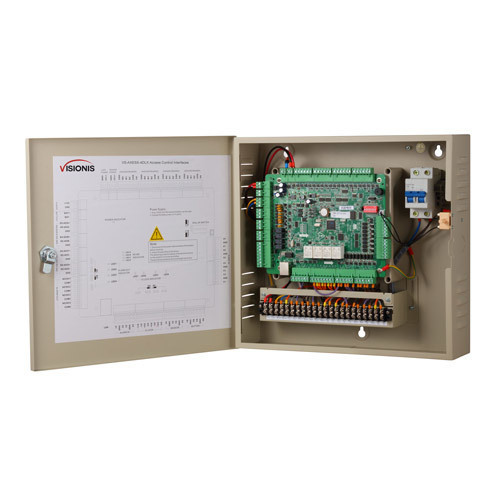
Access control panels play a crucial role in modern security systems by providing a centralized hub for managing and monitoring access to buildings and restricted areas. These panels serve as the brain of the access control system, allowing administrators to set access permissions, track entry and exit activities, and respond to security incidents effectively.
One of the key functions of access control panels is to authenticate individuals seeking entry into a secured area. This authentication process can involve various methods such as keycards, PIN codes, biometric scans (fingerprint or facial recognition), or a combination of these technologies. The access control panel verifies the credentials provided by the individual against the pre-configured access permissions stored in its database before granting or denying access.
Access control panels are designed to be highly customizable, allowing administrators to define different levels of access privileges for different users or groups. This flexibility enables organizations to implement tailored security policies based on their specific requirements and operational needs. In addition, access control panels can be integrated with other security systems such as CCTV cameras, alarms, and intercoms to enhance overall security measures.
Furthermore, modern access control panels offer advanced features such as real-time monitoring, event logging, remote management capabilities, and integration with cloud-based platforms for seamless accessibility from anywhere. These features not only improve security but also streamline administrative tasks and provide valuable insights into building traffic patterns and security incidents.
In conclusion, access control panels are essential components of comprehensive security systems that help organizations protect their assets, employees, and sensitive information effectively. By investing in reliable access control panels and staying up-to-date with the latest advancements in access control technology, businesses can ensure a secure and controlled environment for their operations.
8 Essential Tips for Securing and Managing Access Control Panels
- 1. Secure access control panels in a locked room or cabinet to prevent unauthorized tampering.
- 2. Regularly update access control panel software to patch any security vulnerabilities.
- 3. Restrict physical access to the control panel to authorized personnel only.
- 4. Use strong, unique passwords for the access control panel and change them regularly.
- 5. Monitor and log access control panel activities for auditing and troubleshooting purposes.
- 6. Implement multi-factor authentication for added security when accessing the control panel remotely.
- 7. Conduct regular maintenance checks on the access control panel hardware to ensure proper functioning.
- 8. Train employees on how to use the access control panel properly and securely.
1. Secure access control panels in a locked room or cabinet to prevent unauthorized tampering.
To enhance the security of access control panels, it is recommended to secure them in a locked room or cabinet to prevent unauthorized tampering. By restricting physical access to the panels, organizations can minimize the risk of unauthorized individuals gaining control over the system and potentially compromising security measures. This simple yet effective tip helps ensure that only authorized personnel have the ability to manage and monitor access control systems, maintaining the integrity and reliability of the overall security infrastructure.
2. Regularly update access control panel software to patch any security vulnerabilities.
Regularly updating access control panel software is a critical security measure to safeguard against potential cyber threats and breaches. By installing the latest software patches and updates, organizations can address known security vulnerabilities and ensure that their access control systems remain resilient against evolving risks. This proactive approach not only enhances the overall security posture of the system but also helps in maintaining compliance with industry regulations and standards. Keeping access control panel software up-to-date is essential for protecting sensitive data, preventing unauthorized access, and maintaining the integrity of the security infrastructure.
3. Restrict physical access to the control panel to authorized personnel only.
To enhance security measures, it is crucial to restrict physical access to the control panel to authorized personnel only. By limiting access to individuals with proper authorization, organizations can prevent unauthorized tampering or manipulation of the control panel settings, ensuring the integrity and effectiveness of the access control system. This practice not only protects sensitive information and resources but also minimizes the risk of security breaches and ensures that only trained personnel can make necessary adjustments or configurations to the control panel as needed.
4. Use strong, unique passwords for the access control panel and change them regularly.
Tip 4: Use strong, unique passwords for the access control panel and change them regularly.
It is crucial to prioritize the security of access control panels by implementing strong, unique passwords and regularly updating them. Strong passwords should be complex, incorporating a mix of letters, numbers, and special characters to enhance their resilience against potential cyber threats. By using unique passwords for each access control panel and changing them on a regular basis, organizations can significantly reduce the risk of unauthorized access and potential security breaches. This proactive approach to password management is essential in maintaining the integrity and effectiveness of access control systems.
5. Monitor and log access control panel activities for auditing and troubleshooting purposes.
Monitoring and logging access control panel activities is a critical tip for ensuring security and accountability within an organization. By keeping a record of all access control panel activities, including entry attempts, permissions changes, and system updates, administrators can effectively audit and troubleshoot any security incidents or operational issues that may arise. This practice not only helps in identifying unauthorized access attempts but also provides valuable insights into system performance and user behavior. By maintaining detailed logs of access control panel activities, organizations can enhance their overall security posture and ensure compliance with regulatory requirements.
6. Implement multi-factor authentication for added security when accessing the control panel remotely.
Tip 6: Implementing multi-factor authentication for added security when accessing the control panel remotely is a crucial step in enhancing the overall security of your access control system. By requiring users to provide multiple forms of verification, such as a password, a unique code sent to their mobile device, or a biometric scan, you can significantly reduce the risk of unauthorized access and potential security breaches. This additional layer of authentication adds an extra level of protection to sensitive data and ensures that only authorized personnel can remotely access the control panel, strengthening the integrity of your security infrastructure.
7. Conduct regular maintenance checks on the access control panel hardware to ensure proper functioning.
Regular maintenance checks on the access control panel hardware are essential to ensure its proper functioning and reliability. By conducting routine inspections and tests, potential issues or malfunctions can be identified early on and addressed promptly, preventing any disruptions to the security system’s operation. Checking components such as power supply, wiring connections, sensors, and communication modules can help maintain the optimal performance of the access control panel and prolong its lifespan. Overall, proactive maintenance practices play a crucial role in maximizing the effectiveness and efficiency of access control systems in safeguarding premises and assets.
8. Train employees on how to use the access control panel properly and securely.
It is essential to train employees on how to use the access control panel properly and securely. By providing thorough training, employees can understand the functionalities of the access control panel, including how to grant access, revoke permissions, and respond to security alerts effectively. Proper training also ensures that employees follow best practices for maintaining the security of the system, such as safeguarding access credentials and reporting any suspicious activities promptly. Ultimately, well-trained employees play a critical role in maximizing the effectiveness of the access control panel and enhancing overall security measures within an organization.