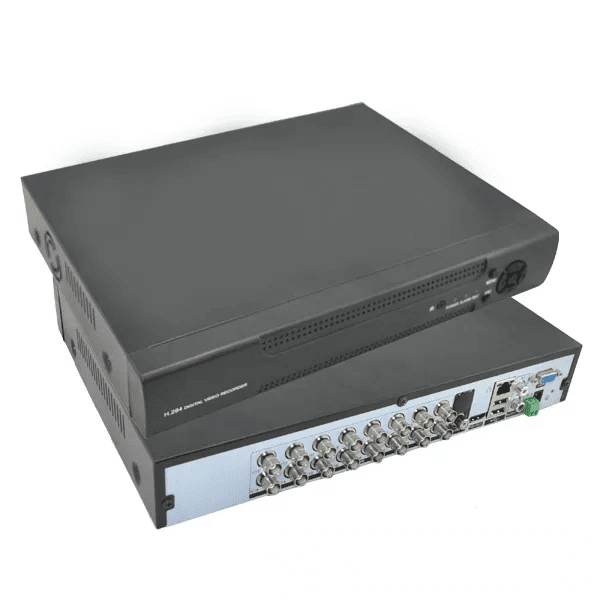
In the realm of security systems, Digital Video Recorders (DVRs) play a crucial role in enhancing surveillance capabilities and ensuring the safety of both residential and commercial properties. A DVR for security cameras serves as the central hub for storing and managing video footage captured by connected cameras, offering a host of benefits that contribute to a comprehensive security infrastructure.
One of the primary advantages of utilizing a DVR with security cameras is the ability to record high-quality video footage for later review. DVRs are equipped with ample storage capacity, allowing users to store days, weeks, or even months’ worth of video data depending on the size of the hard drive. This feature is invaluable for investigating incidents, monitoring activity, and providing evidence in case of security breaches or criminal activities.
Moreover, DVRs offer advanced functionality such as motion detection and scheduled recording, enabling users to customize their surveillance settings based on specific needs and preferences. By setting up motion detection alerts, users can receive notifications whenever unexpected movement is detected within the camera’s field of view, enhancing proactive monitoring and response capabilities.
Furthermore, modern DVRs come equipped with remote viewing capabilities, allowing users to access live or recorded video footage from their security cameras via smartphones, tablets, or computers. This remote accessibility feature provides added convenience and flexibility for monitoring properties in real-time from anywhere with an internet connection.
Security concerns are ever-present in today’s world, making it essential for individuals and businesses to invest in robust surveillance solutions. A DVR for security cameras serves as a reliable tool for capturing, storing, and managing video data effectively, thereby bolstering overall safety and security measures. With continuous advancements in technology, DVRs continue to evolve with enhanced features and functionalities that cater to the diverse needs of modern-day surveillance systems.
Essential FAQs About DVR Systems for Security Cameras: Everything You Need to Know
- What is a DVR for security cameras?
- How does a DVR work with security cameras?
- What are the benefits of using a DVR for security cameras?
- Can I connect multiple cameras to a single DVR?
- How much video footage can a DVR store?
- Can I access my DVR remotely?
- Do I need an internet connection for my DVR to work?
- Are there different types of DVR systems available?
- How do I set up motion detection on my DVR system?
What is a DVR for security cameras?
A Digital Video Recorder (DVR) for security cameras is a specialized device designed to record and store video footage captured by surveillance cameras. Acting as the central hub of a security system, a DVR plays a crucial role in managing and organizing recorded video data for later review and analysis. By connecting multiple security cameras to the DVR, users can monitor and record activities in various areas of a property, enhancing overall surveillance capabilities. With features such as remote viewing, motion detection, and scheduled recording, a DVR for security cameras offers users flexibility and control over their monitoring systems, ensuring comprehensive security measures are in place.
How does a DVR work with security cameras?
Understanding how a DVR works with security cameras is essential for grasping the fundamentals of a comprehensive surveillance system. A DVR serves as the central component that connects to multiple security cameras, capturing and recording video footage from each camera onto a built-in hard drive. When a security camera detects motion or is triggered by an event, it sends the video feed to the DVR for processing and storage. Users can then access the stored footage through the DVR interface, allowing them to review past events, monitor live feeds, and customize recording settings. By seamlessly integrating with security cameras, a DVR enhances overall surveillance capabilities by providing a centralized platform for managing and storing critical video data efficiently.
What are the benefits of using a DVR for security cameras?
Using a DVR for security cameras offers a multitude of benefits that significantly enhance the effectiveness and efficiency of surveillance systems. One key advantage is the ability to store and archive high-quality video footage captured by security cameras, providing valuable evidence for investigations and incident reviews. Additionally, DVRs enable users to customize recording settings, such as motion detection and scheduled recording, optimizing resource usage and ensuring critical events are captured. The remote viewing feature of DVRs allows users to monitor their premises in real-time from anywhere, enhancing situational awareness and enabling prompt responses to potential security threats. Overall, the use of a DVR with security cameras not only improves security measures but also provides peace of mind knowing that properties are under constant surveillance and protection.
Can I connect multiple cameras to a single DVR?
One common query regarding DVRs for security cameras is whether it is possible to connect multiple cameras to a single DVR. The answer is yes, most DVR systems are designed to support multiple camera inputs, allowing users to connect and manage several cameras simultaneously. This feature enables users to create a comprehensive surveillance network covering various areas of interest within a property, enhancing overall security and monitoring capabilities. By connecting multiple cameras to a single DVR, users can effectively monitor different zones, angles, and entry points, providing comprehensive coverage and peace of mind.
How much video footage can a DVR store?
One of the frequently asked questions regarding DVRs for security cameras is related to the storage capacity and how much video footage a DVR can store. The answer to this question varies depending on several factors such as the resolution of the cameras, the compression format used, the number of cameras connected, and the size of the hard drive installed in the DVR. Generally, DVRs are available with varying storage capacities ranging from a few hundred gigabytes to multiple terabytes. This translates to storing anywhere from a few days to several months’ worth of video footage. It is recommended to consider these factors and calculate storage requirements based on specific surveillance needs to ensure optimal performance and effective video management.
Can I access my DVR remotely?
One of the most frequently asked questions regarding DVRs for security cameras is, “Can I access my DVR remotely?” The answer is yes, most modern DVRs are equipped with remote viewing capabilities that allow users to access live or recorded video footage from their security cameras using smartphones, tablets, or computers. This remote access feature provides users with the flexibility to monitor their properties in real-time from anywhere with an internet connection, enhancing convenience and peace of mind. By enabling remote access to DVRs, users can stay connected to their surveillance systems even when they are away, ensuring continuous monitoring and proactive response to security events.
Do I need an internet connection for my DVR to work?
One common query regarding DVRs for security cameras is whether an internet connection is necessary for the DVR to function effectively. While some DVR models may require an internet connection for remote viewing and accessing advanced features like mobile alerts and notifications, a basic setup typically does not mandate constant internet connectivity. The primary purpose of a DVR is to record and store video footage from connected cameras locally, allowing for playback and review on-site without the need for an internet connection. However, having an internet connection can offer additional benefits such as remote monitoring capabilities and seamless access to live or recorded footage from anywhere, providing users with enhanced control and convenience over their surveillance system.
Are there different types of DVR systems available?
Yes, there are different types of DVR systems available to cater to varying security needs and preferences. The two main categories of DVR systems are standalone DVRs and PC-based DVRs. Standalone DVRs are all-in-one units that include the necessary hardware and software for video recording and playback, making them easy to install and operate independently. On the other hand, PC-based DVRs require a separate computer or server to function, offering greater flexibility and scalability for larger surveillance setups. Additionally, there are hybrid DVR systems that support both analog and IP cameras, providing compatibility with a wider range of camera types. Each type of DVR system has its own set of features and capabilities, allowing users to choose the option that best suits their specific security requirements.
How do I set up motion detection on my DVR system?
Setting up motion detection on a DVR system for security cameras is a straightforward process that can significantly enhance surveillance capabilities. To configure motion detection, begin by accessing the DVR system’s settings menu and locating the motion detection tab or section. Within this menu, you can define specific areas within the camera’s field of view where motion should be detected by adjusting sensitivity levels and setting up detection zones. Once these parameters are set, save the changes and enable the motion detection feature to start receiving alerts whenever movement is detected in the designated areas. Fine-tuning the motion detection settings based on your monitoring needs ensures efficient and accurate surveillance, providing added peace of mind knowing that your security system is actively monitoring for any suspicious activity.