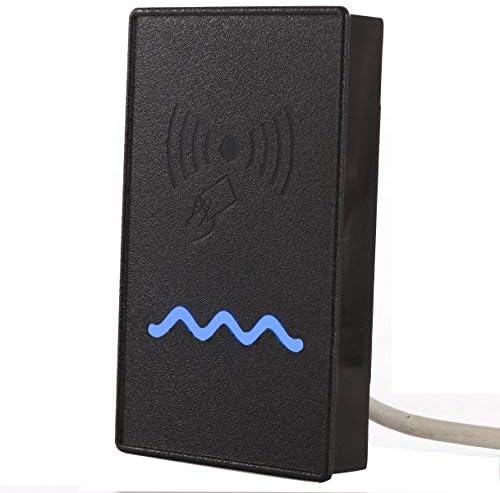
A proximity card reader is a device that is used to read information stored on a proximity card, also known as a proximity key or access card. These cards are embedded with a radio frequency identification (RFID) chip that communicates with the card reader when brought into close proximity. This technology allows for convenient and secure access control in various settings, such as office buildings, educational institutions, and residential complexes.
The operation of a proximity card reader is simple yet effective. When a user approaches the reader with their proximity card, the reader emits a low-frequency radio signal that powers the RFID chip within the card. The chip then transmits its unique identifier back to the reader, which verifies the information against its database to determine whether access should be granted.
One of the key benefits of using a proximity card reader is its convenience. Users do not need to physically swipe or insert the card into the reader; instead, they simply need to hold it near the device for quick and seamless access. This hands-free operation makes it ideal for high-traffic areas where efficiency and speed are essential.
In addition to convenience, proximity card readers offer enhanced security features. The unique identifiers stored on each card help prevent unauthorized individuals from gaining entry to restricted areas. Furthermore, many proximity card systems allow administrators to easily revoke access privileges for lost or stolen cards, adding an extra layer of protection.
Overall, proximity card readers have become an integral part of modern access control systems due to their ease of use, reliability, and security features. Whether used in commercial buildings, government facilities, or residential complexes, these devices provide a convenient and effective solution for controlling access and ensuring safety.
6 Essential Tips for Optimizing Proximity Card Reader Performance and Security
- Ensure the card reader is installed at the correct height for easy access.
- Keep the area around the card reader clear of obstructions to ensure smooth operation.
- Regularly clean the card reader to prevent dirt and dust from affecting its performance.
- Train users on the proper way to use proximity cards with the reader to avoid damage.
- Monitor and test the card reader regularly to address any issues promptly.
- Consider additional security measures, such as PIN verification, for added protection.
Ensure the card reader is installed at the correct height for easy access.
When installing a proximity card reader, it is crucial to ensure that the device is positioned at the correct height for easy access. Placing the card reader at an optimal height ensures that users can conveniently present their proximity cards without having to stretch or bend, enhancing user experience and efficiency. By positioning the card reader at the correct height, you can promote seamless access control and streamline entry processes in various settings, ultimately contributing to a smoother and more user-friendly access management system.
Keep the area around the card reader clear of obstructions to ensure smooth operation.
It is important to keep the area around the proximity card reader clear of obstructions to ensure smooth operation. By maintaining a clutter-free environment near the reader, users can easily access the device without any hindrances. This simple tip not only helps in ensuring efficient operation of the card reader but also promotes a seamless and hassle-free user experience. Clearing the area around the card reader allows for quick and convenient access, enhancing overall security and accessibility in various settings.
Regularly clean the card reader to prevent dirt and dust from affecting its performance.
It is important to regularly clean the proximity card reader to prevent dirt and dust from affecting its performance. Over time, dust and debris can accumulate on the reader’s surface, potentially interfering with the communication between the card and the device. By maintaining a clean reader, you can ensure smooth operation and reliable access control, ultimately prolonging the lifespan of the system and minimizing the risk of malfunctions.
Train users on the proper way to use proximity cards with the reader to avoid damage.
It is essential to train users on the correct way to use proximity cards with the reader to prevent damage and ensure smooth operation. By educating users on the proper handling and positioning of their proximity cards when accessing secured areas, you can help extend the lifespan of both the cards and the reader. Encouraging users to avoid bending, scratching, or exposing their cards to extreme conditions will not only reduce the risk of damage but also contribute to maintaining a reliable access control system. Effective training on card usage can ultimately lead to cost savings by minimizing potential replacements and repairs, while also promoting a culture of responsibility and care among users.
Monitor and test the card reader regularly to address any issues promptly.
It is crucial to monitor and test the proximity card reader regularly to proactively address any potential issues that may arise. By conducting routine checks and testing procedures, any malfunctions or performance issues can be identified and resolved promptly. This proactive approach helps ensure the smooth operation of the card reader system, minimizing downtime and maintaining optimal security levels. Regular monitoring and testing also help in detecting any signs of wear and tear, allowing for timely maintenance or replacement to prevent system failures. By staying vigilant and proactive in monitoring the card reader, you can maintain its efficiency and reliability for seamless access control.
Consider additional security measures, such as PIN verification, for added protection.
When implementing a proximity card reader system, it is advisable to consider additional security measures, such as PIN verification, for added protection. While proximity cards offer a convenient and efficient way to grant access, combining them with a personal identification number (PIN) adds an extra layer of security. By requiring users to enter a unique PIN along with presenting their proximity card, the system becomes more robust against unauthorized access attempts. This dual authentication method helps ensure that only authorized individuals can gain entry to restricted areas, enhancing overall security and peace of mind.