HONET Video Door Phone: A Smarter Way to Manage Entry
A video door phone lets you see and speak to a visitor before opening the door. HONET video door phone systems are designed to support this everyday security need in homes, offices and other premises. By combining video and two-way communication, they help occupants check who is at the entrance and decide whether to grant access.
What Is a Video Door Phone?
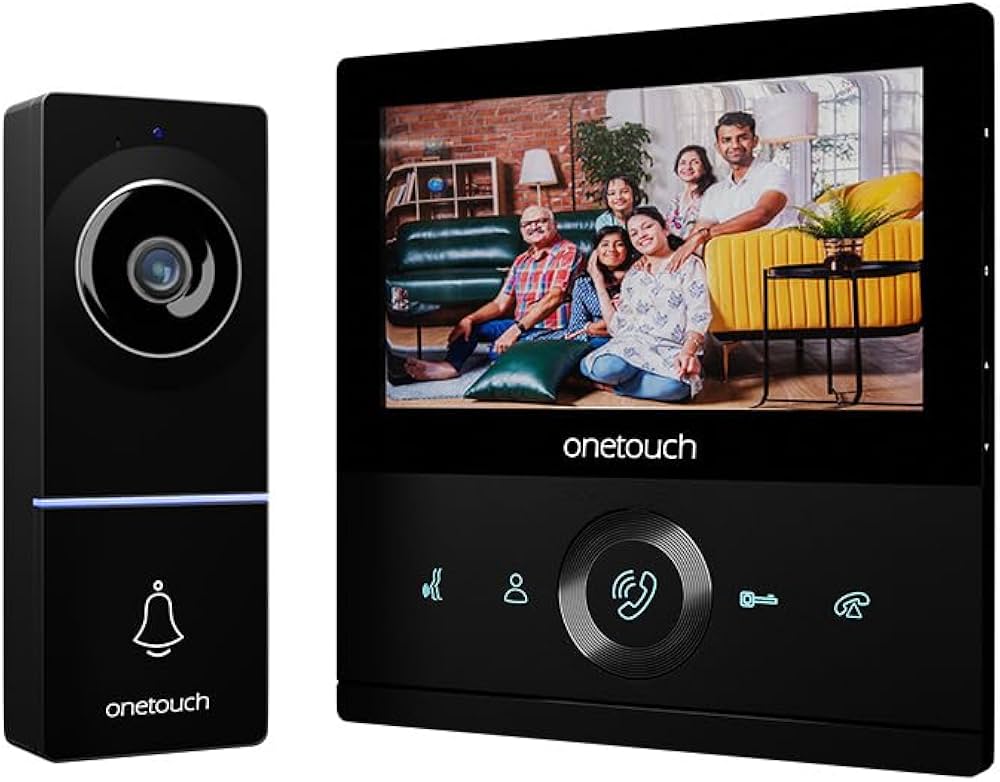
A video door phone system typically has an outdoor camera unit near the entrance and an indoor monitor. When a visitor presses the call button, the indoor unit alerts the occupant and displays the visitor on screen. The occupant can then speak with the visitor and, where the system is connected to an electric lock, release the door without having to approach it.
Exact features can vary between HONET models. Check the product specifications to confirm the screen size, camera capabilities, connectivity options and compatibility with door locks before choosing a system.
Potential Benefits of a HONET Video Door Phone
- Visual visitor identification: See who is at the entrance before answering.
- Two-way communication: Speak to visitors from the indoor monitor, depending on the model.
- Convenient access management: Compatible systems may allow the door to be released from the monitor.
- Greater peace of mind: Check unexpected visitors without opening the door.
- Useful for different premises: Video door phones can be considered for houses, flats, offices and other controlled-entry locations.
How to Choose the Right Model
Before purchasing a HONET video door phone, consider where it will be installed and how it will be used. Review the following points:
- Number of entrances and indoor monitors: Choose a setup suited to the number of doors and users.
- Display and camera specifications: Compare the screen and camera details listed for each model.
- Wiring and installation: Confirm the wiring requirements and whether the system suits the existing site infrastructure.
- Door-lock compatibility: If remote door release is required, check that the system works with the intended lock.
- Additional functions: Look for features such as memory, night viewing or mobile connectivity only if they are stated for the specific model.
- Support and warranty: Ask about installation, service availability and warranty terms before making a decision.
Installation and Everyday Use
For reliable operation, the outdoor unit should be positioned so that visitors are clearly visible and the unit is protected from excessive exposure to weather. Indoor monitors should be installed in a convenient location. Professional installation can help ensure that the camera, monitor, wiring and any connected lock work together correctly.
Keep the camera lens clean and follow the manufacturer’s instructions for operation and maintenance. If the system is connected to an electric door lock, access should be managed carefully and the installation should meet applicable safety requirements.
Is a HONET Video Door Phone Right for You?
A HONET video door phone may be worth considering if you want to view and speak with visitors before granting entry. The best choice depends on the layout of the premises, the number of users and the features required. Compare the specifications of the available HONET models and confirm installation and compatibility details with the supplier before purchase.
6 Essential Tips for Using and Maintaining Your Honet Video Door Phone
- Install the Honet video door phone near the main entrance.
- Keep the camera lens clean for a clear view.
- Check the wiring and power supply regularly.
- Set a strong password if your model uses an app.
- Adjust the volume and brightness to suit your home.
- Contact an authorised technician for repairs.
Install the Honet video door phone near the main entrance.
Install the HONET video door phone near the main entrance so visitors can be seen and answered conveniently. Choose a position that gives the camera a clear view of callers and keeps the indoor monitor easy for household members or staff to reach. Before installation, check the model’s wiring and mounting requirements, and ensure the outdoor unit is suitably protected from the weather.
Keep the camera lens clean for a clear view.
Keep the HONET video door phone camera lens clean to maintain a clear view of visitors at your entrance. Dust, fingerprints, rain spots and other dirt can affect the picture, so gently wipe the lens with a soft, dry, lint-free cloth. Avoid abrasive materials and harsh cleaning products, which may scratch or damage the lens.
Check the wiring and power supply regularly.
Regularly check the wiring and power supply of your HONET video door phone to help keep it working reliably. Look for loose connections, visible damage or signs of overheating, and ensure the power supply matches the manufacturer’s specifications. If you notice a fault, switch off the system where safe to do so and contact a qualified technician rather than attempting electrical repairs yourself.
Set a strong password if your model uses an app.
If your HONET video door phone connects to a mobile app, set a strong, unique password to help protect access to your account and device. Avoid using easy-to-guess details, such as your name, phone number or “123456”, and don’t reuse a password from another account. Where available, enable two-factor authentication and keep the app and device software up to date.
Adjust the volume and brightness to suit your home.
Adjusting the volume and brightness of your HONET video door phone can make it more comfortable and convenient to use. Set the ringtone and speaker volume so you can hear visitors clearly without disturbing others, and adjust the screen brightness to suit the lighting in your home. A well-balanced display can make it easier to see visitors during the day or in dimmer indoor conditions. Check your model’s instructions for the available settings.
Contact an authorised technician for repairs.
For repairs to your HONET video door phone, contact an authorised technician. Video door phone systems may include sensitive electronic components, wiring and door-lock connections, so attempting repairs without the right expertise could cause further damage or affect safe operation. An authorised technician can diagnose the fault, use suitable replacement parts and help ensure the system works correctly after servicing.