Network Video Recorder (NVR) with Power over Ethernet (PoE)
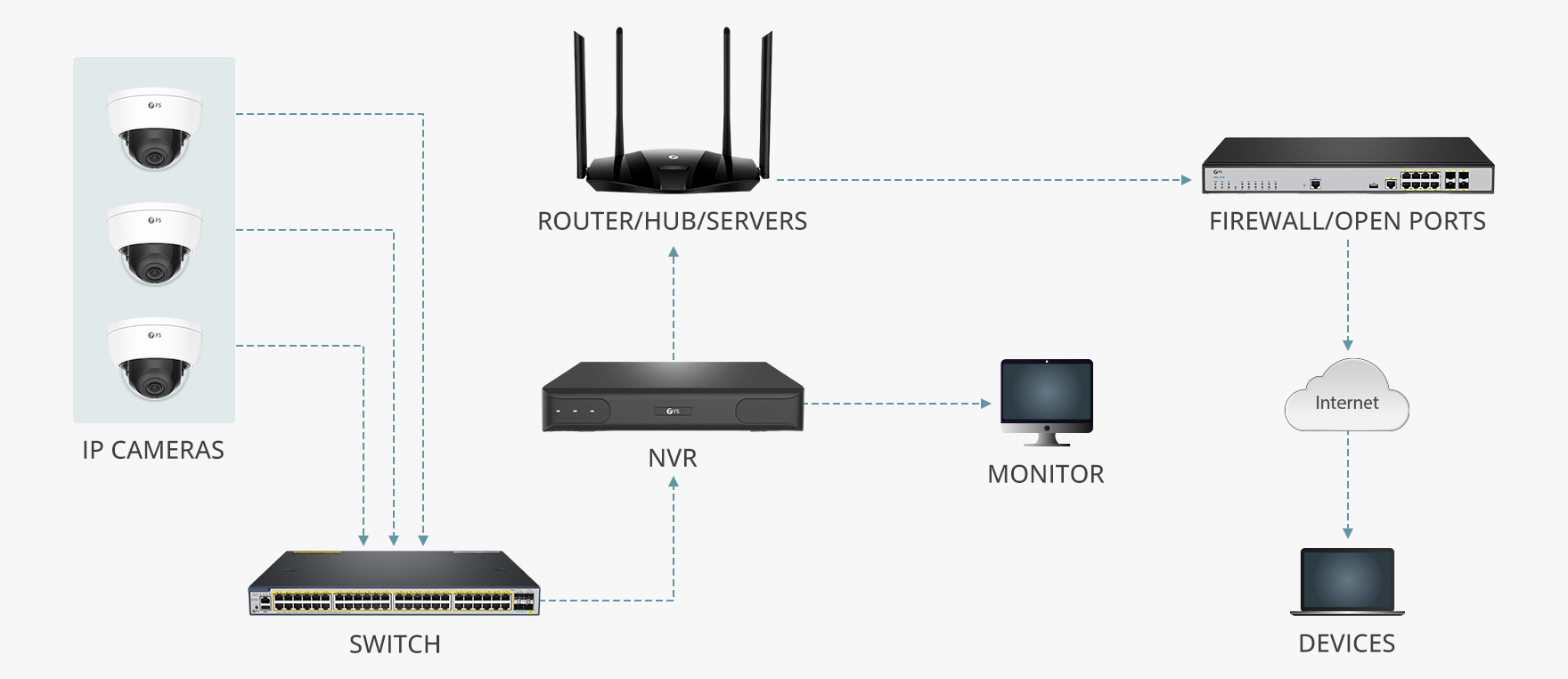
Network Video Recorder (NVR) with Power over Ethernet (PoE) technology is a powerful and efficient solution for managing and recording video footage from IP cameras. PoE technology eliminates the need for separate power cables by delivering both power and data over a single Ethernet cable, simplifying installation and reducing costs.
An NVR with PoE capability offers several advantages for surveillance systems. By utilizing PoE, the NVR can power IP cameras directly through the Ethernet cable, eliminating the need for additional power sources at each camera location. This not only reduces installation time but also provides a more streamlined and professional-looking setup.
Furthermore, PoE technology allows for greater flexibility in camera placement, as cameras can be installed in locations where power outlets are not readily available. This makes it easier to cover blind spots and optimize camera placement for maximum coverage.
In addition to simplifying installation and enhancing flexibility, NVRs with PoE support offer advanced features such as remote access and management capabilities. Users can easily access live or recorded footage from their IP cameras using a web browser or dedicated software, making it convenient to monitor their premises from anywhere at any time.
Overall, Network Video Recorders with Power over Ethernet technology provide a cost-effective, efficient, and user-friendly solution for managing IP surveillance systems. With the ability to power cameras through the same cable used for data transmission, PoE-enabled NVRs offer simplified installation, flexible camera placement options, and convenient remote access features that enhance overall security monitoring capabilities.
7 Essential Tips for Optimizing Your NVR with PoE Technology
- Ensure your NVR supports Power over Ethernet (PoE) for easy installation.
- Use high-quality PoE cameras to ensure clear video footage.
- Regularly update your NVR’s firmware to improve performance and security.
- Set up motion detection on your NVR to receive alerts for any suspicious activity.
- Backup important footage from your NVR to an external storage device regularly.
- Secure your network and NVR with strong passwords to prevent unauthorized access.
- Position your PoE cameras strategically for optimal coverage of the area you want to monitor.
Ensure your NVR supports Power over Ethernet (PoE) for easy installation.
When setting up your surveillance system, it is crucial to ensure that your Network Video Recorder (NVR) supports Power over Ethernet (PoE) technology for seamless and hassle-free installation. By opting for an NVR with PoE support, you can eliminate the need for separate power cables for your IP cameras, simplifying the setup process significantly. With PoE capability, your NVR can power the connected cameras through the Ethernet cable, making installation cleaner, more efficient, and cost-effective. This ensures that your surveillance system is not only easy to set up but also offers a more streamlined and professional look while providing the benefits of flexible camera placement without being constrained by the availability of power outlets.
Use high-quality PoE cameras to ensure clear video footage.
When setting up a Network Video Recorder (NVR) with Power over Ethernet (PoE) technology, it is essential to use high-quality PoE cameras to ensure clear and reliable video footage. High-quality PoE cameras not only capture sharper images but also provide better clarity and detail, making it easier to identify objects and individuals in the footage. By investing in top-notch PoE cameras, users can enhance the overall effectiveness of their surveillance system and ensure that critical details are captured accurately for comprehensive security monitoring.
Regularly update your NVR’s firmware to improve performance and security.
It is essential to regularly update your NVR’s firmware to enhance performance and bolster security measures. Firmware updates often include bug fixes, performance enhancements, and security patches that help protect your NVR from vulnerabilities and potential cyber threats. By staying up-to-date with the latest firmware releases, you can ensure that your NVR operates smoothly, efficiently, and securely, providing you with peace of mind knowing that your surveillance system is optimized for performance and protected against potential risks.
Set up motion detection on your NVR to receive alerts for any suspicious activity.
Setting up motion detection on your NVR with PoE capability is a smart way to enhance security monitoring and receive alerts for any suspicious activity. By configuring motion detection settings, the NVR can detect movement within the camera’s field of view and trigger alerts or notifications when activity is detected. This feature not only helps to minimize false alarms but also ensures that you are promptly notified of any potential security threats, allowing for quick action to be taken. With motion detection enabled on your NVR, you can have peace of mind knowing that you will be alerted to any unusual or unauthorized movements captured by your IP cameras.
Backup important footage from your NVR to an external storage device regularly.
It is crucial to backup important footage from your NVR to an external storage device regularly to ensure the safety and security of your video recordings. By transferring critical footage to an external storage device, you can safeguard against data loss in case of NVR malfunctions, system failures, or unexpected events. Regular backups not only protect valuable recordings but also provide you with peace of mind knowing that your surveillance footage is securely stored and easily accessible when needed. Make it a routine practice to back up your NVR data to an external storage device to maintain the integrity and reliability of your video surveillance system.
Secure your network and NVR with strong passwords to prevent unauthorized access.
It is crucial to secure your network and Network Video Recorder (NVR) with strong passwords to prevent unauthorized access. By setting strong and unique passwords for your NVR and network devices, you can significantly reduce the risk of security breaches and protect sensitive video footage from falling into the wrong hands. Avoid using default or common passwords and opt for complex combinations of letters, numbers, and special characters to create a robust defense against potential cyber threats. Regularly updating and changing your passwords adds an extra layer of security, ensuring that your surveillance system remains safe and secure at all times.
Position your PoE cameras strategically for optimal coverage of the area you want to monitor.
Positioning your PoE cameras strategically is crucial for ensuring optimal coverage of the area you want to monitor. By carefully planning the placement of your cameras, you can eliminate blind spots and maximize surveillance coverage. Consider factors such as the camera’s field of view, angle of coverage, and potential obstacles that may obstruct the view. By strategically positioning your PoE cameras, you can enhance the effectiveness of your surveillance system and improve overall security monitoring capabilities.