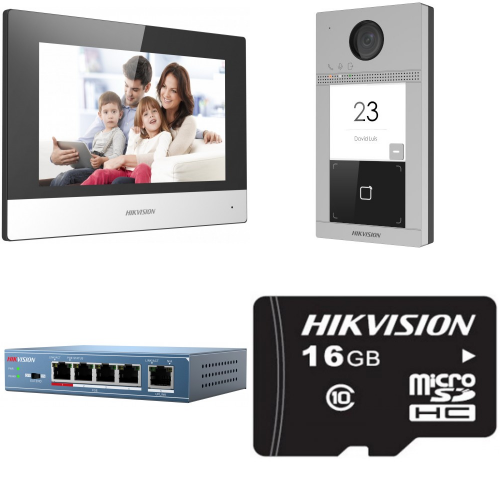
In today’s fast-paced world, security and convenience are top priorities for homeowners and businesses alike. With the advancement of technology, innovative solutions like the Hikvision IP video door phone have revolutionized the way we approach security at our doorsteps.
The Hikvision IP video door phone combines cutting-edge technology with user-friendly features to provide a seamless and efficient security solution. With its high-definition camera and two-way audio communication, users can see and speak to visitors at their doorstep from anywhere using their smartphone or tablet.
One of the key benefits of the Hikvision IP video door phone is its integration with smart home automation systems. Users can easily control access to their property, monitor visitors, and even unlock doors remotely with just a few taps on their mobile device.
Furthermore, the Hikvision IP video door phone offers advanced features such as motion detection, night vision, and cloud storage for recording footage, ensuring round-the-clock security and peace of mind for users.
Whether you’re looking to enhance the security of your home or streamline access control for your business, the Hikvision IP video door phone is a reliable and sophisticated solution that ticks all the boxes. With its sleek design, easy installation process, and robust functionality, it’s no wonder that this innovative device is becoming increasingly popular among tech-savvy consumers.
Investing in a Hikvision IP video door phone is not just about upgrading your security system – it’s about embracing a smarter way of living that prioritizes safety, convenience, and peace of mind. Experience the future of home security with the Hikvision IP video door phone today.
8 Essential Tips for Optimizing Your Hikvision IP Video Door Phone
- Ensure proper installation of the Hikvision IP video door phone to maximize its performance.
- Regularly check and update the firmware of the device for security and functionality improvements.
- Set up motion detection features to enhance security monitoring around your property.
- Adjust camera angles and settings to capture clear images and videos of visitors at your door.
- Enable two-way audio communication for seamless interaction with visitors from a remote location.
- Utilize the mobile app to receive notifications and access live footage from the video door phone anytime, anywhere.
- Consider integrating the video door phone with other smart home devices for added convenience and automation.
- Protect your device with a strong password and enable encryption to safeguard against unauthorized access.
Ensure proper installation of the Hikvision IP video door phone to maximize its performance.
Ensuring proper installation of the Hikvision IP video door phone is crucial to maximize its performance and functionality. By following the manufacturer’s guidelines and engaging professional installers, you can guarantee that the device is set up correctly and operates at its full potential. A well-installed Hikvision IP video door phone not only enhances security but also ensures seamless communication with visitors, remote access control, and reliable monitoring capabilities. Investing time and effort in the installation process will pay off in the form of a robust and efficient security solution that provides peace of mind for users.
Regularly check and update the firmware of the device for security and functionality improvements.
It is essential to regularly check and update the firmware of your Hikvision IP video door phone to ensure optimal security and functionality. Firmware updates often include patches for known vulnerabilities, enhancements to existing features, and overall performance improvements. By staying up-to-date with the latest firmware releases, you can protect your device from potential security threats and ensure that it operates smoothly and efficiently at all times.
Set up motion detection features to enhance security monitoring around your property.
Setting up motion detection features on your Hikvision IP video door phone is a smart way to enhance security monitoring around your property. By activating this feature, you can receive real-time alerts on your mobile device whenever motion is detected near your doorstep. This proactive approach allows you to stay informed and vigilant, ensuring that you are always aware of any potential threats or suspicious activity. With motion detection enabled, you can take immediate action and have peace of mind knowing that your property is being closely monitored at all times.
Adjust camera angles and settings to capture clear images and videos of visitors at your door.
For optimal performance and enhanced security, it is crucial to adjust the camera angles and settings of your Hikvision IP video door phone to capture clear images and videos of visitors at your door. By ensuring that the camera is positioned correctly and the settings are optimized, you can effectively monitor and identify individuals approaching your property. This simple yet important tip can make a significant difference in enhancing the overall functionality and reliability of your security system, providing you with peace of mind knowing that you have a clear view of who is at your doorstep at all times.
Enable two-way audio communication for seamless interaction with visitors from a remote location.
By enabling two-way audio communication on your Hikvision IP video door phone, you can ensure seamless interaction with visitors from any remote location. This feature allows you to not only see who is at your doorstep but also communicate with them in real-time, providing a sense of presence and control even when you’re away from home. Whether it’s receiving a delivery, greeting guests, or simply monitoring activity outside your property, the two-way audio functionality enhances the overall security and convenience offered by the Hikvision IP video door phone.
Utilize the mobile app to receive notifications and access live footage from the video door phone anytime, anywhere.
Make the most of your Hikvision IP video door phone by utilizing the mobile app to receive instant notifications and access live footage from the device no matter where you are. With this feature, you can stay connected to your home or business premises at all times, ensuring enhanced security and convenience at your fingertips. Whether you’re at work, on vacation, or simply relaxing at home, having the ability to monitor and interact with visitors remotely through the mobile app adds an extra layer of control and peace of mind to your daily routine.
Consider integrating the video door phone with other smart home devices for added convenience and automation.
When setting up your Hikvision IP video door phone, it’s worth considering integrating it with other smart home devices to enhance convenience and automation. By connecting the video door phone to devices such as smart locks, lights, and security cameras, you can create a seamless and interconnected ecosystem that offers added functionality and control. Imagine being able to unlock your door, turn on the lights, and view live camera feeds all from the same app on your smartphone – integrating your video door phone with other smart home devices opens up a world of possibilities for a truly connected and automated living experience.
Protect your device with a strong password and enable encryption to safeguard against unauthorized access.
Protecting your Hikvision IP video door phone with a strong password and enabling encryption is crucial to safeguarding against unauthorized access. By setting up a robust password that combines letters, numbers, and special characters, you create a strong barrier against potential intruders trying to gain unauthorized entry into your device. Additionally, enabling encryption adds an extra layer of security by encoding the data transmitted between your device and the network, making it more difficult for hackers to intercept sensitive information. Taking these simple yet effective steps can significantly enhance the security of your Hikvision IP video door phone and provide you with peace of mind knowing that your device is well-protected.