DVR CCTV 4 Channel: A Practical Guide for Homes and Small Businesses
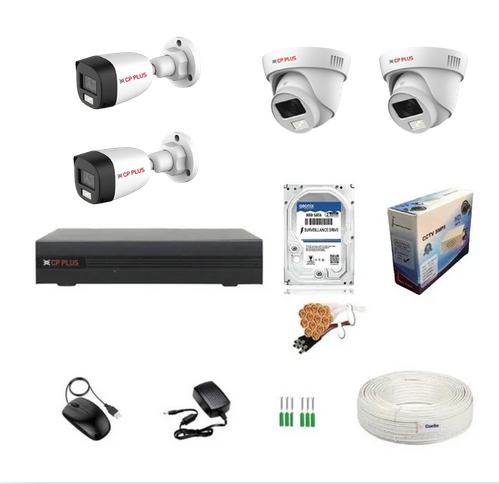
A 4-channel DVR CCTV system is a popular choice for monitoring a home, shop, office or other small premises. It can connect up to four compatible cameras to a Digital Video Recorder (DVR), which records footage and lets users view live or recorded video on a monitor or compatible device.
Before choosing a system, it helps to understand how a 4-channel DVR works, what features to look for and how to plan camera placement.
What Is a 4-Channel DVR?
A DVR is a recording unit used with CCTV cameras. The term “4-channel” means that the recorder has four camera inputs, so it can support up to four cameras at the same time. The cameras are generally connected to the DVR using coaxial cable, while the DVR connects to a display and, when required, to a network router for remote viewing.
Many DVRs support analogue HD formats such as HD-TVI, HD-CVI or AHD. Compatibility varies between models, so check that the DVR and cameras use a format that works together. Some recorders also support a limited number of IP cameras, but this depends on the model.
How Does a 4-Channel CCTV System Work?
- Capture: Each camera records video from its field of view.
- Connection: Video travels from the cameras to the DVR, usually through coaxial cables.
- Recording: The DVR saves footage to an installed hard disk drive (HDD), if supported.
- Viewing: Users can watch live or recorded footage on a connected monitor or use remote viewing if the recorder is configured for network access.
Depending on the system, cameras may need separate power supplies or may receive power through a compatible power arrangement. Confirm the requirements before installation.
Where Can a 4-Channel DVR Be Used?
A four-camera setup can help monitor key areas without the cost or complexity of a larger system. Common locations include:
- Homes, including entrances, driveways and common areas
- Retail shops, covering the entrance, sales area and checkout
- Small offices, covering reception and access points
- Warehouses or workshops, monitoring selected doors and work areas
- Small clinics, cafés and other commercial premises
Camera placement should be planned around the areas that need monitoring. Avoid pointing cameras into private spaces or neighbouring properties, and follow applicable privacy requirements.
Key Features to Consider
Camera resolution and DVR compatibility
Check the resolution supported by both the DVR and cameras. A camera with a higher resolution will not necessarily deliver its full capability if the recorder does not support it. Also confirm the video format and any limits on resolution or frame rate when all channels are in use.
Storage capacity and recording time
Recording duration depends on the HDD capacity, number of cameras, video resolution, frame rate, compression settings and whether recording is continuous or motion-based. Look for a DVR that supports an HDD of suitable capacity and check the manufacturer’s guidance on installation and maximum storage.
Recording modes
Many systems offer continuous recording, scheduled recording or motion-triggered recording. Motion-based recording can help make better use of storage, although settings should be adjusted to reduce unwanted alerts caused by movement such as trees, vehicles or changing light.
Night-time performance
If monitoring is needed after dark, check whether the cameras have infrared night vision or another low-light feature. Actual visibility depends on lighting, distance, obstructions and the camera’s specifications.
Remote viewing
Some DVRs provide remote viewing through a mobile application or computer software. This usually requires an internet connection and setup through the manufacturer’s supported method. Use strong, unique passwords, keep the recorder’s software updated and restrict access to trusted users.
Audio support
Audio recording is not available on every DVR or camera. Check whether the equipment supports audio and whether recording it is appropriate and lawful for the location.
Benefits of a 4-Channel DVR CCTV System
- Suitable for smaller premises: Four channels can cover several important areas.
- Recorded footage: An installed HDD can store video for later review.
- Expandable within its limit: Additional cameras can be added if spare channels are available, up to the recorder’s maximum.
- Flexible viewing: Compatible systems may support a local monitor and remote access.
- Choice of camera types: Depending on compatibility, users may be able to select different camera styles for indoor or outdoor use.
Tips for Choosing the Right DVR
- Count the areas that need coverage and decide whether four cameras will be sufficient.
- Match the DVR’s supported camera format and resolution to the cameras.
- Estimate the required recording period and choose suitable HDD capacity.
- Check whether the cameras are rated for indoor or outdoor use and suit the lighting conditions.
- Confirm the power, cabling and network requirements before purchase.
- Choose a recorder with clear playback, backup and user-access options.
- Arrange professional installation if cable routing, configuration or camera positioning is complex.
Conclusion
A 4-channel DVR CCTV system can be a practical surveillance option for a home or small business that needs coverage of up to four locations. The right setup depends on camera compatibility, image quality, storage requirements, lighting conditions and remote-access needs. Reviewing these details before installation can help create a system that is reliable, easy to use and suited to the premises.
8 Essential Tips for Choosing and Using a 4-Channel CCTV DVR
- Choose a 4-channel DVR for up to four cameras.
- Check that the DVR supports your camera type.
- Use a surveillance-grade hard drive.
- Set strong passwords and change default login details.
- Position cameras to cover entrances and key areas.
- Use a UPS to keep the system running during power cuts.
- Enable motion alerts to reduce unnecessary recordings.
- Test playback and backups regularly.
Choose a 4-channel DVR for up to four cameras.
Choose a 4-channel DVR CCTV system when you need to connect and record footage from up to four cameras. It can be a practical option for monitoring key areas in a home, shop or small office, such as entrances, corridors and checkout counters. Before buying, check that the DVR is compatible with your cameras and offers enough storage for your recording needs.
Check that the DVR supports your camera type.
Before purchasing a 4-channel DVR, check that it is compatible with your CCTV cameras. DVRs may support different video formats, such as HD-TVI, HD-CVI or AHD, and not every recorder works with every camera. Also confirm the maximum resolution supported on each channel, so your cameras can deliver the picture quality you expect. Checking these specifications in advance can help avoid compatibility issues during installation.
Use a surveillance-grade hard drive.
Use a surveillance-grade hard drive in your 4-channel DVR CCTV system. Unlike standard desktop drives, these are designed for continuous video recording and repeated write cycles, making them better suited to round-the-clock use. Choose a capacity that meets your required recording period, based on the number of cameras, video quality and recording settings. Check the DVR manufacturer’s compatibility recommendations before purchasing or installing the drive.
Set strong passwords and change default login details.
Set strong, unique passwords for your 4-channel DVR and change all default login details before connecting the system to a network. Default credentials may be easy to guess, so use a password that combines upper- and lower-case letters, numbers and symbols, and avoid reusing it for other accounts. Where available, create separate user accounts with only the access each person needs, and update passwords if they may have been shared or exposed.
Position cameras to cover entrances and key areas.
Position the cameras in your 4-channel DVR CCTV system to cover entrances and other key areas, such as reception counters, checkout points, corridors or storage rooms. Plan each camera’s angle to capture useful detail while minimising blind spots, and check that lighting and obstructions won’t affect the view. For privacy, avoid recording areas where people have a reasonable expectation of privacy and ensure cameras do not unnecessarily capture neighbouring properties.
Use a UPS to keep the system running during power cuts.
Use a UPS (Uninterruptible Power Supply) with your 4-channel DVR CCTV system to keep the recorder and connected equipment running during short power cuts. This can help maintain surveillance and prevent interruptions to recording when the mains supply fails. Choose a UPS with sufficient capacity for the DVR, cameras and any other essential devices, and check its backup time and compatibility before installation. A UPS is not a substitute for regular backups or proper system maintenance.
Enable motion alerts to reduce unnecessary recordings.
Enable motion alerts on your 4-channel DVR CCTV system to record footage when activity is detected, rather than continuously recording every channel. This can help make better use of storage space and make important events easier to find during playback. Adjust the motion sensitivity and detection zones for each camera to minimise unnecessary recordings caused by moving trees, passing traffic or changes in lighting.
Test playback and backups regularly.
Test playback and backups regularly to make sure your 4-channel DVR CCTV system is recording properly and that important footage can be retrieved when needed. Review clips from each camera, check that the date and time are correct, and confirm that exported files play on another device. If your DVR supports USB, network or cloud backups, test the chosen method periodically and store copies securely. Regular checks can help identify recording, storage or backup problems before footage is required.