
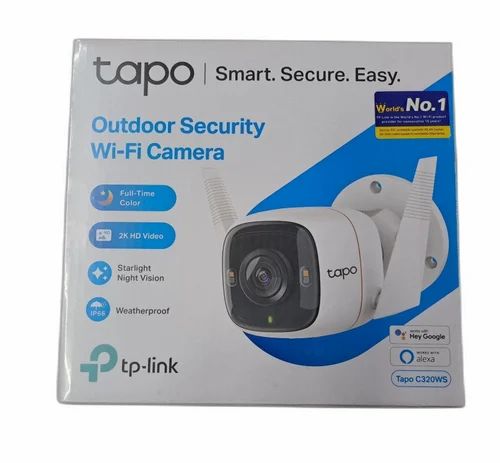
CCTV Camera for Outdoor Use with Mobile Connectivity
An outdoor CCTV camera with mobile connectivity lets you monitor your home, office, shop or other premises from a smartphone. Whether you are away at work or travelling, you can check live footage, review recorded video and receive alerts through a compatible mobile app, subject to the camera’s features and internet connection.
For reliable performance, it is important to choose a camera designed for outdoor conditions and install it where it can capture the areas that matter most. This guide explains the key features to consider when selecting an outdoor CCTV camera with mobile viewing.
What Is a Mobile-Connected Outdoor CCTV Camera?
It is a surveillance camera installed outside a property that can send video to a recorder, storage device or cloud service and provide access through a mobile app. Depending on the model and setup, the camera may connect to your network through Wi-Fi, an Ethernet cable or a mobile data connection.
Mobile access generally requires the camera or recording system to be connected to the internet. Once configured, authorised users can view live footage and, where supported, access recordings and receive motion alerts on their phones.
Benefits of Mobile Connectivity
- Remote viewing: Check live footage from a compatible smartphone or tablet when you have internet access.
- Motion notifications: Receive alerts when the camera detects activity, depending on the model and settings.
- Recorded playback: Review footage stored on a DVR, NVR, memory card or cloud service, if supported.
- Multiple-camera viewing: Some apps let you view several cameras or locations from one account.
- Two-way audio: Selected models include a microphone and speaker, allowing communication through the app.
Features to Look for in an Outdoor CCTV Camera
Weather-resistant design
Outdoor cameras should be rated for exposure to conditions such as rain and dust. Check the product’s IP rating and operating temperature range, and confirm that the camera is suitable for the location where it will be installed. The connectors and cable joints should also be protected from moisture.
Image quality and field of view
Choose a resolution and viewing angle suited to the area being monitored. A wider view can cover more space, while a narrower view may provide more detail in a particular area. Consider what you need to see, such as an entrance, driveway or boundary, before choosing the lens and camera position.
Night vision
For monitoring after dark, check the camera’s night-vision capability and effective range. Infrared night vision can provide black-and-white footage in low light, while some cameras offer colour night vision when sufficient lighting is available.
Connectivity options
Wi-Fi cameras can be convenient where a suitable wireless signal reaches the installation point. For greater connection stability, a wired Ethernet connection may be preferable. If a fixed broadband connection is unavailable, certain cameras or systems may support a SIM card and mobile data. Check coverage, data requirements and ongoing charges before choosing this option.
Storage and recording
Outdoor CCTV footage can be stored on a memory card, DVR, NVR or cloud platform, depending on the system. Compare storage capacity, recording options, retention period and any subscription fees. Continuous recording and motion-based recording may be available on different models.
Power supply
Most outdoor cameras require a reliable power source. Some models support Power over Ethernet (PoE), which can carry power and data through a compatible Ethernet cable. Battery-powered and solar-assisted models are also available, but their recording and connectivity features may differ. Confirm power requirements before installation.
Installation Tips
- Position the camera to cover key entry points and areas of concern.
- Mount it securely and at a height that balances coverage with practical access for maintenance.
- Check Wi-Fi strength at the proposed location before installing a wireless camera.
- Avoid pointing the camera directly at strong light sources, which can affect image quality.
- Protect cables, connectors and power supplies from weather and accidental damage.
- Follow applicable privacy requirements and avoid unnecessarily recording neighbouring homes or private areas.
Keep Mobile Access Secure
Use a strong, unique password for the camera account and enable two-factor authentication if available. Keep the camera firmware and mobile app updated, limit access to trusted users and secure the home or business Wi-Fi network. These steps help protect both the system and its recordings.
Choosing the Right Camera for Your Property
The right outdoor CCTV camera depends on the area to be monitored, lighting conditions, available internet connection, preferred storage method and installation environment. Before purchasing, confirm that the camera is compatible with your phone, app and recording system, and check whether remote viewing requires a subscription or additional equipment.
A suitable outdoor CCTV camera with mobile connectivity can make it easier to keep an eye on your premises when you are away. For the best results, match the camera’s features to your site requirements and ensure that it is installed, configured and maintained correctly.
5 Tips for Choosing and Using an Outdoor CCTV Camera with Mobile Connectivity
- Choose a weatherproof camera rated IP66 or higher.
- Use a 4G SIM camera if Wi-Fi is unavailable outdoors.
- Check mobile signal strength before installation.
- Enable motion alerts to monitor activity on your phone.
- Use a strong password and keep the camera firmware updated.
Choose a weatherproof camera rated IP66 or higher.
Choose a weatherproof outdoor CCTV camera with an IP66 rating or higher to help protect it from dust and heavy rain. This is especially important for cameras exposed to monsoon showers, strong winds or dusty conditions. Before installation, check the manufacturer’s guidance and ensure that cables and connectors are also properly sealed, as the camera’s rating may not cover unprotected connections.
Use a 4G SIM camera if Wi-Fi is unavailable outdoors.
If Wi-Fi is unavailable outdoors, consider using a CCTV camera with a 4G SIM connection. It can send live footage and motion alerts to your mobile phone over the mobile network, provided there is reliable 4G coverage at the installation site. Before choosing a model, check SIM compatibility, data usage, network support and any ongoing recharge or subscription costs. Use a suitable data plan and secure the camera account with a strong password.
Check mobile signal strength before installation.
Before installing an outdoor CCTV camera that uses a SIM card and mobile data, check the signal strength at the exact location where the camera will be mounted. A weak or inconsistent signal can interrupt live viewing, delay alerts and affect video uploads. Test the signal at different times of the day, and consider a suitable antenna or a different mounting position if reception is poor. Also confirm that the selected network provider has reliable coverage at the site.
Enable motion alerts to monitor activity on your phone.
Enable motion alerts on your outdoor CCTV camera to receive a notification on your phone when movement is detected. This can help you keep track of activity around entrances, driveways and other important areas, even when you are away. Adjust the camera’s motion sensitivity and detection zones to reduce unnecessary alerts caused by passing vehicles, pets or swaying trees.
Use a strong password and keep the camera firmware updated.
To protect your outdoor CCTV camera and its footage, use a strong, unique password for the camera account and change any default login details during setup. Keep the camera firmware and mobile app updated, as updates can fix security issues and improve performance. These simple steps help reduce the risk of unauthorised access and keep your mobile-connected camera more secure.


