Panoramic CCTV Cameras: Wide-Area Surveillance Explained
A panoramic CCTV camera is designed to monitor a broad area from a single camera position. Depending on its design, it can provide a 180-degree or 360-degree view, helping reduce blind spots in open spaces such as reception areas, retail floors, offices, warehouses and car parks.
Unlike a standard camera with a narrow field of view, a panoramic camera can capture a wider scene. This can make it easier for security teams to monitor activity across a large area without installing several separate cameras. However, choosing the right camera depends on the size of the space, lighting conditions and the level of image detail required.
How does a panoramic CCTV camera work?
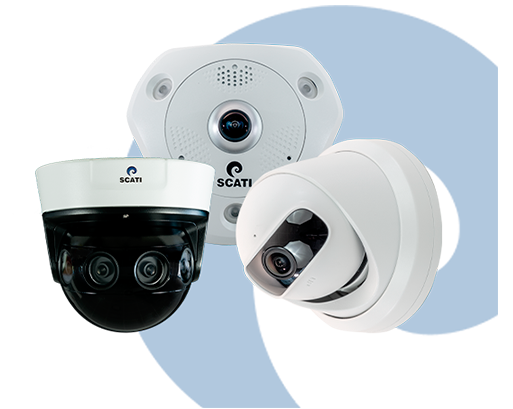
Panoramic CCTV cameras use one or more image sensors and wide-angle lenses to capture a broad view. Some models use a fisheye lens to record a 360-degree image, while multi-sensor models combine footage from several lenses to create a wider, more natural-looking view.
Many cameras use image processing software to correct the curved appearance that can result from a fisheye lens. This process, often called dewarping, presents the footage in a more familiar format. Depending on the model and software, viewers may be able to see the full panoramic image or focus on selected sections of it.
Key benefits
- Wide-area coverage: A single camera can monitor a broad space, depending on its lens, resolution and installation position.
- Fewer blind spots: A wide field of view can help cover areas that might otherwise require several fixed cameras.
- Flexible viewing: Some systems allow operators to view different parts of the scene or digitally zoom into an area of interest.
- Potentially simpler installation: Fewer camera positions may be needed for certain layouts, which can simplify cabling and maintenance.
- Useful scene context: A panoramic view can show where people or vehicles are moving within a larger area.
Common types of panoramic cameras
Fisheye cameras
Fisheye cameras use an ultra-wide lens to capture a circular or panoramic image. They are often installed on ceilings to monitor open indoor spaces. Image dewarping can help make the footage easier to view, but the level of detail may vary across the image.
Multi-sensor cameras
These cameras use multiple sensors or lenses to cover a wide area. They can offer a more detailed view than some single-lens options, but performance depends on the camera’s specifications, installation and lighting.
Panoramic cameras with PTZ functionality
Some systems combine a fixed panoramic view with a PTZ (pan, tilt and zoom) camera. The panoramic camera provides an overview, while the PTZ camera can be directed towards a particular activity. This arrangement can be useful where both wide coverage and closer inspection are required.
Where are panoramic CCTV cameras used?
Panoramic cameras may be suitable for locations where a wide, continuous view is useful, including:
- Retail shops and shopping centres
- Office reception areas and open-plan workspaces
- Warehouses and manufacturing facilities
- Schools, colleges and other educational premises
- Hotels, restaurants and public areas
- Car parks, transport facilities and building entrances
What to consider before choosing a camera
- Field of view: Check whether the camera provides 180-degree, 360-degree or another coverage angle, and confirm that it suits the space.
- Resolution and detail: A wide view spreads the available image detail across a larger scene. Consider whether the camera can capture the level of detail needed for your application.
- Installation height: Mounting position affects coverage and image quality. The ideal height and angle depend on the room layout and camera type.
- Lighting: Assess daylight, shadows and low-light conditions. Features such as wide dynamic range or infrared illumination may be useful where supported.
- Image dewarping: Check how the camera displays corrected images and whether the viewing software supports the required layouts.
- Recording and network requirements: Confirm compatibility with the network video recorder (NVR), video management software and storage capacity. High-resolution footage can require more bandwidth and storage.
- Privacy and access: Position cameras responsibly, restrict access to recordings and follow applicable privacy requirements.
Are panoramic CCTV cameras right for every site?
Panoramic cameras are useful for broad-area monitoring, but they may not replace every standard or PTZ camera. A wide image can provide excellent scene context, yet a camera covering a large area may not capture fine detail at a distance. For identification or close-up monitoring, additional cameras or a different lens may be needed.
A site assessment can help determine the right camera locations, coverage angles and recording requirements. It can also identify areas where panoramic cameras should be supported by fixed-lens, dome or PTZ cameras.
Conclusion
Panoramic CCTV cameras offer a practical way to monitor wide indoor and outdoor areas from fewer camera positions. Their effectiveness depends on selecting the right camera type, installing it appropriately and matching its image quality to the purpose of surveillance. Careful planning can help create a CCTV system that balances broad coverage with the level of detail needed for the site.
8 Essential Tips for Choosing and Using a Panoramic CCTV Camera
- Choose a camera with a wide field of view.
- Check the image quality before buying.
- Install it high for a clear overview.
- Avoid pointing it directly at bright lights.
- Use night vision for low-light areas.
- Secure the camera with a strong password.
- Clean the lens regularly.
- Check local privacy rules before installation.
Choose a camera with a wide field of view.
Choose a panoramic CCTV camera with a wide field of view to cover more of the area from a single position and help reduce blind spots. Before selecting a model, check its coverage angle and consider the room’s size, layout and camera mounting position. A wider view is useful for monitoring open spaces, but make sure the camera’s resolution can still provide the level of detail required.
Check the image quality before buying.
Before buying a panoramic CCTV camera, check the image quality in conditions similar to those at your site. A wide field of view spreads the image across a larger area, so details such as faces or number plates may be less clear, especially at a distance or in low light. Review sample footage, check the camera’s resolution and night-time performance, and confirm that any dewarping feature produces clear, usable images.
Install it high for a clear overview.
Install a panoramic CCTV camera at a suitable height to capture a clear, wide overview of the area. A higher position can help reduce obstructions and cover more of the scene, but avoid mounting it so high that important details become difficult to see. Choose the height and angle based on the space layout, lighting and surveillance requirements.
Avoid pointing it directly at bright lights.
Avoid pointing a panoramic CCTV camera directly at bright lights, such as the sun, floodlights or strong indoor lighting. Bright light can cause glare, overexposure or dark shadows, making it harder to see important details across the wide-angle image. Position the camera to capture the area without facing the light source, and use features such as wide dynamic range (WDR) where suitable.
Use night vision for low-light areas.
For areas with limited lighting, choose a panoramic CCTV camera with night vision to help maintain visibility after dark. Infrared (IR) illumination can capture footage in low-light or near-dark conditions, while features such as low-light colour imaging may provide more detail where some ambient light is available. Check the camera’s night-vision range and test its performance at the intended installation height, as walls, glass and other obstacles can affect the image.
Secure the camera with a strong password.
Use a strong, unique password to secure your panoramic CCTV camera and change any default login details during setup. Choose a password that is difficult to guess, avoid reusing it across devices, and keep the camera’s firmware updated. These steps can help prevent unauthorised access to live footage and camera settings.
Clean the lens regularly.
Clean the panoramic CCTV camera lens regularly to help maintain clear, detailed footage. Dust, fingerprints, water spots and cobwebs can blur the image or affect visibility across its wide field of view. Switch off the camera before cleaning, and use a soft, lint-free cloth or a lens-cleaning product recommended by the manufacturer. Avoid abrasive materials and harsh chemicals, which may scratch or damage the lens coating.
Check local privacy rules before installation.
Before installing a panoramic CCTV camera, check the privacy rules that apply in your area. As these cameras capture a wide field of view, they may record neighbouring properties, public spaces or areas where people expect privacy. Position the camera carefully, use privacy masking where available, and ensure recordings are accessed and stored responsibly. If in doubt, seek guidance from a qualified professional or the relevant local authority.