
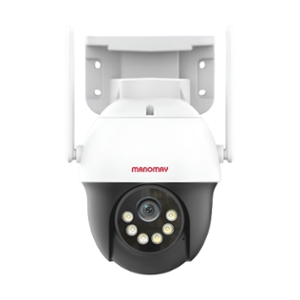
Best Wireless Surveillance Cameras: A Practical Guide for Homes and Businesses
Wireless surveillance cameras offer a convenient way to monitor homes, offices, shops, warehouses and other premises. They can reduce the need for long video cables and make it easier to add cameras to locations where wiring is difficult. However, the “best” wireless camera depends on where it will be installed, the level of security required and how footage needs to be stored.
This guide explains the main types of wireless surveillance cameras, the features to compare and how to choose a system suited to your requirements.
What Does “Wireless” Mean?
Most wireless surveillance cameras use Wi-Fi or another wireless network to send video to a recorder, app or monitoring station. They may still need a power connection. Battery-powered models are also available, while some professional systems use solar power or dedicated radio links.
Wireless transmission does not always mean that every part of the system is cable-free. Check whether the camera needs power, a network connection or a separate recorder before selecting a model.
Types of Wireless Surveillance Cameras
- Wi-Fi cameras: Suitable for locations with reliable Wi-Fi coverage, such as homes, small offices and shops.
- Battery-powered cameras: Useful where power outlets are not readily available. Battery life depends on recording settings, activity and signal strength.
- Solar-powered cameras: Can be considered for suitable outdoor locations with adequate sunlight and a compatible solar panel.
- Pan-tilt-zoom (PTZ) cameras: Allow an operator to move the camera view and zoom in remotely. They can be useful for larger areas that need active monitoring.
- Long-range wireless cameras: Use dedicated wireless links to connect cameras over greater distances. These require careful planning and may need a clear line of sight.
- Wireless camera systems with a recorder: Multiple cameras connect to a central recorder, which can provide local storage and a single point for reviewing footage.
Features to Look for in a Wireless Surveillance Camera
Image quality
Choose a resolution that makes sense for the area being monitored. A higher resolution can capture more detail, but it also requires more storage and network bandwidth. Consider the camera’s performance in different lighting conditions, not only its headline resolution.
Night vision and low-light performance
For round-the-clock monitoring, check how the camera performs after dark. Infrared night vision is common, while some models use low-light sensors or built-in lighting to produce colour images in suitable conditions.
Reliable connectivity
A camera is only as dependable as its connection. Check Wi-Fi coverage at the proposed mounting point and consider obstacles such as thick walls, metal structures and long distances. For larger sites, a dedicated wireless link or professionally planned network may be more suitable than ordinary Wi-Fi.
Storage and recording options
Footage may be stored on a memory card, a network video recorder (NVR), a local server or a cloud platform. Compare retention time, access controls, subscription costs and what happens if the internet connection is interrupted. For business use, local recording can be an important part of a resilient system.
Weather resistance
Outdoor cameras should be designed for the conditions at the installation site. Look for an appropriate weather-resistance rating and check the manufacturer’s guidance on temperature, rain, dust and mounting.
Motion detection and alerts
Motion detection can help users find relevant footage and receive alerts. Features such as person, vehicle or area detection may reduce unnecessary notifications, but their performance varies by camera and environment. Set detection zones carefully to avoid alerts from roads, trees or neighbouring properties.
Cybersecurity
Wireless cameras are networked devices, so security matters. Change default passwords, use strong unique credentials, enable multi-factor authentication where available, install firmware updates and restrict access to authorised users. Business systems should be configured in line with the organisation’s IT and security policies.
Integration and ongoing support
For a multi-camera installation, check whether the cameras work with the intended recorder, monitoring software and other security systems. Confirm warranty terms, availability of replacement parts and the supplier’s technical support arrangements.
Choosing the Right Camera for Your Application
- Home entrance or apartment: A compact Wi-Fi camera with clear two-way audio, night vision and dependable alerts may be appropriate.
- Retail shop or small office: Consider multiple cameras, local recording and coverage of entrances, counters and stock areas.
- Warehouse or industrial premises: Assess the site’s size, lighting, network coverage and storage needs. A professionally designed system may be more reliable than consumer Wi-Fi cameras.
- Remote or outdoor location: Battery, solar or long-range wireless options may be considered after checking power, signal, weather and maintenance requirements.
- Large facility: A managed wireless network, dedicated links or a hybrid wired-and-wireless design may provide more consistent coverage and recording.
Wireless Cameras vs Wired Cameras
Wireless cameras can be quicker to install and easier to reposition, particularly where cable routing is difficult. They also depend on wireless coverage and may be affected by interference, congestion or changes to the network. Wired cameras generally require more installation work but can provide a stable connection and may be preferable for critical or high-traffic locations.
In many installations, a hybrid system offers a practical balance: wired cameras in key areas and wireless cameras in locations where cabling is challenging.
Installation Tips
- Identify the areas that need monitoring and the level of detail required.
- Check network signal strength at each proposed camera location.
- Position cameras to avoid glare, backlighting and unnecessary views of neighbouring properties.
- Confirm power, weather protection and mounting requirements before installation.
- Test live viewing, recording, playback and alerts after setup.
- Review user permissions and update passwords and firmware regularly.
Privacy and Responsible Use
Surveillance should be used responsibly and in accordance with applicable laws and workplace policies. Inform people where monitoring is in operation when required, restrict access to recordings and retain footage only for a legitimate period. Avoid pointing cameras into private areas or locations where people reasonably expect privacy. Organisations should seek appropriate legal or compliance advice when planning surveillance at workplaces or public-facing sites.
Frequently Asked Questions
Do wireless surveillance cameras need the internet?
Not always. Some cameras need the internet for remote viewing and cloud services, while systems with local recording may continue recording within the premises if the internet connection fails. The exact behaviour depends on the camera and recorder configuration.
Can wireless cameras record continuously?
Some models support continuous recording, while others record when motion is detected. Continuous recording requires suitable power, storage capacity and network performance.
Are wireless cameras suitable for large properties?
They can be, but coverage and reliability need to be assessed carefully. Larger sites may require access points, dedicated wireless links, local recorders or a hybrid system designed for the site.
What is the best wireless surveillance camera?
There is no single best camera for every application. The right choice depends on coverage, image quality, connectivity, storage, power supply, weather conditions, cybersecurity and the level of support required.
Conclusion
The best wireless surveillance camera is one that reliably covers the area, records usable footage and fits the site’s power, network and storage requirements. Before choosing equipment, assess the installation environment and decide how footage will be accessed, protected and retained. For larger or business-critical sites, professional planning can help ensure that camera placement, wireless coverage and recording work together effectively.
6 Tips to Choose the Best Wireless Security Camera for Your Home in India
- Choose a camera with reliable Wi‑Fi and 2.4 GHz support.
- Look for clear 2K or higher video and useful night vision.
- Pick a battery-powered model for easy installation without wiring.
- Check the IP weather rating for outdoor use in Indian conditions.
- Compare local storage options with cloud subscription costs.
- Use strong passwords and enable two-factor authentication.
Choose a camera with reliable Wi‑Fi and 2.4 GHz support.
Choose a wireless surveillance camera with a reliable Wi-Fi connection and support for the 2.4 GHz band. It generally offers better range and can pass through walls more effectively than 5 GHz, making it useful for cameras placed farther from the router or outdoors. Before installation, check the Wi-Fi signal at the camera’s intended location, as walls, metal surfaces and interference can affect performance. A stable connection helps ensure smoother live viewing, dependable alerts and consistent video transmission.
Look for clear 2K or higher video and useful night vision.
When choosing a wireless surveillance camera, look for clear 2K or higher video so important details are easier to identify, especially around entrances and driveways. Check its night vision too: infrared or low-light colour imaging can help capture useful footage after dark. For the best results, consider how the camera performs in the lighting conditions at your site, rather than relying on resolution alone.
Pick a battery-powered model for easy installation without wiring.
Choose a battery-powered wireless surveillance camera for quick, flexible installation without running power cables—especially in places where wiring is difficult. Before buying, check the expected battery life, charging method and whether the camera supports a spare or rechargeable battery. Frequent motion alerts or continuous recording can drain the battery faster, so consider your site’s activity level and how often you can recharge it.
Check the IP weather rating for outdoor use in Indian conditions.
For outdoor use in Indian conditions, check the camera’s IP (Ingress Protection) rating before buying. A rating such as IP66 indicates protection against dust and powerful water jets, making it suitable for many exposed locations during heavy rain and monsoon weather; IP67 offers additional protection against temporary immersion. Also check the manufacturer’s specified operating temperature and resistance to sunlight, heat and humidity, as the IP rating alone does not cover these factors.
Compare local storage options with cloud subscription costs.
When choosing a wireless surveillance camera, compare local storage options, such as a memory card or NVR, with the ongoing cost of cloud subscriptions. Local storage may involve a higher upfront cost but can avoid monthly fees, while cloud storage makes footage easier to access remotely and may offer off-site backup. Check storage capacity, retention period, security features and what happens to recordings if the internet connection fails.
Use strong passwords and enable two-factor authentication.
Use strong, unique passwords for your wireless surveillance cameras and associated accounts to help prevent unauthorised access. Avoid default or easily guessed passwords, and enable two-factor authentication wherever available. This adds an extra verification step when signing in, strengthening the security of your camera system and recorded footage.

