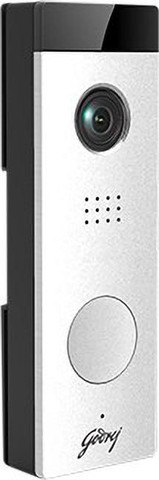
Godrej Contactless Video Door Phone: A Safer, Smarter Way to Welcome Visitors
A video door phone helps you see and speak to visitors before opening the door. A contactless model adds convenience by reducing the need to touch shared buttons or handsets. For homes, offices and apartment buildings, a Godrej contactless video door phone can be considered as part of a modern entry-security setup.
What Is a Contactless Video Door Phone?
A video door phone generally includes an outdoor camera and calling unit, an indoor monitor, and a connection between the two. When a visitor arrives, the system lets the occupant view them and communicate before deciding whether to grant access. Depending on the model, the system may also support door release through an electric lock.
“Contactless” can refer to features such as touch-free visitor calling or hands-free communication. The exact functions differ by model, so it is important to check the product specifications before choosing a system.
How It Works
- A visitor arrives: The outdoor unit captures the visitor’s image and may notify the indoor monitor.
- You check who is at the door: The live video feed helps you identify the visitor without opening the entrance.
- You communicate: Depending on the system, you can speak with the visitor using a handset or hands-free audio.
- You decide whether to allow entry: If supported and correctly installed, the system can be connected to an electric lock for controlled access.
Potential Benefits
- Improved visitor screening: See who is outside before opening the door.
- More convenient communication: Speak to visitors from inside the premises.
- Reduced contact with shared controls: Touch-free calling features may help limit contact with frequently used buttons.
- Added access control: Compatible systems can work with an electric lock, allowing entry to be managed from indoors.
- Useful for different settings: Video door phones may suit houses, flats, offices and selected commercial premises.
What to Check Before Buying
Before selecting a Godrej video door phone, confirm the features and installation requirements of the specific model. Consider the following:
- Screen size, display quality and night-vision capability
- Whether calling and communication are genuinely touch-free or hands-free
- Audio quality and the number of indoor monitors supported
- Compatibility with the existing door, wiring and electric lock
- Whether the system supports one entrance or multiple entrances
- Indoor and outdoor unit placement, weather protection and power requirements
- Warranty, service support and availability of compatible accessories
Installation and Maintenance
Correct positioning of the outdoor camera is important for a clear view of visitors. The installer should also check cable routing, power supply, lock compatibility and the distance between indoor and outdoor units. For multi-flat buildings or larger premises, the installation may need additional planning to ensure each unit connects to the correct entrance.
Keep the camera lens and outdoor unit clean, and follow the manufacturer’s instructions for operation and maintenance. Have wiring or lock issues checked by a qualified technician rather than attempting repairs yourself.
Is It the Right Choice for Your Property?
A contactless video door phone may be a practical option if you want to identify visitors and communicate with them before granting entry. The best choice depends on the layout of your premises, the number of entrances, the features you need and compatibility with existing access-control equipment.
Godrej product specifications and availability may vary by model and location. Check the latest product information and consult an authorised dealer or experienced security-system installer before purchasing.
7 Tips for Using Your Godrej Contactless Video Door Phone Safely and Effectively
- Install the Godrej contactless video door phone where visitors are clearly visible.
- Keep the camera lens clean for a clear view.
- Use the indoor monitor to check who is at the door.
- Speak to visitors without opening the door straight away.
- Test the door phone regularly to ensure it works properly.
- Follow the installation guide for power and wiring.
- Keep access to the indoor unit limited to trusted people.
Install the Godrej contactless video door phone where visitors are clearly visible.
Install the Godrej contactless video door phone at a height and position that gives a clear view of visitors at the entrance. Check that the camera can capture faces in different lighting conditions and is not blocked by a door frame, plants or other objects. A well-positioned unit makes it easier to identify callers before allowing them inside.
Keep the camera lens clean for a clear view.
Keep the camera lens of your Godrej contactless video door phone clean to ensure a clear view of visitors. Dust, fingerprints, water spots and other marks can blur the image, so gently wipe the lens with a soft, lint-free cloth. Avoid abrasive materials or harsh cleaning products, which may damage the lens.
Use the indoor monitor to check who is at the door.
Use the indoor monitor of your Godrej contactless video door phone to see who is at the entrance before opening the door. The live video lets you identify visitors and decide whether to speak with them or allow access, helping you manage entry with greater convenience and peace of mind.
Speak to visitors without opening the door straight away.
With a Godrej contactless video door phone, you can see and speak to visitors before deciding whether to open the door. This lets you confirm who is at the entrance, ask the purpose of their visit and give instructions from inside your home or office. By taking a moment to check first, you can manage entry more confidently without opening the door straight away.
Test the door phone regularly to ensure it works properly.
Test your Godrej contactless video door phone regularly to ensure the camera, display, audio and calling functions are working properly. Check that you can clearly see and hear visitors, and confirm that any connected door-release feature operates as intended. If you notice poor image quality, unclear audio or a delayed response, contact a qualified technician for assistance.
Follow the installation guide for power and wiring.
Follow the installation guide carefully when connecting the power supply and wiring for your Godrej contactless video door phone. Correct connections help the system work reliably and reduce the risk of damage or electrical hazards. If you are unsure about the wiring, contact a qualified installer rather than attempting the installation yourself.
Keep access to the indoor unit limited to trusted people.
Keep access to the indoor unit of your Godrej contactless video door phone limited to trusted people. The monitor may let users view visitors, communicate with them and, if connected to a compatible electric lock, allow entry. Restricting access helps prevent unauthorised use and ensures that only household members or approved staff can manage entry to your premises.