Standalone CCTV Camera: A Simple Guide
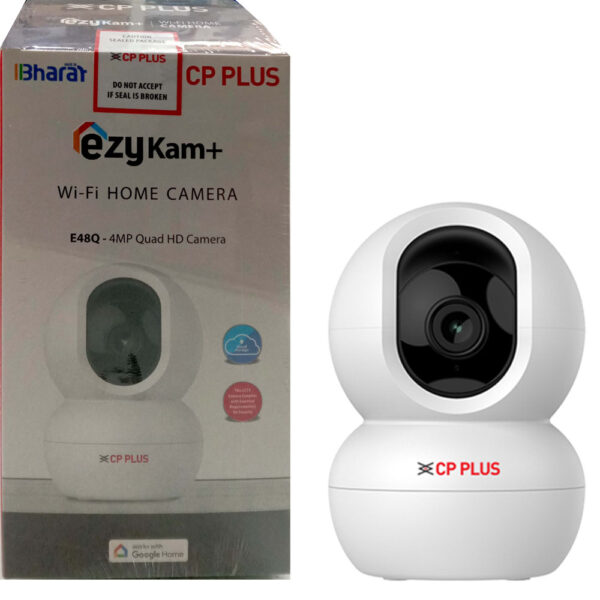
A standalone CCTV camera is a surveillance camera designed to operate without a conventional DVR or NVR. Depending on the model, it may record footage to a memory card, connect to a mobile app over Wi-Fi, or use cloud storage. This makes it a practical option for homes, small offices, shops and other locations where a straightforward security setup is preferred.
How Does a Standalone CCTV Camera Work?
A standalone camera captures video through its image sensor and stores or transmits the footage using its built-in features. Many models connect to a Wi-Fi network and let users view live footage on a smartphone. Others record directly to a microSD card, allowing video to be saved even when an internet connection is unavailable.
Some standalone cameras combine local recording with remote viewing. In these systems, the camera can continue recording to its memory card during an internet outage, while live viewing and notifications may be unavailable until the connection is restored.
Common Types of Standalone CCTV Cameras
- Wi-Fi cameras: Connect to a wireless network for remote viewing and app-based alerts.
- Memory-card cameras: Save footage locally to a microSD card, often without requiring a separate recorder.
- Battery-powered cameras: Offer flexible placement where power points are not readily available. Battery life depends on usage and settings.
- Solar-powered cameras: Use a solar panel to help recharge the battery, making them useful in suitable outdoor locations.
- 4G or SIM-enabled cameras: Use a mobile data connection where Wi-Fi is unavailable. A suitable SIM plan and reliable mobile coverage are required.
Key Features to Consider
- Video resolution: Higher resolution can make details easier to identify, but it also uses more storage and bandwidth.
- Night vision: Infrared or colour night vision helps monitor areas in low-light conditions.
- Motion detection: The camera can record or send an alert when movement is detected. Adjustable detection zones can help reduce unwanted notifications.
- Two-way audio: A built-in microphone and speaker allow communication through the camera, where supported.
- Weather protection: For outdoor installation, check the camera’s ingress protection rating and suitability for local weather conditions.
- Storage options: Check the supported memory-card capacity, cloud-storage terms and whether recording continues during an internet outage.
- Power supply: Consider whether the camera needs a nearby electrical point, batteries or a solar panel.
- App and network compatibility: Confirm that the camera works with your phone and home or office network before purchase.
Advantages of a Standalone CCTV Camera
The main advantage is a simpler installation. Since a separate recorder may not be needed, a standalone camera can be suitable for monitoring a single room, entrance, shop counter or driveway. App-based access also makes it convenient to check live footage when away from the premises.
Standalone cameras can be expanded gradually, depending on the product and its app. A user may begin with one camera and add more later. Local memory-card recording can also provide a useful recording option without relying entirely on cloud storage.
Limitations to Keep in Mind
A standalone camera may not be the right choice for every site. Storage on a memory card is limited compared with many recorder-based systems, and footage may be lost if the camera or card is damaged or stolen. Cloud recording may involve subscription fees and requires a reliable internet connection.
For larger premises or multiple cameras, a DVR or NVR system may offer centralised monitoring, longer retention and easier management. The best option depends on the number of cameras, coverage area, recording requirements and available network infrastructure.
Installation and Placement Tips
- Choose a position that covers the intended area without pointing directly at bright lights.
- Mount the camera securely and keep it within range of the Wi-Fi network or mobile signal.
- For outdoor use, protect cables and connectors from rain and ensure the mounting surface is stable.
- Set a strong, unique password and install firmware updates when available.
- Test live viewing, motion alerts and playback after installation.
- Format and check the memory card periodically, and confirm that recordings are being saved correctly.
Privacy and Responsible Use
Position cameras to monitor areas you are authorised to secure. Avoid recording private spaces, and inform staff, visitors or residents when appropriate. Use secure passwords, restrict account access and review the manufacturer’s privacy and data-storage settings.
Is a Standalone CCTV Camera Right for You?
A standalone CCTV camera can be a convenient choice when you need a simple surveillance solution for a limited area. Before choosing one, consider whether you need local or cloud recording, remote access, night vision, weather resistance and continuous recording. For larger or more demanding installations, compare standalone cameras with a recorder-based CCTV system to find the right fit.
Standalone CCTV Camera FAQs: DVR-Free Use, Internet Connectivity and Cost
- Can a CCTV camera work without DVR?
- Can I get CCTV without internet?
- What is a stand-alone CCTV camera?
- What is the cost of single CCTV camera?
- Which CCTV works without WiFi?
Can a CCTV camera work without DVR?
Yes, a CCTV camera can work without a DVR, depending on its type. A standalone IP camera may record footage to a microSD card, cloud storage or a compatible network video recorder (NVR), and many models also offer live viewing through a mobile app. However, some traditional analogue cameras need a DVR to record and manage footage. Check the camera’s storage and connectivity features before purchasing, as remote viewing usually requires an internet connection.
Can I get CCTV without internet?
Yes, you can use a standalone CCTV camera without internet if it supports local recording to a microSD card, or connect cameras to a DVR/NVR system that records footage to a hard drive. You may still be able to view recordings on a connected monitor or local network, but remote viewing, app notifications and cloud storage generally require an internet connection. Check the camera’s specifications to confirm its offline recording features, storage capacity and whether it needs Wi-Fi for setup.
What is a stand-alone CCTV camera?
A stand-alone CCTV camera is a surveillance camera that can work without a separate DVR or NVR. Depending on its features, it may record footage to a memory card, connect to a mobile app over Wi-Fi, or use cloud storage. It is often used to monitor a single area, such as a shop, office, entrance or home, and may offer features such as motion alerts, night vision and remote viewing.
What is the cost of single CCTV camera?
The cost of a single standalone CCTV camera in India typically ranges from around ₹1,000 to ₹5,000, depending on its resolution, night vision, Wi-Fi or 4G connectivity, storage options and indoor or outdoor suitability. Advanced models with features such as pan-and-tilt control, two-way audio or weather protection may cost more. Installation, memory cards and cloud-storage subscriptions may also be charged separately, so check what is included in the quoted price.
Which CCTV works without WiFi?
CCTV cameras can work without Wi-Fi if they record footage locally to a microSD card or connect to a DVR/NVR using cables. These systems can continue recording without an internet connection, though remote viewing and mobile alerts generally require internet access. For locations without Wi-Fi where remote monitoring is needed, consider a 4G CCTV camera with a SIM card and suitable mobile coverage.