Proximity Reader: A Simple and Reliable Access Control Solution
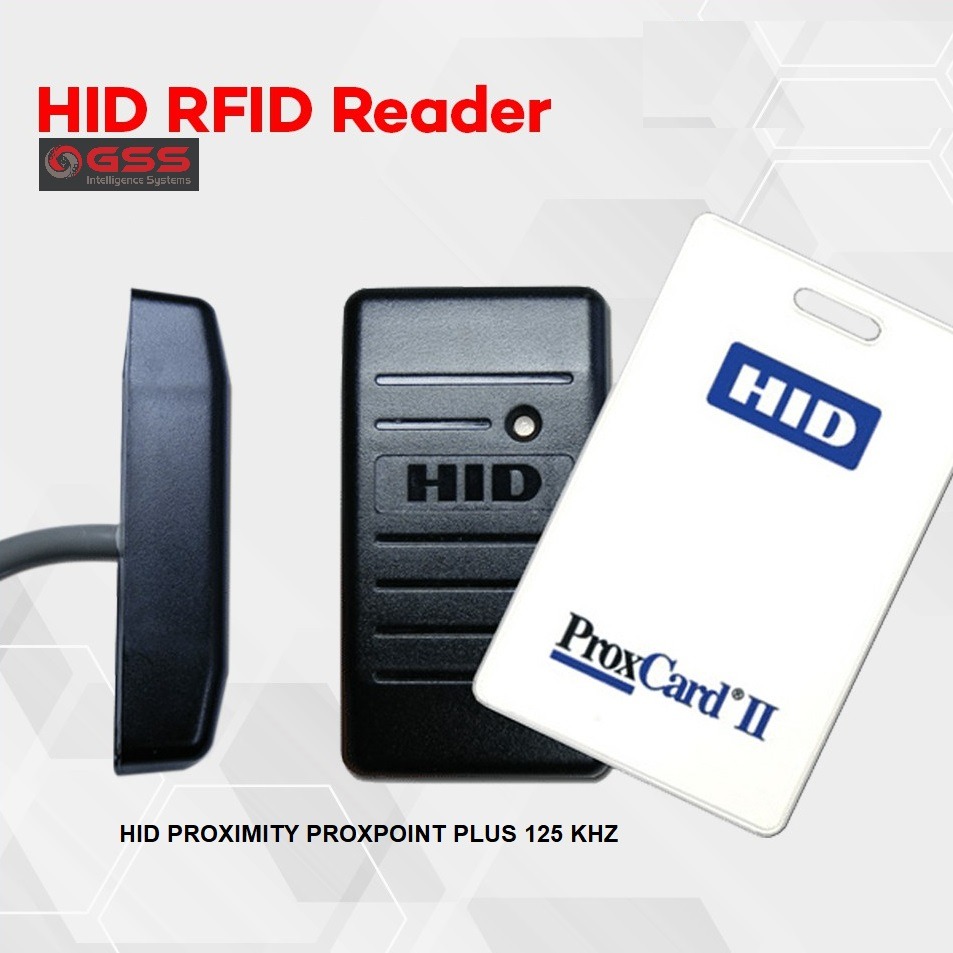
A proximity reader is an electronic device used to control access to buildings, rooms and restricted areas. It reads information from a compatible card, key fob or other credential when it is brought close to the reader. As the credential does not usually need to be inserted or swiped, entry is quick and convenient.
How does a proximity reader work?
A proximity reader communicates with a credential using radio-frequency identification (RFID) technology. When a person presents an authorised card or key fob, the reader captures its identification data and sends it to an access control panel or system. The system checks whether the credential has permission to enter. If access is approved, it activates the connected door lock or other entry mechanism.
The reader itself typically does not decide who can enter. Access permissions are generally managed through the access control system, where credentials can be added, updated or disabled.
Common types of proximity readers
- Card readers: Read credentials presented as access cards.
- Key fob readers: Work with compact fobs that can be attached to a key ring.
- Keypad and proximity readers: Combine a card or fob with a PIN for an additional verification step.
- Multi-technology readers: Support more than one credential format, which can be useful when upgrading an existing system.
Compatibility is important. Readers and credentials must use compatible technologies and formats. Some systems may also require specific settings or configuration by the installer.
Benefits of proximity readers
- Convenient entry: Users can present a card or fob without using a conventional key.
- Centralised access management: Permissions can be managed through a connected access control system.
- Quick credential changes: Lost or misplaced credentials can often be disabled without replacing a physical lock.
- Access records: Depending on the system, entry events can be recorded for review and reporting.
- Flexible deployment: Readers can be installed at doors, gates and other controlled entry points.
Where are proximity readers used?
Proximity readers are commonly used in offices, factories, warehouses, residential communities, educational institutions, healthcare facilities and commercial buildings. They can help manage access for employees, residents, visitors and contractors, according to the permissions set by the organisation.
What to consider when choosing a reader
Before selecting a proximity reader, consider the access control panel or software already in use, credential compatibility, the number of users and the type of entry point. For outdoor installations, check that the reader is suitable for the site’s weather and environmental conditions. You may also wish to consider whether keypad entry, multiple credential technologies or integration with other security systems is required.
Installation should be planned with the door hardware, locking device, power supply and access control system in mind. A qualified security-system professional can help check compatibility, configure permissions and test the full setup.
Proximity reader or contactless smart-card reader?
The terms are sometimes used broadly, but not every contactless reader offers the same features or level of security. Older proximity technologies may provide basic identification, while some smart-card systems can support stronger authentication and additional security functions. The right option depends on the site’s requirements, existing equipment and security policy. Ask the supplier to confirm the supported credential technology and system compatibility before purchasing.
Conclusion
A proximity reader offers a convenient way to manage entry without relying solely on traditional keys. When matched with compatible credentials and a well-configured access control system, it can support organised access management across a wide range of premises. Careful product selection, suitable installation and responsible credential management help ensure the system works effectively.
6 Essential Tips for Using a Proximity Card Reader
- Keep the reader clean and dry.
- Hold the card close to the reader.
- Wait for the access confirmation.
- Do not share your access card.
- Report a lost card promptly.
- Avoid placing metal objects near the reader.
Keep the reader clean and dry.
Keep the proximity reader clean and dry to help it work reliably. Wipe the surface gently with a soft, dry cloth, and avoid spraying water or cleaning products directly onto the device. For outdoor readers, check that the protective cover and seals are in good condition, especially after heavy rain. Always follow the manufacturer’s cleaning instructions and avoid using abrasive materials that could damage the reader.
Hold the card close to the reader.
For reliable access, hold your card close to the proximity reader and keep it steady for a moment until you hear a beep, see an indicator light or the door unlocks. If the reader does not respond, check that you are presenting the card correctly and that it is an authorised, compatible credential. Avoid tapping or swiping the card unless the reader is designed for that method.
Wait for the access confirmation.
Wait for the access confirmation before opening the door or moving through the entry point. After presenting your card or key fob, look for the reader’s approved signal, such as a green light, a beep or an unlocked door. If access is denied, avoid repeatedly presenting the credential; check that you are using the correct card or fob and contact the building’s security or reception team for assistance.
Do not share your access card.
Do not share your access card: Your access card is assigned to you and helps the access control system maintain an accurate record of entry. Lending it to someone else can allow unauthorised access and make it difficult to identify who entered an area. If a visitor or colleague needs entry, follow your organisation’s visitor procedure or contact an authorised person. Report a lost or stolen card promptly so it can be deactivated.
Report a lost card promptly.
If an access card is lost, report it to the building manager or security team promptly. They can deactivate the missing card to help prevent unauthorised entry and issue a replacement if required. Quick reporting also helps keep access records accurate and protects your workplace or premises.
Avoid placing metal objects near the reader.
Avoid placing metal objects near a proximity reader, as metal can interfere with the radio-frequency signal between the reader and the access card or key fob. This may result in slower or unreliable card detection. Keep metal fixtures, equipment and stored items at a suitable distance, and follow the manufacturer’s installation guidance for best performance.