Hikvision CCTV IP Cameras: Features, Benefits and Buying Guide
Hikvision CCTV IP cameras are network-based security cameras that capture video and transmit it over an internet protocol (IP) network. They are used in homes, offices, shops, warehouses, factories and other premises where clear video monitoring and flexible system management are important.
Unlike traditional analogue CCTV cameras, an IP camera processes video digitally. Depending on the model and system configuration, footage can be viewed on a computer, mobile device or network video recorder (NVR). This guide explains the main features to consider when choosing a Hikvision IP camera and planning an installation.
What is a CCTV IP camera?
An IP camera connects to a network using an Ethernet cable or, for selected models, Wi-Fi. It can send video to an NVR or other compatible recording system. Many models support Power over Ethernet (PoE), which allows power and data to travel through a single Ethernet cable when used with compatible equipment. This can make installation simpler and reduce the need for a separate power connection at each camera.
Common features of Hikvision IP cameras
- High-resolution video: Models are available in different resolutions. A higher resolution can capture more detail, but also requires more storage and network bandwidth.
- Day and night monitoring: Depending on the model, cameras may use infrared illumination or other low-light technologies to provide images in dark conditions.
- Indoor and outdoor options: Camera designs vary by use. Outdoor models should be selected for the expected weather and installation conditions; check the product’s ingress protection rating and operating specifications.
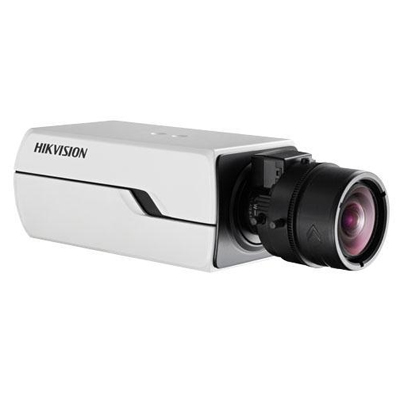
- Different camera styles: Common types include dome, turret and bullet cameras. The best choice depends on the area, mounting position and viewing direction.
- Motion and event features: Some models can detect movement or support more advanced analytics. Available functions vary, so check the exact model specifications before purchase.
- Remote viewing: Compatible systems may allow authorised users to view live video or recordings through an app or software, subject to network setup and product compatibility.
- Recording options: Footage may be stored on an NVR, a supported memory card or another compatible storage setup, depending on the camera and system.
Benefits of an IP camera system
An IP camera system can be expanded to suit different premises and monitoring needs. It can also provide detailed video, centralised recording and convenient access for authorised users. When cameras and recording equipment are properly selected and configured, the system can help monitor entrances, work areas, stockrooms, car parks and other key locations.
Network video can use significant bandwidth, particularly when several high-resolution cameras are recording at once. A well-planned system should account for network capacity, recording settings and retention requirements to help maintain reliable performance.
How to choose the right Hikvision IP camera
- Identify the area to monitor: Decide whether the camera will cover an entrance, corridor, open area, perimeter or another location.
- Consider the required level of detail: Think about what needs to be recognised in the footage, such as general activity or details at a particular distance.
- Choose the camera style: Dome, turret and bullet cameras suit different mounting locations and coverage requirements.
- Check lighting conditions: Review how the area is lit during the day and at night, including glare, shadows and backlighting.
- Confirm weather and environmental suitability: For outdoor or industrial locations, check the camera’s ratings and operating limits.
- Plan recording and storage: Consider the number of cameras, video quality, recording schedule and how long footage needs to be retained.
- Check system compatibility: Confirm that cameras, NVRs, switches, software and mobile applications are compatible with one another.
- Decide how the cameras will connect: Wired Ethernet and PoE are common choices for stable installations. Wi-Fi may be suitable in some situations, but depends on reliable wireless coverage and the camera’s supported features.
Installation and network security
Camera placement has a major effect on image quality. Install cameras to cover useful areas while avoiding unnecessary views into neighbouring properties or private spaces. Use secure mounting, protect exposed cables and test the camera’s field of view during both daytime and night-time conditions.
As IP cameras are connected to a network, they should be configured securely. Change default credentials, use strong passwords, keep firmware updated through official channels and restrict access to authorised users. Network segmentation and secure remote-access settings can also help reduce exposure. Follow applicable privacy requirements and inform people where monitoring is in use when required.
Choosing a suitable system
The right Hikvision CCTV IP camera depends on the site, lighting, coverage needs, network infrastructure and recording expectations. Checking the exact model specifications and planning the complete system—including cabling, PoE equipment, NVR capacity and storage—can help avoid compatibility or performance issues.
For guidance on selecting CCTV and surveillance equipment for your premises, contact Sonal Enterprises India with details of the areas you need to monitor and your installation requirements.
Hikvision CCTV IP Camera FAQs: Setup, Mobile Viewing, Features, Storage and Security
- What is a Hikvision CCTV IP camera, and how does it work?
- How do I connect a Hikvision IP camera to an NVR or network?
- Can I view Hikvision CCTV footage on my mobile phone?
- Do Hikvision IP cameras support night vision and motion detection?
- How much storage do I need for a Hikvision CCTV IP camera system?
- How can I reset and secure my Hikvision IP camera?
What is a Hikvision CCTV IP camera, and how does it work?
A Hikvision CCTV IP camera is a digital security camera that captures video and sends it over a network, such as a local area network or the internet. It converts images into digital data and transmits the footage to a compatible network video recorder (NVR), computer or authorised mobile device for live viewing and recording. Depending on the model and setup, it may connect through an Ethernet cable, use Power over Ethernet (PoE) for both power and data, or support Wi-Fi. Features such as night vision, motion detection and remote viewing vary by model.
How do I connect a Hikvision IP camera to an NVR or network?
To connect a Hikvision IP camera, connect it to a PoE port on a compatible NVR, or connect the camera and NVR to the same network switch or router; use a PoE switch or suitable power supply if required. Activate and configure the camera using Hikvision’s supported setup tools, then ensure its IP address is compatible with the network and does not conflict with another device. In the NVR’s camera settings, add it using plug-and-play or enter its IP address and login details manually. Use strong, unique passwords, check that the camera appears online, and consult the camera and NVR manuals if menu options differ by model.
Can I view Hikvision CCTV footage on my mobile phone?
Yes, you can view footage from a compatible Hikvision CCTV IP camera on your mobile phone using Hikvision’s supported mobile app, such as Hik-Connect, where available. The camera or recorder must be set up for remote access and connected to the internet, and you’ll need to sign in with the correct account details. App availability and features may vary by product and region; use strong passwords and keep the app and device firmware updated.
Do Hikvision IP cameras support night vision and motion detection?
Many Hikvision IP camera models support night-time monitoring using infrared (IR) or other low-light technologies, while motion detection and other event features are available on selected models. The range, image quality and detection options can vary by camera, so check the specifications of the particular model to confirm it suits your lighting and monitoring requirements.
How much storage do I need for a Hikvision CCTV IP camera system?
The storage required for a Hikvision CCTV IP camera system depends on the number of cameras, resolution, frame rate, video compression, recording schedule and how many days you want to retain footage. Continuous recording uses more storage than motion-triggered recording, while higher video quality requires more space. As a starting point, estimate storage for each camera using its recording settings and desired retention period, then add the camera requirements together. Check the specifications of your Hikvision cameras and NVR, as supported storage capacity and recording features vary by model.
How can I reset and secure my Hikvision IP camera?
To reset a Hikvision IP camera, use the reset option in its web interface or the physical reset button, if your model has one; the button procedure varies, so check the model’s manual. A factory reset usually erases network settings and other configuration, so be prepared to set the camera up again. To secure it, change the default username or password to a strong, unique password, install firmware from Hikvision’s official sources, disable unused services, restrict access to trusted users and networks, and avoid exposing the camera directly to the internet.