Electronic Eye Controlled Security System: A Smarter Approach to Protection
An electronic eye controlled security system uses cameras and electronic sensors to help monitor a property and identify activity that may require attention. Depending on the system’s design, it can detect movement, capture images or video, and send an alert to a security team or authorised user.
The term “electronic eye” is often used to describe a camera or a sensor that detects changes in its surroundings. When connected to a suitable monitoring and alarm system, these devices can support security at homes, offices, factories, shops and other premises.
How does the system work?
A typical system may include one or more cameras, motion or photoelectric sensors, a control panel, recording equipment and a communication link. When a sensor detects movement or another selected change, the system can trigger an alert, activate a recording or notify an authorised person. Some systems also allow live viewing through a monitor or compatible mobile device.
The exact response depends on the equipment and configuration. For example, a camera may record activity without triggering an alarm, while a sensor linked to an alarm panel may send an alert when a protected area is entered.
Key components
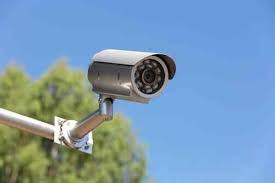
- Cameras: Capture video of selected areas. Camera types and features can be chosen to suit indoor, outdoor, day or low-light conditions.
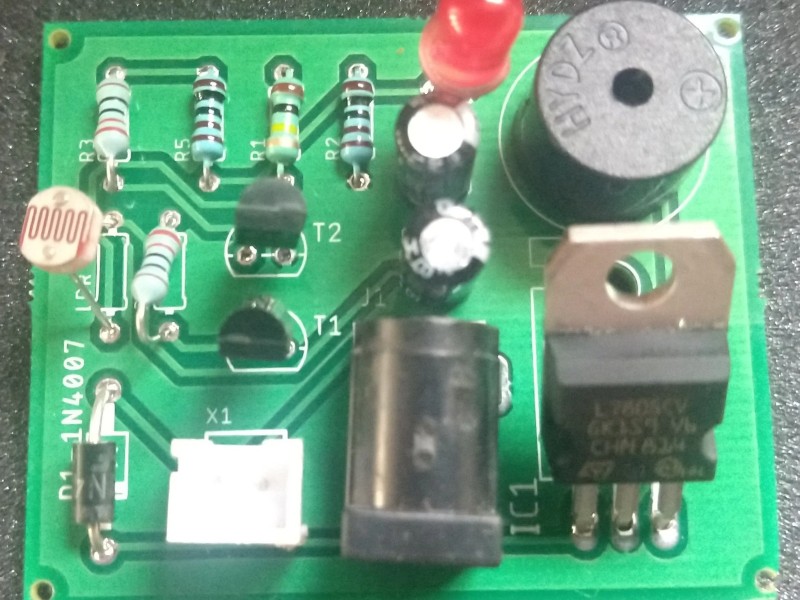
- Electronic sensors: Detect activity or changes within a defined area. The sensor type and placement affect what it can detect.
- Control panel: Coordinates connected devices and manages configured alerts or responses.
- Recording and storage: Stores footage locally or through a suitable network-based service, depending on the system.
- Notifications: Alerts authorised users or a monitoring team when a configured event occurs.
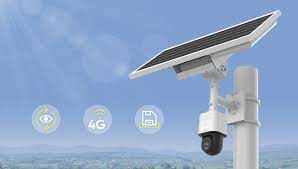
- Power and connectivity: Keep devices operating and allow communication between system components.
Benefits of electronic eye security
- Improved awareness: Helps users observe important areas and review recorded events.
- Timely alerts: Configured notifications can help authorised personnel respond to activity sooner.
- Flexible coverage: Devices can be selected and positioned for entrances, perimeters, corridors, warehouses and other areas.
- Support for investigations: Recorded footage may help establish what happened, subject to image quality, system settings and applicable rules.
- Integration options: Depending on compatibility, cameras and sensors may be integrated with alarms, access control or other security systems.
Where can it be used?
Electronic eye controlled security systems can be considered for residential buildings, commercial premises, educational institutions, healthcare facilities, industrial sites, warehouses and car parks. The requirements vary by location. A small office may need coverage of entrances and reception areas, while a larger site may require perimeter monitoring and multiple cameras connected to a central control room.
Choosing the right system
Before selecting equipment, identify the areas that need protection and the purpose of monitoring. Consider lighting conditions, the distance to be covered, indoor or outdoor use, recording duration, network availability and who will receive alerts. Camera placement should provide useful views while avoiding unnecessary monitoring of private areas.
It is also important to check how footage will be stored, who can access it, how long it will be retained and how the system will operate during a power or network interruption. A site assessment by a qualified security professional can help determine suitable devices and placement.
Responsible installation and maintenance
Security equipment works best when installed and maintained correctly. Sensors and cameras should be tested regularly, lenses kept clean, and recording and notification settings reviewed. Access credentials should be protected, and software or firmware should be updated where applicable.
Video monitoring should be carried out responsibly. Inform people where required, restrict access to recordings, and follow applicable privacy and data-protection requirements. The system should be configured to collect only the information needed for its security purpose.
Conclusion
An electronic eye controlled security system can support property protection by combining visual monitoring with sensor-based detection and alerts. The right solution depends on the site, the risks being addressed and the response required. Careful planning, responsible use and regular maintenance help ensure that the system remains useful over time.
7 Essential Tips for an Electronic Eye-Controlled Security System
- Install the sensor at entry points like doors and windows.
- Keep the sensor lens clean and free from dust.
- Position it away from direct sunlight and heat sources.
- Test the alarm and sensor regularly.
- Use a backup battery for power cuts.
- Set access codes that are hard to guess.
- Connect the system to a reliable monitoring service.
Install the sensor at entry points like doors and windows.
Install electronic eye sensors at key entry points such as doors and windows to help detect activity where someone is most likely to enter. Position each sensor according to the manufacturer’s instructions, ensuring it has a clear view and is not obstructed by curtains, furniture or other objects. Test the sensors after installation and check them regularly to confirm they are working correctly.
Keep the sensor lens clean and free from dust.
Keep the sensor lens clean and free from dust to help your electronic eye controlled security system detect activity accurately. Dust, smudges or cobwebs can obstruct the sensor and affect its performance. Gently clean the lens with a soft, dry, lint-free cloth, following the manufacturer’s instructions, and check it regularly—especially in dusty areas.
Position it away from direct sunlight and heat sources.
Position cameras and electronic eye sensors away from direct sunlight and heat sources. Strong sunlight can cause glare, washed-out images or false motion alerts, while heat from equipment, lamps or heaters may affect sensor performance. Choose a shaded location with a clear view of the area to be monitored, and test the system at different times of day to ensure reliable operation.
Test the alarm and sensor regularly.
Test the alarm and sensors regularly to make sure the electronic eye controlled security system responds as expected. Follow the manufacturer’s instructions to check that sensors detect activity, alerts reach the right people and the alarm can be heard or received. Record any faults and arrange prompt repairs, as a poorly maintained system may fail to provide timely warning when it is needed.
Use a backup battery for power cuts.
Use a backup battery to keep your electronic eye controlled security system operating during power cuts. A compatible battery can help maintain essential functions such as cameras, sensors and alerts until the mains supply returns. Check the battery’s capacity and condition regularly, and ensure it is suitable for your system. For longer outages, ask a qualified installer about backup options that meet your security requirements.
Set access codes that are hard to guess.
Choose access codes for your electronic eye controlled security system that are difficult to guess. Avoid obvious combinations such as 1234, repeated digits, birthdays or house numbers, and use a unique code for each authorised user where possible. Change default codes during installation, update codes when access needs change, and never share them more widely than necessary. These simple steps help reduce the risk of unauthorised access to your security system.
Connect the system to a reliable monitoring service.
Connect your electronic eye controlled security system to a reliable monitoring service for timely attention when an alarm or unusual activity is detected. Choose a provider with clear response procedures, dependable communication and support suited to your premises. Confirm who will receive alerts, how incidents will be verified and what action will be taken. Regularly test the connection and keep contact details up to date so alerts reach the right people.