Network Solutions: Building a Reliable and Secure Digital Foundation
A dependable network is essential for the smooth operation of businesses, institutions and public facilities. It connects computers, cameras, access control systems, servers and other devices, allowing them to share information and work together. A well-planned network solution can support day-to-day operations while making it easier to manage security, communication and future growth.
What Is a Network Solution?
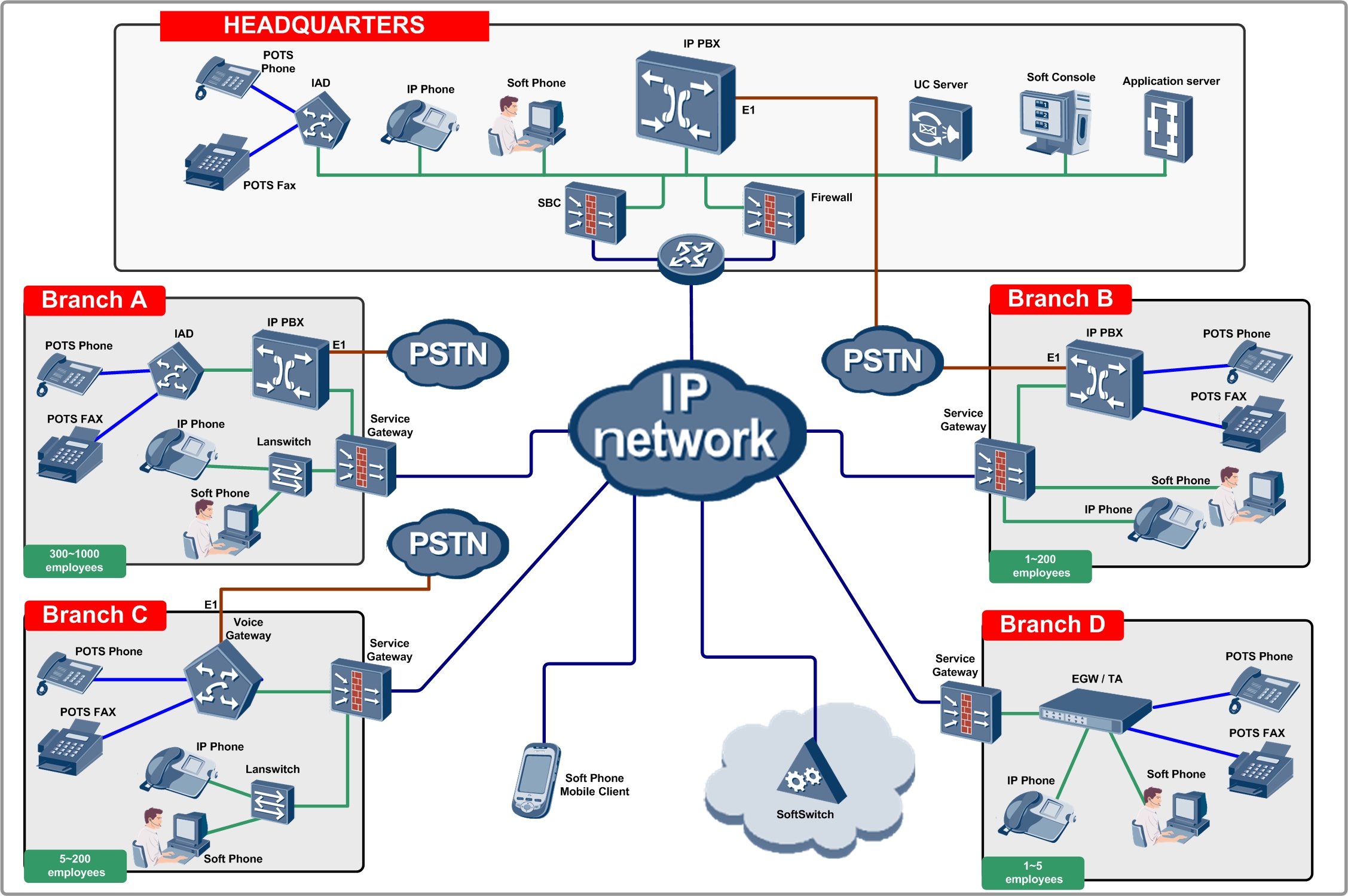
A network solution is the combination of equipment, software and services used to connect devices and manage the flow of data. It may include wired and wireless connections, network switches, routers, structured cabling, Wi-Fi access points, firewalls and network monitoring tools.
The right solution depends on the size of the premises, the number of users and devices, the applications in use and the level of security required. A small office may need a straightforward local area network (LAN), while a campus, warehouse or multi-site organisation may require a more extensive design.
Common Types of Network Solutions
- Wired networks: Use structured cabling to connect computers, servers, IP cameras and other devices. They can provide stable, high-speed connections for fixed equipment.
- Wireless networks: Use Wi-Fi access points to connect laptops, mobile devices and compatible equipment without a physical cable at every connection point.
- Local area networks (LANs): Connect devices within a limited area, such as an office, school, factory or building.
- Wide area networks (WANs): Link networks across multiple sites, helping teams and systems communicate between locations.
- Network security solutions: Help protect connected devices and data through measures such as firewalls, access controls, secure configurations and monitoring.
- Video surveillance networks: Connect IP cameras, recording equipment and monitoring stations so that authorised users can access video across the network.
Why a Well-Designed Network Matters
A network should do more than provide an internet connection. A suitable design helps devices communicate reliably and gives an organisation a strong foundation for its digital systems.
- Improved connectivity: Users and devices can access the resources they need across the premises.
- Support for security systems: IP CCTV, access control and other connected systems can share information over the network.
- Better performance: Appropriate equipment and configuration can help reduce congestion and connection interruptions.
- Centralised management: Administrators can oversee network devices and services from a structured setup.
- Room to grow: A scalable design can accommodate additional users, cameras, access points and applications as requirements change.
- Greater visibility: Network monitoring can help identify unusual activity, faults or performance issues.
Network Solutions for CCTV and Security Systems
Modern security systems often depend on network connectivity. IP cameras transmit video over a network, while access control systems may communicate with central management software. Security operators may also need to view information from multiple buildings or sites.
When planning a network for security equipment, it is important to consider bandwidth, coverage, cable routes, power requirements and access permissions. Video streams can use significant network capacity, particularly when many cameras operate at high resolution. Separating security devices from general office traffic, where appropriate, can also help with network management and security.
Key Considerations When Planning a Network
- Assess current and future needs: Identify users, devices, applications and expected expansion.
- Plan coverage: Consider the building layout, construction materials and areas that require wired or wireless connectivity.
- Select suitable equipment: Routers, switches, cabling and access points should match the required capacity and environment.
- Prioritise security: Use strong passwords, appropriate access controls, secure configurations and regular updates.
- Consider reliability: Identify critical systems and plan for maintenance and recovery in the event of equipment or connection failure.
- Allow for monitoring: Regular checks can help detect faults and maintain performance.
Choosing a Network Solution Provider
Every site has different requirements, so network planning should begin with a clear assessment of the premises and its operational needs. A professional provider can help evaluate connectivity requirements, recommend suitable equipment, plan installation and support integration with systems such as CCTV, access control and communication equipment.
It is also useful to ask about documentation, testing, handover and ongoing support. Clear network documentation can make future troubleshooting and upgrades easier.
Conclusion
A reliable network helps people, devices and security systems work together. By considering performance, coverage, security and future growth from the outset, organisations can build a network that supports daily operations and evolving technology needs. Whether the requirement is a wired office network, site-wide Wi-Fi or connectivity for IP surveillance, careful planning is key to achieving a dependable solution.
Network Solutions FAQs: Company Overview, CEO, Services and Comparison with GoDaddy
- Is Network Solutions a real company?
- Who is CEO of Network Solutions?
- What kind of company is Network Solutions?
- Which is better, GoDaddy or Network Solutions?
- What are the examples of Network Solutions?
- What is the Network Solutions?
Is Network Solutions a real company?
Yes, Network Solutions is a real company, but the name may refer to different businesses or service providers in different locations. If you are considering a company using this name, check its official website, business registration details, contact information and customer reviews before making a decision. For network installation or support, confirm that the provider’s services match your requirements and ask for a clear quotation.
Who is CEO of Network Solutions?
If you mean Network Solutions, the US-based domain registrar and web hosting provider, it is part of Newfold Digital. Newfold Digital’s CEO is Sharon Rowlands. The name “Network Solutions” is also used by other businesses, so the answer may differ depending on which company you mean.
What kind of company is Network Solutions?
Network Solutions is an internet services company best known for domain name registration and website hosting. It also offers services such as website creation, business email and online marketing to help individuals and businesses establish and manage their online presence.
Which is better, GoDaddy or Network Solutions?
GoDaddy and Network Solutions both offer domain registration, web hosting and related services, but the better choice depends on your requirements. GoDaddy is often considered for its broad range of products and user-friendly tools, while Network Solutions may suit customers looking for domain and business services in one place. Compare the current pricing, renewal costs, features, customer support and terms for the specific service you need before deciding, as offerings can change over time.
What are the examples of Network Solutions?
Examples of network solutions include wired LANs that connect computers, servers and printers; Wi-Fi networks for wireless access; WANs that link offices across different locations; and VPNs that provide secure remote connectivity. Network solutions may also include structured cabling, routers, switches, firewalls, network monitoring tools, and dedicated networks for IP CCTV, access control and other security systems. The right combination depends on the site’s requirements, number of users and devices, security needs and plans for future expansion.
What is the Network Solutions?
Network solutions are the hardware, software and services used to connect devices and enable them to share data and resources. They may include wired and wireless networks, routers, switches, Wi-Fi access points, structured cabling, firewalls and network monitoring tools. The right network solution depends on the size of the premises, the number of users and devices, and the organisation’s connectivity, security and performance requirements.