Samsung Surveillance Cameras: Features, Benefits and Buying Guide
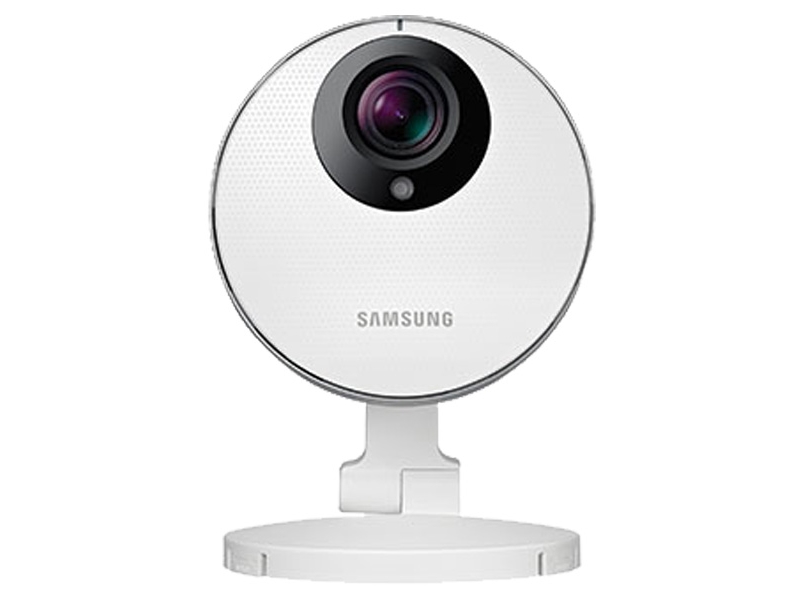
Samsung surveillance cameras have been used in homes, offices, shops and industrial premises for monitoring and security. The name is often associated with reliable imaging and a broad range of CCTV products, including cameras designed for indoor, outdoor and specialist applications.
When researching these cameras, it is useful to distinguish between older Samsung-branded security products and current products from other Samsung businesses. Samsung Techwin’s security business was acquired by Hanwha Group in 2014 and later became Hanwha Vision. As a result, Samsung-branded CCTV equipment is generally found in legacy installations, while current product ranges and support may be listed under Hanwha Vision. Availability and compatibility can vary by model.
Types of Samsung Surveillance Cameras
Samsung security cameras have been available in several formats. The right option depends on the area to be monitored, lighting conditions, installation requirements and the recording system in use.
- Bullet cameras: Commonly installed outdoors, these cameras are easy to position towards entrances, driveways and perimeters.
- Dome cameras: Their compact design suits shops, offices and other indoor spaces. Some models are also suitable for outdoor use.
- PTZ cameras: Pan-tilt-zoom models can move across a scene and zoom in on selected areas. Their capabilities vary by model.
- Network cameras: IP cameras transmit video over a network and may connect to a compatible network video recorder (NVR).
- Analogue cameras: Some older models work with analogue or hybrid recording systems. Check the camera’s output and recorder compatibility before purchase or replacement.
Common Features to Check
Features differ considerably between models, so the product datasheet should always be checked. Depending on the camera, useful specifications may include:
- Image resolution: Higher resolution can capture more detail, but it also requires more storage and network capacity.
- Day and night performance: Infrared illumination or other low-light features may help record in darkness. Results depend on the scene and installation.
- Wide dynamic range: This can help balance bright and dark areas, such as an entrance with strong sunlight behind it.
- Weather protection: For outdoor use, look for an appropriate ingress protection rating and a suitable operating temperature range.
- Video compression: Supported compression formats affect bandwidth and storage requirements.
- Motion detection and analytics: Some cameras offer event detection or video analytics, while others require these functions to be handled by a recorder or software.
- Power and connectivity: Confirm whether the camera uses Power over Ethernet (PoE), a separate power supply, analogue cabling or another connection method.
Benefits of a Suitable CCTV System
A well-planned surveillance system can help monitor important areas, review incidents and support day-to-day security operations. Network cameras may allow authorised users to view live or recorded video remotely, depending on the camera, recorder, network setup and software. CCTV can also help businesses understand access patterns and manage operations, but it should be installed with appropriate privacy safeguards.
The camera alone does not determine the quality of a surveillance system. Lens choice, camera placement, lighting, cabling, recorder settings and ongoing maintenance all affect the final result.
How to Choose a Samsung Camera
Before choosing a Samsung-branded camera, identify the exact model number and check whether it meets the requirements of the site. Consider the following:
- Define the purpose: Decide whether the camera is intended to identify faces, monitor activity, cover a wide area or observe a specific entrance.
- Check the environment: Consider lighting, weather exposure, dust, vibration and the distance between the camera and the area of interest.
- Confirm system compatibility: Verify that the camera works with the existing DVR, NVR, video management software and network. ONVIF support, where present, does not guarantee that every feature will work across different manufacturers.
- Review availability and support: For older Samsung models, check the availability of firmware, accessories, replacement parts and technical support before committing to an installation.
- Plan storage and bandwidth: Resolution, frame rate, compression and recording duration all influence the storage and network capacity required.
- Secure the system: Change default passwords, use strong unique credentials, update firmware where available and restrict remote access to authorised users.
Installation and Privacy Considerations
Position cameras to capture the required area while avoiding unnecessary recording of neighbouring homes, private spaces or public areas. Use clear signage where appropriate and manage recordings responsibly. Retention periods and access to footage should follow the organisation’s policies and applicable Indian laws and regulations.
Professional installation can help ensure that cameras are securely mounted, correctly focused and configured for the site. It can also help identify blind spots, reduce glare and confirm that recording equipment and network settings are suitable.
Conclusion
Samsung surveillance cameras may be a practical choice for extending or maintaining an existing CCTV installation, particularly when the model is compatible with the current recording system. However, many Samsung-branded security products are older models, so buyers should verify the precise specifications, product condition, firmware availability and support arrangements before making a decision. A careful assessment of the site and the complete CCTV system will help ensure that the selected camera meets its intended purpose.
6 Key Benefits of Samsung Surveillance Cameras for Homes and Businesses
- Wide range of camera styles for different settings.
- Options for indoor and outdoor monitoring.
- Some models offer clear, detailed video.
- Night-vision features are available on select models.
- Can integrate with compatible CCTV systems.
- Useful for monitoring homes and business premises.
5 Drawbacks of Samsung Surveillance Cameras to Consider Before Buying
- Many Samsung-branded models are discontinued.
- Replacement parts may be difficult to find.
- Compatibility with newer recorders can vary.
- Firmware and support may be limited for older models.
- Advanced features differ across models.
Wide range of camera styles for different settings.
Samsung surveillance cameras are available in a wide range of styles to suit different settings and security needs. Bullet cameras can be ideal for monitoring outdoor areas such as entrances and driveways, while discreet dome cameras may fit neatly into shops, offices and other indoor spaces. For larger areas that need flexible coverage, PTZ cameras can pan, tilt and zoom to focus on different parts of a scene. This variety makes it easier to choose a camera design that complements the location and its monitoring requirements.
Options for indoor and outdoor monitoring.
Samsung surveillance cameras offer options for both indoor and outdoor monitoring, making it easier to plan coverage across different areas of a home or business. Indoor models can help monitor spaces such as reception areas, shops and corridors, while suitably rated outdoor cameras can be used to oversee entrances, car parks and perimeters. When choosing a camera, check its specifications, weather-protection rating and compatibility with the existing CCTV system to ensure it is suitable for the intended location.
Some models offer clear, detailed video.
Some Samsung surveillance camera models offer clear, detailed video, making it easier to observe activity and review recorded footage. This can help users see important details in areas such as entrances, corridors and shop floors. Actual image quality depends on the model’s resolution, lighting, lens and installation, so it is best to check the specifications for the camera that suits your requirements.
Night-vision features are available on select models.
Selected Samsung surveillance camera models include night-vision features to help capture footage in low-light conditions and after dark. This can support monitoring of entrances, corridors and outdoor areas when natural lighting is limited. Night-time performance varies by model and installation, so check the camera’s specifications and ensure it is positioned appropriately for the area being monitored.
Can integrate with compatible CCTV systems.
Samsung surveillance cameras can integrate with compatible CCTV systems, making them a practical option for expanding or upgrading an existing setup. Depending on the camera model and recorder, they may work with compatible DVRs, NVRs or video management software, allowing users to manage live viewing and recordings through a unified system. Check the model’s connections, protocols and specifications before installation, as compatibility and available features can vary.
Useful for monitoring homes and business premises.
Samsung surveillance cameras can be useful for monitoring both homes and business premises, helping users keep an eye on entrances, common areas, stockrooms and other important spaces. Depending on the model and system setup, footage may be viewed live or reviewed later, which can support everyday security and help clarify incidents. Camera placement should be planned carefully to cover relevant areas while respecting privacy.
Many Samsung-branded models are discontinued.
Many Samsung-branded surveillance camera models have been discontinued, which can make it difficult to find new units, compatible accessories or replacement parts. Buyers may also face limited firmware updates and technical support, particularly for older models. Before adding one to an existing CCTV system, check the camera’s condition, compatibility with the recorder and availability of ongoing support; for a new installation, consider whether a currently supported model would be a more practical choice.
Replacement parts may be difficult to find.
Replacement parts for Samsung surveillance cameras may be difficult to find, particularly for older or discontinued models. Components such as power adapters, housings, mounts and compatible accessories may no longer be readily available, which can make repairs slower and more expensive. Before buying or maintaining a camera, check whether the required parts and technical support are still available, and confirm that any substitute is compatible with the model and existing CCTV system.
Compatibility with newer recorders can vary.
Compatibility with newer recorders can vary when using Samsung surveillance cameras, particularly older models. Differences in video formats, connection types, firmware and supported features may prevent a camera from working fully—or at all—with a newer DVR or NVR. Before upgrading or replacing equipment, check the camera’s exact model specifications and confirm compatibility with the recorder, including any required settings or firmware updates.
Firmware and support may be limited for older models.
One drawback of older Samsung surveillance cameras is that firmware updates and technical support may be limited or unavailable. This can make it harder to address security vulnerabilities, resolve compatibility issues or find replacement parts. Before buying or continuing to use an older model, check whether the required firmware, documentation and support are still available, and consider whether the camera works securely with your current CCTV system.
Advanced features differ across models.
Advanced features can vary considerably across Samsung surveillance camera models. Functions such as night vision, motion detection, wide dynamic range, video analytics and remote viewing may be available only on selected models, while older cameras may not support newer capabilities. It is therefore important to check the exact model specifications and compatibility with the existing recorder or software before purchasing, as two cameras from the same brand may offer very different features.