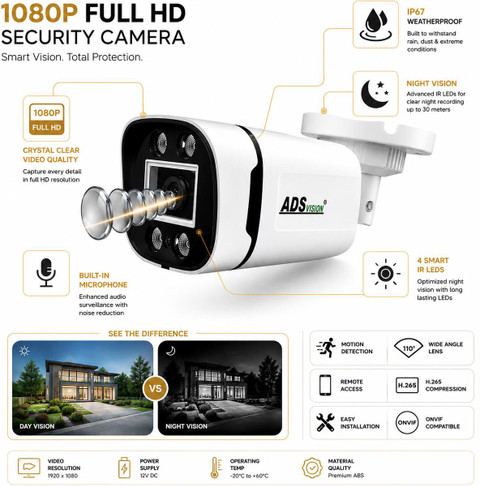
Wireless Camera with DVR: A Practical Guide
A wireless camera with DVR can help monitor homes, shops, offices, warehouses and other premises without running video cables from every camera to the recording unit. Before choosing a system, however, it is important to understand how wireless cameras work and whether they are compatible with a DVR.
What Is a Wireless Camera with DVR?
A wireless camera captures video and sends it to a recording device over a wireless connection, usually Wi-Fi or a dedicated radio link. A DVR (Digital Video Recorder) stores and manages the footage so it can be viewed live or played back later.
The word “wireless” generally refers to the video connection. Most cameras still need a power source, unless they are battery-operated or use a suitable solar power arrangement. Some systems also require cables for power, network connectivity or other functions.
Is a DVR Suitable for Every Wireless Camera?
No. Compatibility depends on the type of camera and recorder:
- Traditional DVR systems: Usually work with analogue or HD-over-coaxial cameras. These cameras typically connect to the DVR using video cables, so they are not fully wireless.
- Wireless camera kits: Some kits use a wireless receiver connected to a compatible DVR or recording hub. Check that the camera, receiver and recorder are designed to work together.
- Wi-Fi IP cameras: These send digital video over a network. They commonly record to an NVR (Network Video Recorder), a memory card or approved software. Some hybrid DVRs support selected IP cameras, but compatibility should be confirmed before purchase.
In many cases, an NVR is the more suitable recorder for Wi-Fi or other IP cameras. If a DVR is specifically required, check its supported camera types, resolution, network protocols and available IP channels.
Benefits of a Wireless Camera System
- Less video cabling: Wireless transmission can reduce the need to run video cables across a property.
- Flexible placement: Cameras may be easier to position or relocate, provided they remain within reliable wireless range and have power.
- Centralised recording: A compatible recorder can keep footage in one place for review and management.
- Remote viewing: Many systems provide mobile or computer access, depending on the recorder, network setup and manufacturer’s app.
- Expandable options: Some systems allow additional cameras, subject to the recorder’s channel limit and network capacity.
Key Features to Consider
Camera Resolution and Image Quality
Choose a resolution suited to the area being monitored. A general overview of a room may need less detail than an entrance where identifying faces or number plates is important. Image quality can also be affected by lighting, distance, lens choice and camera placement.
Night Vision and Low-Light Performance
For monitoring after dark, check the camera’s infrared or low-light capability. Consider whether the area has additional lighting, as this can affect the clarity of night-time footage.
Wireless Range and Signal Strength
Walls, metal structures, floors and other electronic devices can weaken a wireless signal. Check the stated range and, where possible, test the connection at the planned camera locations. A stable connection is essential for dependable recording.
Storage and Recording Options
Check the recorder’s storage capacity, the number of supported cameras and the available recording modes. Continuous recording uses more storage than motion-based recording. Retention time depends on factors such as camera resolution, frame rate, compression, recording schedule and hard-drive capacity.
Power Requirements
Confirm how each camera receives power. A wireless video link does not necessarily mean the camera is battery-powered. Plan for nearby power outlets, weatherproof connections or other suitable power arrangements.
Weather Protection
For outdoor use, choose cameras rated for the expected weather and installation conditions. Check the product’s ingress protection rating and follow the manufacturer’s installation guidance.
Security and Privacy
Use strong, unique passwords, update device firmware and secure the Wi-Fi network. Limit access to the people who need it. Position cameras responsibly and comply with applicable privacy requirements, especially when recording areas beyond your property.
Installation and Setup Tips
- Plan camera locations: Identify entrances, reception areas, stockrooms, driveways and other locations that need monitoring.
- Check wireless coverage: Test the signal at each proposed location before permanently mounting the cameras.
- Confirm compatibility: Match the camera with the DVR, receiver or NVR. Do not assume that all wireless cameras work with all recorders.
- Set up recording: Choose continuous, scheduled or motion-based recording according to your needs.
- Test playback and remote access: Confirm that footage is recording correctly and can be retrieved when required.
- Review the system regularly: Check camera views, storage capacity, power connections and software updates.
Wireless Camera with DVR or NVR?
The right recorder depends on the camera technology. A DVR is generally associated with analogue or HD-over-coaxial cameras, while an NVR is designed for network cameras, including many Wi-Fi models. Hybrid recorders may support both types, but their capabilities vary.
Before buying, make a list of the cameras you plan to use and confirm the recorder’s compatibility in writing. Also check whether remote viewing, motion alerts and cloud features require an internet connection, subscription or additional configuration.
Frequently Asked Questions
Can a wireless camera record without the internet?
Some systems can record locally to a compatible recorder or memory card without internet access. Internet connectivity is usually needed for remote viewing from outside the premises, but the exact requirements depend on the system.
Does a wireless camera need electricity?
Most wireless cameras require power. Some use rechargeable batteries, but battery life depends on usage and environmental conditions. Check the manufacturer’s specifications before installation.
Can I connect a Wi-Fi camera to an existing DVR?
Possibly, but only if the DVR supports the camera’s connection method and protocol. Many standard DVRs do not directly support Wi-Fi cameras. A compatible hybrid DVR, NVR or manufacturer-approved receiver may be needed.
How many cameras can one recorder support?
This depends on the recorder’s channel capacity and the camera connections it supports. Check the specifications and allow for future expansion if additional cameras may be required.
Conclusion
A wireless camera system can simplify installation and provide flexible monitoring, while a DVR can offer centralised recording when it is compatible with the cameras. The most important step is to match the camera technology to the recorder: many Wi-Fi IP cameras are designed for an NVR rather than a conventional DVR. Check compatibility, signal coverage, power requirements, storage and security features before selecting a system.
9 Benefits of a Wireless Camera System with DVR
- Reduces the need for video cables.
- Offers flexible camera placement.
- Records footage for later review.
- Supports live monitoring.
- May enable remote viewing.
- Helps monitor multiple areas.
- Can provide night-time surveillance.
- Motion recording can save storage.
- Suitable for homes and businesses.
Wireless Cameras with DVR: Signal Interference, Power Requirements and Compatibility Issues
- Wireless signals can be disrupted by walls or interference.
- Cameras still need power, even without video cables.
- Not all wireless cameras are compatible with DVRs.
Reduces the need for video cables.
One of the key advantages of a wireless camera with DVR is that it reduces the need to run video cables between each camera and the recording unit. This can make installation simpler and neater, particularly in existing buildings or locations where cable routing is difficult. Cameras still need a suitable power source, and reliable wireless coverage is essential for consistent video transmission.
Offers flexible camera placement.
A wireless camera with DVR offers flexible camera placement, as it does not need a video cable running from each camera to the recorder. This makes it easier to position cameras in suitable locations, such as entrances, corridors, shops or outdoor areas, and to adjust their placement when monitoring needs change. Before installation, check that each camera has a reliable wireless signal and a suitable power source.
Records footage for later review.
A wireless camera with DVR records footage for later review, helping you check what happened even when you were not monitoring the live feed. Depending on the system settings and available storage, footage can be recorded continuously or when motion is detected, then searched and replayed as needed. This can be useful for reviewing incidents, checking activity around your premises and keeping a record for reference.
Supports live monitoring.
Supports Live Monitoring
A wireless camera with DVR lets authorised users view live camera feeds on a connected monitor, computer or compatible mobile device. This makes it easier to keep an eye on entrances, work areas or other important locations in real time, whether on-site or remotely, depending on the system and internet connection. Live monitoring can help users respond promptly to unusual activity and check that operations are running as expected.
May enable remote viewing.
A wireless camera with a compatible DVR may let you view live footage or recorded video remotely using a smartphone, tablet or computer. This can help you check on your home, shop or workplace when you are away. Remote viewing generally requires an internet connection and the recorder to be configured securely; availability and features vary by system.
Helps monitor multiple areas.
A wireless camera system with a compatible DVR can help monitor multiple areas of a home, office, shop or warehouse from one central location. Cameras can be placed at entrances, corridors, reception areas and storage spaces, while the DVR brings their footage together for live viewing and playback. This makes it easier to keep an eye on different parts of the premises and review recordings when needed.
Can provide night-time surveillance.
A wireless camera with DVR can provide night-time surveillance, helping you monitor your property even after dark. Depending on the camera model, infrared night vision or low-light technology can capture footage in dim conditions, while the DVR stores recordings for later review. For clearer images, choose a camera suited to the area’s lighting and install it where its view is not blocked.
Motion recording can save storage.
Motion-based recording can help save storage space in a wireless camera with DVR system. Instead of recording continuously, the camera records footage when it detects movement, reducing unnecessary video from quiet periods. This can help extend the time footage remains available on the DVR, although storage needs will vary depending on camera resolution, motion sensitivity, activity levels and recording settings.
Suitable for homes and businesses.
A wireless camera with DVR is suitable for both homes and businesses, offering flexible monitoring for spaces of different sizes. At home, it can help keep an eye on entrances, living areas and driveways, while businesses can use it to monitor offices, shops, warehouses and work areas. With footage stored on a compatible recorder, users can review events when needed and manage security from a central location. Camera placement and recording settings can be tailored to the needs of each property.
Wireless signals can be disrupted by walls or interference.
One limitation of a wireless camera with DVR is that the video signal can be weakened or disrupted by walls, floors, metal structures and interference from nearby electronic devices or Wi-Fi networks. This may cause lag, reduced image quality or temporary signal loss, particularly when a camera is installed far from the receiver. Before installation, check signal strength at each camera location and position the equipment to maintain a stable connection.
Cameras still need power, even without video cables.
Although wireless cameras do not need video cables, most still require a reliable power supply. This may mean installing them near a power socket or running separate power cables, which can limit where they are placed and add to installation work. Battery-powered models can offer more flexibility, but they need regular charging or battery replacement.
Not all wireless cameras are compatible with DVRs.
Not all wireless cameras are compatible with DVRs. Wireless cameras use different connection methods and video formats, while many DVRs are designed for specific camera types. As a result, a camera may not connect to the recorder or provide all its features. Before purchasing, check the DVR’s supported camera models, connection protocols and resolution, or consider a compatible NVR for IP cameras.