Solar-Powered Surveillance Cameras: A Practical Guide
Solar-powered surveillance cameras offer a flexible way to monitor locations where access to mains electricity is limited, costly or inconvenient. By using a solar panel to charge an onboard battery, these cameras can provide video security for sites such as farms, construction areas, remote facilities, car parks and perimeter boundaries.
However, “solar-powered” does not always mean completely maintenance-free or independent of other services. Camera performance depends on sunlight, battery capacity, network coverage and the camera’s power consumption. Understanding these factors can help you choose a system that suits your site.
How do solar-powered surveillance cameras work?
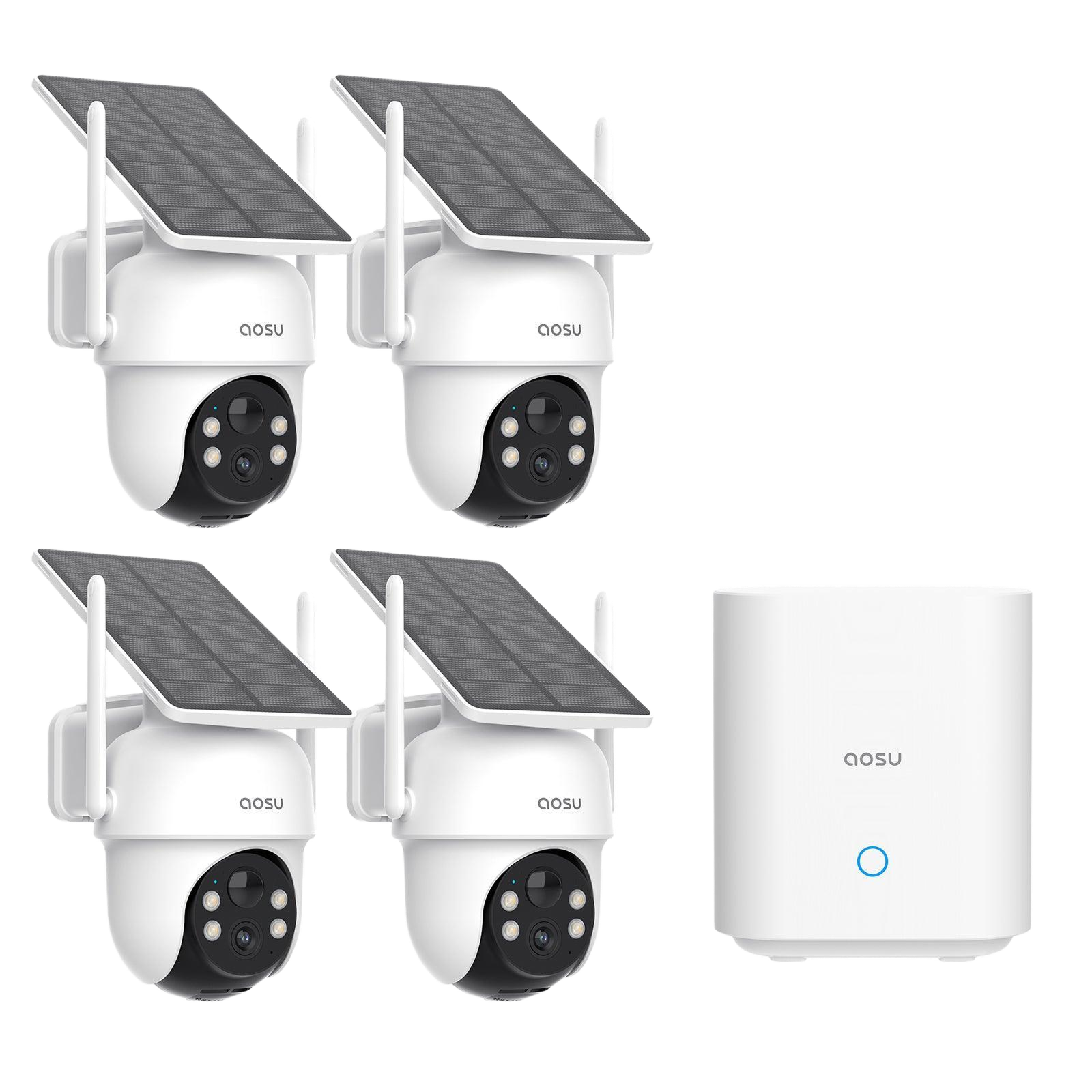
A typical system includes a surveillance camera, solar panel, rechargeable battery and a charge controller. The panel converts sunlight into electricity, which is stored in the battery for use when sunlight is unavailable, such as overnight or during cloudy weather.
Depending on the model, video may be transmitted over Wi-Fi, a mobile network such as 4G or 5G, or another communications link. Some cameras record footage locally on a memory card, while others send video or alerts to a network video recorder (NVR) or cloud service. Solar power supplies the camera with energy; it does not by itself provide an internet connection or video storage.
Key benefits
- Useful in remote locations: Solar cameras can be installed where extending electrical wiring is difficult or expensive.
- Flexible installation: A camera and panel can often be positioned without extensive cabling, subject to the system’s requirements.
- Reduced dependence on mains power: The battery can keep the camera running when sunlight is unavailable, provided it has been sized for the site’s conditions.
- Support for temporary deployments: Portable systems may be suitable for construction projects, events or short-term monitoring.
- Potentially lower cabling costs: In suitable locations, avoiding long power runs can simplify installation.
Where can they be used?
Solar-powered surveillance cameras may be considered for agricultural land, warehouses, construction sites, utility infrastructure, remote roads, gates, boundary areas and temporary work sites. They can also support monitoring at locations where trenching or installing a permanent power supply would disrupt operations.
Before installation, assess what needs to be monitored. A camera watching a gate may have different requirements from one covering a wide field or a long boundary. The viewing distance, lighting conditions, movement in the scene and the need for live viewing all affect the choice of equipment.
What to consider when selecting a system
Solar panel and battery capacity
The panel and battery should be matched to the camera’s energy use and expected sunlight. Features such as continuous recording, frequent live viewing, infrared illumination, pan-tilt-zoom (PTZ) movement and repeated alerts can increase power consumption. Ask the supplier how the system is expected to perform during periods of low sunlight, and whether additional battery or panel capacity is available.
Camera features
Choose the camera based on the area and the type of monitoring required. Consider image resolution, night vision, field of view, weather resistance, motion detection and whether PTZ control is needed. A wider field of view covers more area, while optical zoom can help identify details at a distance.
Connectivity
Check whether the site has reliable Wi-Fi or mobile-network coverage. A cellular camera may require a SIM card and data plan, while a Wi-Fi camera needs a suitable wireless network. If coverage is poor, a separate network solution may be required. Confirm how the camera behaves if its connection is interrupted and whether it continues recording locally.
Recording and alerts
Decide whether footage should be stored on a memory card, NVR or cloud platform. Check the recording period, storage capacity, access controls and process for retrieving footage. Motion-based recording can reduce storage and power use, but detection settings should be tested to minimise missed events and unnecessary notifications.
Installation position
The solar panel needs access to sunlight and should not be shaded by trees, walls or nearby structures. The camera should be mounted at a suitable height and angle, with a clear view of the intended area. Consider cable protection, secure mounting and access for maintenance. A site survey can help identify obstructions, coverage gaps and connectivity issues before installation.
Limitations to keep in mind
Solar-powered cameras are not suitable for every location. Long periods of poor weather, shade or heavy camera activity can reduce battery charge. Network interruptions may affect live viewing and remote alerts, although local recording may continue if the camera supports it. Batteries also have a limited service life and may need replacement over time.
For critical sites, consider backup options such as a larger battery, additional solar capacity, local recording or a secondary power source. The right arrangement depends on the site’s security requirements and the consequences of a camera going offline.
Installation and maintenance tips
- Position the panel where it receives as much direct sunlight as practical.
- Keep the panel clean and inspect it periodically for dust, leaves or other obstructions.
- Test camera coverage, night-time images, motion detection and remote access after installation.
- Check battery condition, mounting hardware, weather seals and cable connections as recommended by the manufacturer.
- Review recording and alert settings regularly to ensure they remain appropriate for the site.
- Use strong passwords, restrict account access and keep device software updated.
Privacy and responsible use
Surveillance cameras should be installed and operated responsibly. Aim cameras at the property or area being monitored and avoid capturing neighbouring premises or private spaces unnecessarily. Where required, display clear notices and follow applicable privacy and data-protection requirements. Access to recordings should be limited to authorised people and retained only for an appropriate period.
Is a solar-powered surveillance camera right for your site?
A solar-powered camera can be a practical choice when reliable monitoring is needed in a location without convenient mains power. The best results come from matching the panel, battery, camera, connectivity and recording method to the site’s conditions—not choosing a camera on its solar rating alone.
Start with a site assessment: identify the area to monitor, available sunlight, network coverage, recording needs and expected maintenance. This will help determine whether a standalone solar camera or a broader surveillance solution is the better fit.
Solar-Powered Surveillance Cameras: 5 Frequently Asked Questions
- How do solar-powered surveillance cameras work?
- Can solar-powered surveillance cameras operate at night or during cloudy weather?
- Do solar-powered surveillance cameras need Wi-Fi or a mobile network?
- How long does the battery last, and how often does it need charging or replacement?
- What should I consider when choosing and installing a solar-powered surveillance camera?
How do solar-powered surveillance cameras work?
Solar-powered surveillance cameras use a solar panel to convert sunlight into electricity, which charges a rechargeable battery that powers the camera. The stored energy allows the camera to operate at night and during periods of low sunlight, depending on the battery capacity and weather conditions. Footage may be saved to a memory card, recorder or cloud service, while live viewing and alerts require a suitable Wi-Fi or mobile-network connection.
Can solar-powered surveillance cameras operate at night or during cloudy weather?
Yes. Solar-powered surveillance cameras can operate at night and during cloudy weather by drawing power from their rechargeable battery, which stores energy collected by the solar panel. However, prolonged cloudy periods can reduce charging, so performance depends on battery capacity, sunlight exposure and the camera’s power use. Choose a system sized for local conditions and check that it can provide enough backup power for the expected number of low-sunlight days.
Do solar-powered surveillance cameras need Wi-Fi or a mobile network?
Solar power keeps the camera running, but it does not provide an internet connection. Wi-Fi or a mobile network is needed for features such as remote live viewing, app alerts and cloud storage. Some cameras can record locally to a memory card without a network, but footage may need to be retrieved in person. For locations without Wi-Fi, a cellular model with a compatible SIM and data plan may be suitable, provided mobile coverage is available.
How long does the battery last, and how often does it need charging or replacement?
Battery life depends on its capacity, camera settings, usage and local weather. With a correctly sized solar panel and adequate sunlight, the battery is recharged automatically, so routine manual charging is usually not needed. Extended cloudy periods, shade, frequent alerts or continuous recording can reduce charge and may require a larger panel or occasional manual charging. Rechargeable batteries commonly need replacement after a few years, but the exact lifespan varies by battery type, temperature and usage; check the manufacturer’s specifications and replace the battery if it no longer holds charge reliably.
What should I consider when choosing and installing a solar-powered surveillance camera?
When choosing and installing a solar-powered surveillance camera, consider the amount of sunlight available at the site, the solar panel and battery capacity, and the camera’s power needs—especially if it records continuously or uses night vision or PTZ features. Check that its image quality, viewing range, weather resistance, connectivity and recording options suit the area you need to monitor. Position the panel where it receives good sunlight and the camera has a clear view, while ensuring the system can connect reliably to Wi-Fi or a mobile network if required. Also plan for periodic cleaning and battery checks, secure the device and its recordings, and follow applicable privacy requirements.