Attendance Machine Software: A Smarter Way to Manage Workforce Attendance
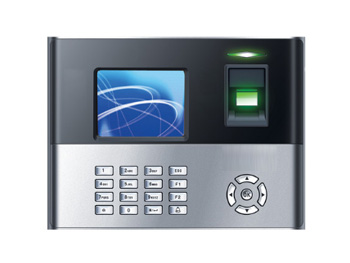
Managing employee attendance manually can take considerable time and may lead to errors in working-hour calculations, leave records and payroll preparation. Attendance machine software helps organisations automate these tasks by collecting attendance data from devices such as biometric fingerprint readers, face recognition terminals, RFID card readers and PIN-based machines.
Whether used in an office, factory, school, hospital or multi-location business, the right software can make attendance records easier to review and help HR teams manage workforce information more efficiently.
What Is Attendance Machine Software?
Attendance machine software is a system that receives and processes attendance data recorded by an attendance device. When an employee checks in or checks out, the device records the event. The software then organises the data into useful reports, such as daily attendance, late arrivals, early departures, overtime and absences.
Depending on the system, data may be transferred through a local network, USB drive, Wi-Fi, cloud connection or a direct integration with the device. Some solutions are installed on a company’s computers, while others are accessed through a web browser or mobile application.
Key Features to Look For
- Automated data collection: Imports attendance records from compatible biometric, card-based or PIN-based machines.
- Shift and roster management: Supports different shifts, weekly offs, rotating schedules and grace periods.
- Leave and holiday management: Helps track leave applications, approvals, public holidays and employee leave balances.
- Attendance rules: Allows authorised users to configure rules for late arrival, early departure, overtime and missed punches.
- Reports and exports: Generates attendance summaries and exports data in formats that can be used for payroll or record-keeping.
- Employee and department management: Organises records by employee, team, location or department.
- Access permissions: Lets administrators control who can view, edit or approve attendance information.
- Integration options: May connect with payroll, HR or workforce management systems, depending on compatibility.
Benefits for Organisations
By reducing manual data entry, attendance machine software can help minimise calculation mistakes and save administrative time. HR teams can review attendance records more quickly, while managers can access clearer information about staffing and shift coverage.
Consistent records can also make payroll preparation more straightforward. Instead of collecting attendance sheets from different departments, authorised staff can use organised reports as a reference when processing working hours, leave and overtime. The software does not replace payroll checks, but it can make the underlying attendance data easier to manage.
For organisations with multiple branches or work sites, a centralised system may help bring records together in one place. Cloud-based solutions can be useful for remote access, while locally installed systems may suit organisations that prefer to manage data on their own infrastructure.
Choosing the Right Software
Before selecting attendance machine software, consider how the organisation works and what the system needs to support. Check the following points:
- Device compatibility: Confirm that the software works with the existing attendance machines and their data-transfer methods.
- Workforce requirements: Check support for the number of employees, departments, shifts and locations in the organisation.
- Ease of use: Choose an interface that HR staff and managers can learn without unnecessary complexity.
- Payroll workflow: Review how attendance reports can be exported or integrated with the payroll system.
- Deployment and support: Compare installation, training, updates, technical support and ongoing maintenance.
- Data security: Ask how employee information is stored, protected, backed up and accessed.
- Scalability: Consider whether the solution can accommodate future growth, new branches or additional devices.
Biometric Data and Employee Privacy
Some attendance systems use fingerprints or facial recognition. These systems may involve sensitive personal information, so organisations should handle it responsibly. Before implementation, explain how the system works, what information is collected, who can access it and how long records are retained. Use appropriate access controls and follow applicable privacy and data-protection requirements.
It is also useful to have a process for device or network outages, missed punches and employees who cannot use a particular biometric method. A clear correction and approval procedure helps maintain accurate records without relying on informal adjustments.
Conclusion
Attendance machine software can simplify the way an organisation records and reviews employee working hours. By combining compatible devices with suitable attendance rules, reporting and data safeguards, businesses can build a more organised attendance process. The best solution is one that fits the organisation’s workforce, integrates with its existing systems and is straightforward for employees and administrators to use.
Attendance Machines and Biometric Software: Frequently Asked Questions
- Which machine is used for attendance?
- Which company attendance machine is best?
- Which software is used for biometric attendance?
- What is the best attendance device?
Which machine is used for attendance?
Attendance is commonly recorded using a biometric machine, such as a fingerprint or face-recognition device, or an RFID card reader where employees tap their access cards. Some organisations use PIN-based machines or mobile attendance systems. The right option depends on the workplace, workforce size, security requirements and the attendance software being used; it is best to check that the machine is compatible with the software before choosing.
Which company attendance machine is best?
The best attendance machine depends on your organisation’s requirements, such as the number of employees, shift patterns, work locations and preferred verification method. Before choosing a company or model, check that the machine works with your attendance software, supports the reports and integrations you need, and offers reliable after-sales service. Consider biometric, face-recognition, RFID or PIN-based options based on your workplace, and compare usability, data security, scalability and total cost rather than selecting on brand name alone.
Which software is used for biometric attendance?
Biometric attendance machines are generally used with attendance management software that is compatible with the device’s make and model. The software records fingerprint or facial recognition check-ins, calculates working hours, and can generate reports for shifts, absences, late arrivals and overtime. Some systems are supplied by the device manufacturer, while others connect with third-party HR or payroll platforms. Before choosing one, check device compatibility, reporting requirements, data security and whether the software supports your organisation’s attendance policies.
What is the best attendance device?
The best attendance device depends on your workplace, workforce size and security requirements. Biometric devices, such as fingerprint or face-recognition machines, can help prevent proxy attendance, while RFID card or PIN-based devices may be suitable where quick, contactless check-ins are a priority. When choosing a device, consider accuracy, ease of use, employee privacy, connectivity, compatibility with your attendance software, reporting needs and after-sales support. Compare options based on your requirements rather than choosing solely by price.