Attendance Management System Software: A Smarter Way to Track Employee Time
Accurate attendance records are essential for smooth workforce management. Whether an organisation has a small team or a large, multi-location workforce, tracking working hours manually can take time and lead to errors. Attendance management system software helps businesses record, manage and review employee attendance more efficiently.
What Is Attendance Management System Software?
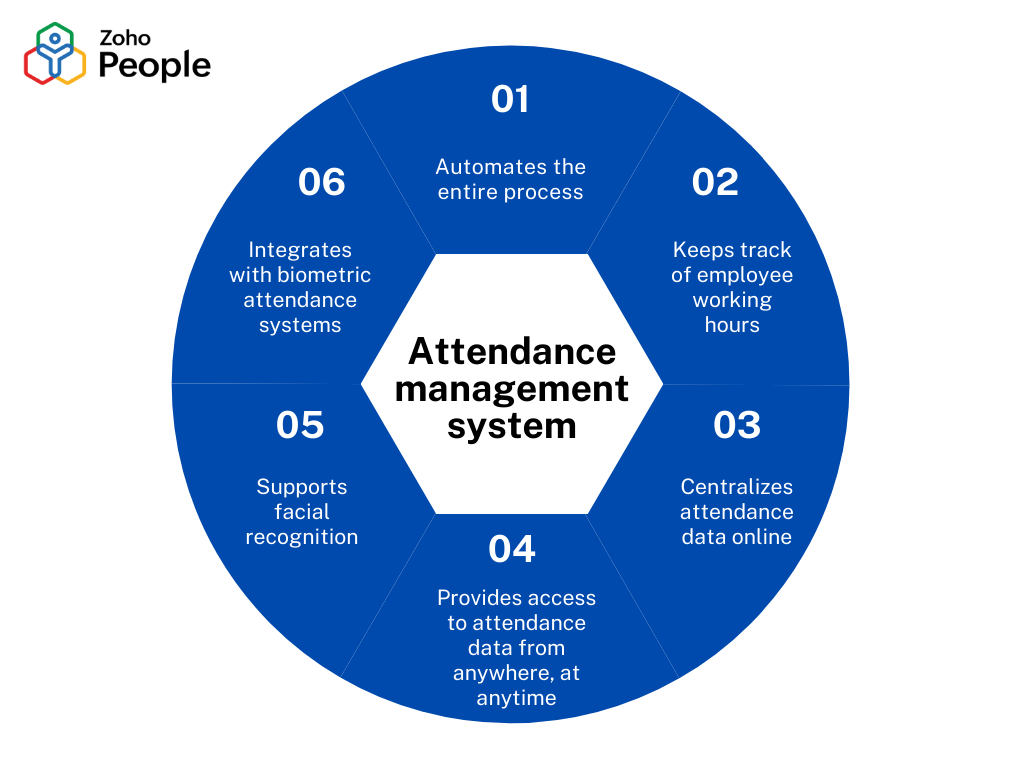
Attendance management system software is a digital tool used to record employee attendance, working hours, late arrivals, early departures, breaks, overtime and leave. It can work independently or connect with attendance devices such as biometric readers, access cards, PIN-based terminals and other time and attendance systems.
Depending on the system, employees may record attendance at an office terminal, through a mobile application or via a web-based platform. Managers and authorised HR staff can then review attendance information from a central dashboard.
How Does It Work?
An attendance system captures a time-stamped record when an employee checks in or checks out. The software applies the organisation’s working schedules and attendance rules to calculate hours worked, identify exceptions and prepare reports.
For example, a system may flag a late arrival, an unrecorded checkout or a missed shift. HR staff can review and correct records according to company policy. Where supported, attendance data can also be shared with payroll or HR software to reduce repeated data entry.
Key Features to Look For
- Multiple attendance methods: Support for suitable options such as biometric devices, access cards, PINs, mobile check-ins or web-based attendance.
- Shift and roster management: Tools for creating schedules, managing shifts and accommodating different work patterns.
- Leave and holiday records: A way to record approved leave, holidays and other authorised absences alongside attendance.
- Automated calculations: Calculation of work hours, late arrivals, overtime and other attendance measures based on configured rules.
- Reports and dashboards: Clear summaries for reviewing attendance trends, exceptions and team-level records.
- Payroll integration: The ability to export or securely share relevant attendance data with payroll systems.
- Role-based access: Permissions that limit who can view, edit or approve attendance information.
- Audit trail: A record of changes to help authorised users review updates and corrections.
Benefits for Organisations
Improved accuracy
Digital records can reduce errors associated with paper registers and manual calculations. The degree of accuracy depends on the attendance method, correct system configuration and how exceptions are handled.
Less administrative work
Automated record-keeping and reporting can reduce repetitive tasks for HR teams and managers, giving them more time for other responsibilities.
Clearer attendance visibility
Authorised staff can review attendance records and identify issues such as missing punches, frequent lateness or unplanned absences. This can support timely follow-up and better workforce planning.
More consistent processes
When attendance rules and schedules are configured centrally, the organisation can apply its policies more consistently across teams or locations.
Better-informed decisions
Reliable reports can help managers understand attendance patterns and plan staffing requirements. Reports should be interpreted in context and in line with company policy.
Choosing the Right System
The right attendance management system depends on the organisation’s workforce, locations, work patterns and existing technology. Before selecting software, consider:
- How many employees and work locations need to be covered?
- Which attendance methods are practical for the workforce?
- Does the organisation need shift, overtime and leave management?
- Will the system integrate with existing payroll, HR or access control systems?
- Can it support remote, field-based or mobile employees where required?
- Are reports easy for HR teams and managers to use?
- What support, training and maintenance are available?
- How does the provider protect personal and attendance data?
It is also useful to assess the total cost of ownership, including software licences, attendance devices, installation, training and ongoing support.
Privacy, Security and Responsible Use
Attendance records may contain personal information. Organisations should collect only the information needed for legitimate business purposes, restrict access to authorised users and follow applicable Indian laws and internal policies. Where biometric attendance is used, employees should be informed about how the information is collected, used, stored and protected.
Strong access controls, secure data handling, regular backups and clear retention practices can help protect attendance information. Organisations should also establish a process for employees to report errors and request corrections.
Making Implementation Successful
Successful implementation starts with clear attendance policies. Define work schedules, grace periods, overtime rules, leave procedures and approval responsibilities before configuring the software. Test the system with a small group, check device placement and network connectivity, and train employees and managers before a wider rollout.
After launch, review exception reports regularly and invite feedback from users. A well-managed attendance system should support clear, fair processes—not replace communication between employees, managers and HR.
Conclusion
Attendance management system software can help organisations maintain organised records, reduce manual administration and gain a clearer view of workforce attendance. By selecting a system that fits operational needs and using it with transparent policies and appropriate data protection, businesses can build a more efficient approach to time and attendance management.
9 Tips for Choosing and Using Attendance Management Software Effectively
- Choose software that suits your team size.
- Check for biometric and mobile check-in options.
- Set clear rules for late arrivals and breaks.
- Enable leave requests and approvals.
- Use location tracking for field staff.
- Review attendance reports regularly.
- Protect employee data with secure access.
- Integrate attendance with payroll software.
- Train staff to use the system correctly.
Choose software that suits your team size.
Choose attendance management software that suits your team size and working style. A small business may need a straightforward system with essential features, while a larger organisation may benefit from support for multiple locations, shifts, approval workflows and payroll integration. Consider your current requirements as well as likely growth, so the software remains practical as your workforce changes.
Check for biometric and mobile check-in options.
When selecting attendance management system software, check whether it offers biometric and mobile check-in options to suit different workplace needs. Biometric devices can help verify attendance at fixed locations, while mobile check-ins may be useful for field staff or employees working across multiple sites. Consider ease of use, connectivity, data security and the organisation’s policies before choosing a method, and ensure employees are informed about how their attendance data is collected and used.
Set clear rules for late arrivals and breaks.
Set clear, consistent rules for late arrivals and breaks, and communicate them to all employees. Explain how grace periods, break durations, missed punches and shift changes will be recorded in the attendance management system software. Configure the system to reflect these policies and ensure managers apply them fairly across teams. This helps prevent misunderstandings, supports accurate attendance records and makes it easier to review exceptions.
Enable leave requests and approvals.
Enable leave requests and approvals in your attendance management system to make time-off planning clear and efficient. Employees can submit requests online, check their leave balances and track approval status, while managers can review requests against team schedules and staffing needs. Configure approval workflows, leave types and notifications to match your organisation’s policies, and keep records updated so approved leave is reflected accurately in attendance reports.
Use location tracking for field staff.
For field staff, location tracking can help managers verify attendance at client sites, project locations or other designated work areas. Choose a system that records location only when employees check in or out, and explain clearly when and why location data is collected. With appropriate employee consent, access controls and data-retention practices, location-based attendance can support accurate records while respecting staff privacy.
Review attendance reports regularly.
Review attendance reports regularly to identify patterns such as frequent late arrivals, unexplained absences, missed check-ins or overtime. Checking these records promptly helps managers and HR teams correct errors, follow up on exceptions and plan staffing more effectively. Make sure any concerns are discussed fairly with the employee and handled according to the organisation’s attendance policy.
Protect employee data with secure access.
Protect employee data by choosing attendance management software with secure sign-in, role-based access and reliable data protection measures. Give each user access only to the information needed for their role, and review permissions regularly, especially when employees change roles or leave the organisation. Strong passwords, multi-factor authentication where available, and clear procedures for handling attendance records can help reduce the risk of unauthorised access. Ensure employees are informed about how their data is collected, used and stored, and follow applicable Indian laws and organisational policies.
Integrate attendance with payroll software.
Integrating attendance management system software with payroll software can reduce duplicate data entry and help streamline salary processing. Attendance details such as days worked, approved leave and overtime can be transferred to payroll, where they can be checked against company rules before salaries are calculated. Choose compatible systems, set up the integration carefully and review records for missing or incorrect entries before each payroll run. This helps improve accuracy while keeping HR and finance teams aligned.
Train staff to use the system correctly.
Train staff to use the attendance management system correctly by providing clear instructions and practical demonstrations on how to check in and out, apply for leave, and report missed or incorrect entries. Explain the organisation’s attendance rules and where employees can get help. Regular refresher sessions can prevent avoidable errors, support consistent record-keeping and help employees feel confident using the system.