Attendance Software for Office: A Smarter Way to Manage Employee Attendance
Managing employee attendance manually can take up valuable time. Paper registers, spreadsheets and separate records are often difficult to maintain, particularly when an organisation has multiple teams, shifts or office locations. Attendance software for office helps simplify this process by recording working hours digitally and making attendance information easier to review.
What Is Office Attendance Software?
Office attendance software is a digital system used to record and manage employees’ attendance, working hours, late arrivals, early departures, breaks, leave and overtime. Employees may mark attendance through a desktop or mobile app, a web portal, or a connected device such as a biometric reader or access-control terminal.
The method used depends on the organisation’s requirements. For example, an office may use a desktop login for remote teams, a mobile app for employees working across locations, or a biometric device at the workplace entrance.
Key Features to Look For
- Digital attendance records: Maintain organised records of employee check-ins and check-outs.
- Shift and roster management: Set working schedules for different teams, locations or shifts.
- Leave management: Allow employees to submit leave requests and managers to review them through the system.
- Late arrival and overtime reports: Identify attendance patterns and review hours worked.
- Multiple attendance options: Support suitable methods such as web, mobile, biometric or access-control-based attendance.
- Reports and exports: Generate summaries for managers and records for payroll processing.
- Role-based access: Give employees, managers and administrators access to the information relevant to their roles.
Benefits for Employers and Employees
Less manual administration: Automated records can reduce routine data entry and the effort involved in preparing attendance summaries.
Clearer records: A central system makes it easier to review attendance information and correct discrepancies through an established process.
More efficient payroll preparation: Attendance reports can help payroll teams review working hours, leave and overtime. The software should be configured to match the organisation’s payroll rules and approval procedures.
Support for flexible workplaces: Organisations with hybrid teams, field staff or multiple branches may find it easier to manage attendance when employees can use approved methods suited to their work locations.
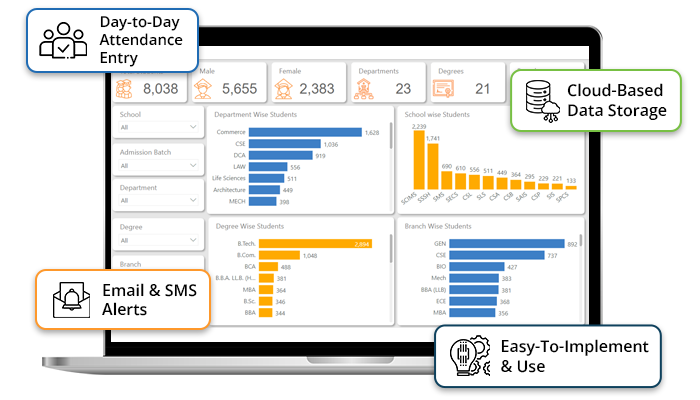
Better visibility for managers: Dashboards and reports can help managers understand attendance trends and plan staffing requirements.
Choosing the Right Attendance System
Before selecting office attendance software, consider the size of the organisation, the number of locations, work patterns and the way attendance will be recorded. Check whether the system can handle shift changes, holidays, leave approvals and relevant payroll workflows.
It is also important to assess ease of use, customer support, data security and the ability to export records. If biometric devices or access-control systems are already in place, confirm that the proposed software is compatible with them. A short trial or demonstration can help employees and administrators understand how the system works before full implementation.
Privacy and Responsible Use
Attendance records contain personal information and should be handled responsibly. Organisations should explain what information is collected, why it is required and who can access it. Access should be limited to authorised users, and records should be retained in line with the organisation’s policies and applicable requirements. Where biometric attendance is used, provide clear information about its use and follow appropriate privacy and security practices.
Making Implementation Smooth
Successful implementation begins with clear attendance policies. Define shift timings, grace periods, leave procedures, overtime approvals and correction requests before configuring the system. Train employees and managers, test the system with a small group and provide a simple process for reporting issues. Regular reviews can help ensure that the software continues to meet the organisation’s needs.
Conclusion
Attendance software for office can help organisations move from manual tracking to a more organised and accessible process. By choosing a system with suitable attendance options, clear reporting, appropriate integrations and responsible data practices, businesses can make attendance administration more efficient for both employees and management.
Office Attendance Software: 5 Frequently Asked Questions
- What is attendance software for office, and how does it work?
- What features should office attendance software include?
- Can attendance software integrate with payroll and HR systems?
- Is attendance software suitable for hybrid and remote employees?
- How can a business choose the right attendance software for its office?
What is attendance software for office, and how does it work?
Attendance software for office is a digital system that records and manages employees’ working hours, check-in and check-out times, leave and attendance reports. Employees mark their attendance using an approved method, such as a web portal, mobile app, biometric device or access-control terminal. The software stores the records in a central system, applies configured work schedules and attendance rules, and helps managers review attendance, approve requests and prepare reports for payroll.
What features should office attendance software include?
Office attendance software should include easy check-in and check-out options, shift and roster management, leave tracking, and reports for working hours, late arrivals and overtime. Useful features may also include mobile or web access for hybrid and field teams, integration with payroll or access-control systems, approval workflows, and role-based access to protect employee records. Look for a system that is simple to use, secure and flexible enough to suit your organisation’s attendance policies.
Can attendance software integrate with payroll and HR systems?
Yes, many attendance software solutions can integrate with payroll and HR systems, helping organisations transfer approved attendance, working hours, leave and overtime records more efficiently. This can reduce duplicate data entry and support smoother payroll processing and HR administration. Integration options vary by provider, so check whether the software connects with your existing systems and supports your organisation’s pay rules, approval workflows and data security requirements.
Is attendance software suitable for hybrid and remote employees?
Yes, attendance software can be suitable for hybrid and remote employees, provided it offers flexible ways to record attendance, such as a web portal or mobile app. Depending on the organisation’s policies, employees can check in from approved locations, while managers can review attendance across office-based, remote and hybrid teams. Before choosing a system, check that it supports your work schedules, privacy requirements and attendance rules, and explain clearly to employees how their attendance data will be collected and used.
How can a business choose the right attendance software for its office?
A business can choose the right attendance software by first assessing its team size, work locations, shift patterns and attendance policies. It should then compare essential features such as mobile or biometric check-ins, leave and shift management, reporting, and integration with payroll or existing access-control systems. Ease of use, data security, customer support, scalability and the total cost should also be considered. A product demonstration or trial can help confirm that the software suits the office’s day-to-day requirements before purchase.