32-Channel NVR: A Complete Guide to Choosing the Right Network Video Recorder
A 32-channel NVR is a network video recorder designed to connect and manage up to 32 IP cameras. It lets users view live footage, record video, search past recordings and manage camera settings from a central system. For larger sites that need coverage across multiple areas, a 32-channel NVR can provide a practical and scalable surveillance solution.
What is an NVR?
NVR stands for Network Video Recorder. Unlike a DVR, which is generally used with analogue cameras, an NVR works with IP cameras that transmit video over a network. Footage is typically recorded in digital format, and cameras can be connected through a local network or directly to the recorder if it has built-in PoE ports.
The term “32-channel” refers to the maximum number of camera channels the recorder can support. The actual number of cameras that can operate smoothly depends on factors such as the NVR’s processing capacity, incoming bandwidth, camera resolution and network design.
Key features to consider
- Camera capacity: Supports up to 32 camera channels, subject to the model’s specifications.
- Recording resolution: Check that the NVR can record the resolutions used by your cameras, such as 4 MP, 8 MP or higher.
- Incoming bandwidth: The recorder must have enough bandwidth to handle the combined video streams from all connected cameras.
- Storage capacity: Check the number of hard-drive bays, supported drive capacity and recording options.
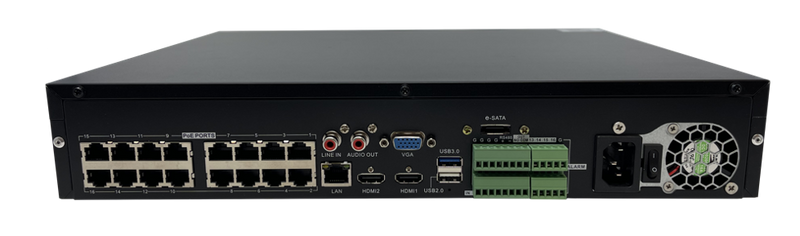
- PoE support: Some models include PoE ports, allowing compatible cameras to receive power and data through a single Ethernet cable. Other models require a separate PoE switch.
- Remote viewing: Many NVRs provide secure remote access through a computer or mobile app, depending on the model and its configuration.
- Video analytics: Depending on the cameras and recorder, features may include motion detection, line crossing, intrusion alerts or people and vehicle classification.
- Display and playback: Review the supported monitor outputs, live-view layouts and playback options to ensure they meet the requirements of the control room.
How much storage do you need?
Storage requirements depend on the number of cameras, image resolution, frame rate, compression format, scene activity and retention period. A busy entrance may require more storage than a quiet storage area, while higher resolution and longer retention generally increase the amount of disk space required.
Before selecting an NVR, estimate how many days of footage need to be retained. Use the manufacturer’s storage calculator or consult a security professional to calculate the required hard-drive capacity. Also check whether the recorder supports continuous, scheduled and motion-based recording, as these options can affect storage use.
Common applications
A 32-channel NVR may suit locations that need centralised video recording across several buildings, floors or outdoor areas. Typical applications include:
- Offices and commercial premises
- Warehouses and industrial facilities
- Hotels, hospitals and educational campuses
- Retail outlets and shopping centres
- Residential complexes and gated communities
- Parking areas and transport facilities
Choosing a compatible system
Compatibility is essential when connecting IP cameras to an NVR. Check the recorder’s supported camera protocols and confirm that the camera models can provide the required features. Even when cameras and recorders support a common standard, advanced functions may vary between manufacturers.
For installations with many cameras, plan the network carefully. Use suitable switches, quality cabling and appropriate bandwidth capacity. Separate or prioritise surveillance traffic where needed, and protect the system with strong passwords, updated firmware and restricted user permissions.
Installation and maintenance tips
- Position the NVR in a secure, ventilated location.
- Use surveillance-rated hard drives recommended for continuous recording.
- Keep a backup of important recordings and configuration settings.
- Test live view, recording, playback and remote access after installation.
- Check camera views and recording status regularly.
- Use a reliable power supply or UPS to help protect the system during power interruptions.
- Change default passwords and install firmware updates from trusted sources.
Conclusion
A 32-channel NVR can bring video from up to 32 IP cameras into one recording and management system. The right choice depends on camera compatibility, bandwidth, storage, PoE requirements and the number of days for which footage must be retained. Careful planning helps create a reliable surveillance system that can support the needs of a growing site.
7 Essential Tips for Choosing and Setting Up a 32-Channel NVR
- Check that the NVR supports all 32 camera channels.
- Match camera resolution and codecs to the NVR.
- Check total incoming bandwidth before buying.
- Choose enough storage for your required recording days.
- Use compatible PoE switches or a separate power supply.
- Secure the NVR with a strong password and updates.
- Test playback and remote viewing after installation.
Check that the NVR supports all 32 camera channels.
Before purchasing a 32-channel NVR, check that it can support all 32 cameras at the same time—not just that it has 32 channel inputs listed. Confirm its maximum camera count, incoming bandwidth and supported camera resolutions, as these specifications affect how many cameras can record smoothly together. This helps prevent performance issues and ensures the recorder meets the needs of your surveillance system.
Match camera resolution and codecs to the NVR.
Match each camera’s resolution and video codec to the capabilities of the 32-channel NVR before installation. Check that the recorder supports the camera’s resolution and codecs, such as H.264 or H.265, and has sufficient incoming bandwidth to handle all 32 video streams. Using a compatible, efficient codec can help reduce storage and network usage while maintaining suitable image quality.
Check total incoming bandwidth before buying.
Before buying a 32-channel NVR, check its total incoming bandwidth to make sure it can handle the combined data streams from all connected cameras. Higher-resolution cameras, higher frame rates and advanced video settings use more bandwidth, so a recorder may not support all 32 cameras at their maximum settings if its capacity is too low. Compare the NVR’s incoming bandwidth with the cameras’ combined requirements, and allow some headroom for reliable performance and future expansion.
Choose enough storage for your required recording days.
When selecting a 32-channel NVR, choose enough storage to retain footage for the number of days you need. Storage requirements depend on the number of cameras, video resolution, frame rate, compression settings and how much activity each camera records. Estimate these needs before installation, and check the NVR’s hard-drive capacity and expansion options to help ensure important footage remains available when required.
Use compatible PoE switches or a separate power supply.
When installing a 32-channel NVR, use PoE switches that are compatible with both the recorder and IP cameras, and ensure they provide enough power for all connected devices. If the NVR does not have built-in PoE or the switch cannot meet the cameras’ power requirements, use a suitable separate power supply. This helps maintain stable camera operation and avoids connectivity issues caused by insufficient power.
Secure the NVR with a strong password and updates.
Secure your 32-channel NVR with a strong, unique password that is difficult to guess, and change any default login details during installation. Limit access to authorised users and update the NVR’s firmware regularly using updates from the manufacturer. These simple steps help address security vulnerabilities and reduce the risk of unauthorised access to your recorder and camera footage.
Test playback and remote viewing after installation.
After installing a 32-channel NVR, test playback and remote viewing to make sure the system is working as expected. Check recordings from different cameras and time periods, and confirm that footage can be searched and played smoothly. Then access the NVR through the authorised mobile app or computer from outside the local network. Verify that the live view and recorded video load correctly, and check that user permissions and security settings are in place. Testing these functions early can help identify configuration or network issues before footage is needed.