Biometric Attendance Management System: A Smarter Way to Manage Attendance
Accurate attendance records are essential for businesses, schools, factories and other organisations. Manual registers and punch cards can be time-consuming to manage and may lead to errors or proxy attendance. A biometric attendance management system offers a more reliable way to record when employees or authorised users arrive and leave.
By using unique biological characteristics, such as a fingerprint or facial features, the system helps organisations maintain attendance records efficiently. When combined with suitable software, it can also simplify attendance reporting and support payroll and workforce management processes.
What Is a Biometric Attendance Management System?
A biometric attendance management system uses biometric identification to verify a person’s identity when they check in or check out. Depending on the device, verification may use a fingerprint, facial recognition, iris pattern or another biometric characteristic.
The attendance terminal records the event, along with details such as the date and time. This information is transferred to attendance management software, where authorised administrators can review records, prepare reports and manage attendance rules.
How Does It Work?
- Enrolment: An administrator registers each user and captures the required biometric information, subject to the organisation’s policies and applicable requirements.
- Verification: The user presents their fingerprint, face or other supported biometric feature at the terminal.
- Matching: The device checks the presented biometric against the enrolled record to verify the user’s identity.
- Attendance recording: Once verified, the system records the check-in or check-out time.
- Reporting: Attendance data is made available through the software for authorised users to review, export or use in related workflows.
Depending on the system, devices may store records locally, connect to a central server or transmit data through a network or cloud-based platform. The right configuration depends on the organisation’s size, locations, connectivity and data-handling requirements.
Common Types of Biometric Attendance Devices
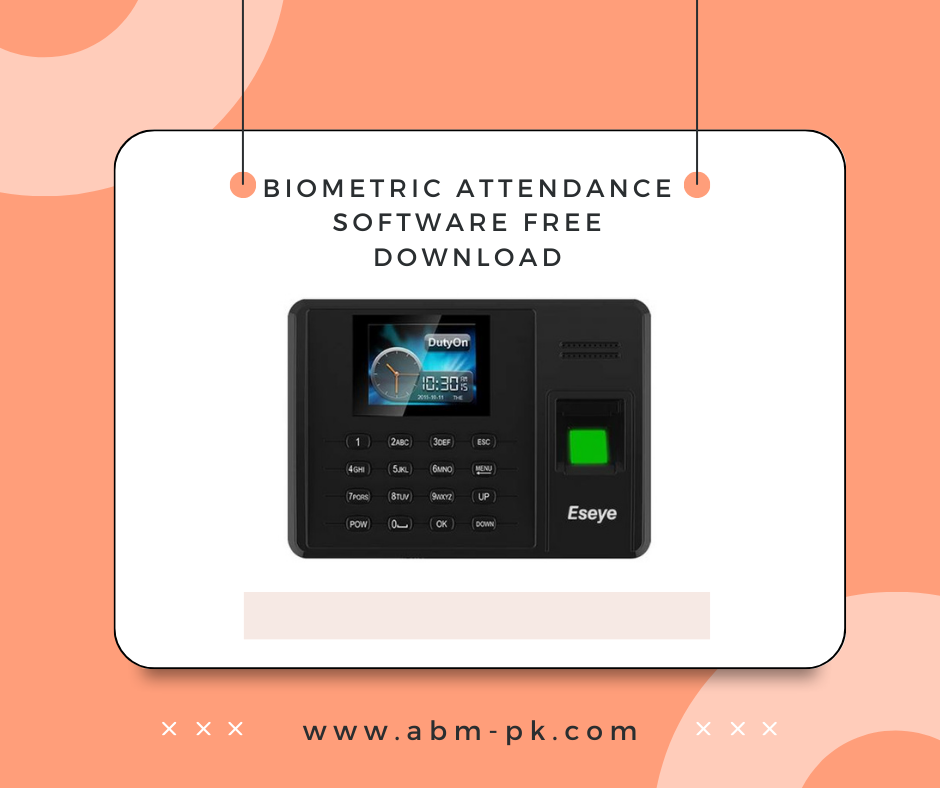
- Fingerprint readers: Verify identity using a fingerprint. These are commonly used in offices and other controlled environments.
- Facial recognition terminals: Identify users by analysing facial features. They can be useful where touch-free verification is preferred.
- Iris recognition devices: Use the pattern of the iris for identification and are selected for applications with particular security requirements.
- Multi-biometric terminals: Support more than one verification method, such as fingerprint and facial recognition, providing an alternative when one method is unsuitable.
Key Benefits
More reliable attendance records
Biometric verification links an attendance event to an enrolled user, helping reduce common issues such as buddy punching, where one person records attendance for another.
Less manual administration
Automated recording can reduce the time spent maintaining paper registers and correcting manually entered data. Attendance reports can be generated from the system, depending on the software and its configuration.
Faster attendance processing
Employees can record their attendance at a terminal without signing a register or using a shared card. The speed of processing depends on the device, user volume and workplace layout.
Useful reports and insights
Attendance software may provide reports on working hours, late arrivals, early departures, absences and overtime. These reports can help managers review attendance patterns and apply workplace policies consistently.
Integration with other systems
Some solutions can be integrated with payroll, HR or access control systems. Before choosing a product, confirm that it is compatible with the organisation’s existing software and processes.
Features to Consider
When comparing biometric attendance systems, consider the following features:
- Supported biometric methods and verification performance
- Capacity for users, records and locations
- Offline operation and data synchronisation options
- Attendance rules for shifts, grace periods, breaks and overtime
- Reporting, export and payroll integration options
- Administrator controls and audit logs
- Network connectivity and compatibility with existing infrastructure
- Data security, backup and retention options
- Availability of installation, training and after-sales support
Where Can It Be Used?
Biometric attendance management systems are used across a wide range of settings, including corporate offices, manufacturing facilities, educational institutions, hospitals, retail locations, warehouses and multi-site organisations. The system should be selected according to the environment. For example, a busy entrance may require a different terminal configuration from a small office or a remote worksite.
Privacy and Data Security
Biometric information is sensitive personal data. Organisations should collect and use it responsibly, explain the purpose of collection to users, restrict access to authorised personnel and follow applicable laws and internal policies. It is also important to understand how the chosen system stores biometric data, how long it is retained, how it is protected and what happens when a user leaves the organisation.
Before deployment, organisations should review the vendor’s security documentation and establish clear procedures for enrolment, access, backups, retention and deletion. Where appropriate, provide an alternative attendance method for users who cannot or do not wish to use a particular biometric method, in line with organisational policy and applicable requirements.
Choosing the Right System
Start by assessing the number of users, entry points, work shifts and locations. Consider whether attendance data needs to integrate with payroll or HR software, and check the connectivity available at each site. A demonstration or trial can help confirm that the device is suitable for the workplace and easy for staff to use.
It is also advisable to clarify installation requirements, training, warranty coverage, software licensing and ongoing support before making a decision. A well-planned system is not just a biometric terminal; it includes the device, management software, network setup and procedures for handling attendance data.
Conclusion
A biometric attendance management system can help organisations record attendance more consistently, reduce manual work and make reporting easier. The best solution will depend on the organisation’s size, operating environment, software requirements and approach to privacy and security. With careful planning and responsible data management, biometric attendance technology can become a practical part of a modern workforce management process.
8 Tips for Managing Your Biometric Attendance System Effectively
- Choose a system that suits your team size and workplace.
- Use fingerprint or face recognition for quick check-ins.
- Keep a backup attendance method for device failures.
- Set clear rules for late arrivals and missed scans.
- Update employee records when roles or shifts change.
- Clean scanners regularly to ensure accurate readings.
- Limit access to biometric data to authorised staff.
- Check attendance reports regularly and fix errors promptly.
Choose a system that suits your team size and workplace.
Choose a biometric attendance management system that suits your team size and workplace. A small office may need only a basic fingerprint or facial recognition device, while a large organisation with multiple locations may require several terminals, centralised software and higher user capacity. Consider your daily footfall, shift patterns, work environment, network connectivity and any integration needs before making a choice. Selecting a system that fits these requirements can make attendance tracking easier for employees and administrators alike.
Use fingerprint or face recognition for quick check-ins.
Use fingerprint or face recognition to make attendance check-ins quick and convenient. Employees can verify their identity at a biometric terminal without signing a register or carrying an attendance card, helping reduce queues and minimise proxy attendance. Choose a method that suits your workplace, and ensure the system handles biometric data securely and in line with applicable privacy requirements.
Keep a backup attendance method for device failures.
Even a well-maintained biometric attendance management system may occasionally become unavailable due to a power cut, network issue or device fault. Keep a simple backup attendance method, such as a paper register or secure digital form, so staff can record their arrival and departure during downtime. Assign someone to verify and enter these records once the system is restored, and reconcile them with system data to avoid missed or duplicate entries. Store backup records securely and follow your organisation’s data-retention and privacy policies.
Set clear rules for late arrivals and missed scans.
Set clear rules for late arrivals and missed scans before introducing a biometric attendance management system. Explain how grace periods, shift timings and corrections will be handled, and tell employees whom to contact if a scan fails or is missed. Keep a simple process for reporting issues and approving attendance corrections, with appropriate records for audit purposes. Applying these rules consistently helps avoid confusion and ensures attendance data is managed fairly.
Update employee records when roles or shifts change.
Keep employee records up to date whenever roles, departments or shifts change. Review each employee’s shift timings, access permissions and reporting details in the biometric attendance management system so that attendance is calculated against the correct schedule. Prompt updates help prevent errors in attendance reports, overtime calculations and payroll, while ensuring employees have the appropriate system access.
Clean scanners regularly to ensure accurate readings.
Clean biometric scanners regularly to help maintain accurate and reliable readings. Dust, fingerprints, oil and other residue on a sensor can interfere with recognition and may lead to failed scans or delays. Use a soft, lint-free cloth and follow the manufacturer’s cleaning instructions; avoid harsh chemicals or excess moisture that could damage the device. Keeping the scanner clean helps ensure a smoother check-in experience for everyone.
Limit access to biometric data to authorised staff.
Restricting access to biometric data to authorised staff helps protect employees’ privacy and reduce the risk of misuse or unauthorised disclosure. Use individual accounts with strong passwords, assign permissions according to job responsibilities, and review access regularly. Keep audit logs of access and changes, and ensure biometric information is stored securely and retained only for as long as required under your organisation’s policies and applicable Indian laws.
Check attendance reports regularly and fix errors promptly.
Check attendance reports regularly to ensure that check-in and check-out records are accurate and complete. Promptly review and correct issues such as missed punches, incorrect shift timings or device errors, following your organisation’s procedures. Timely corrections help maintain reliable attendance data and support smoother payroll processing.