CCTV Cameras for Farms: A Practical Guide to Farm Security
Farms cover large areas and often have valuable equipment, livestock, crops, fuel and storage facilities to protect. A well-planned CCTV camera system can help monitor these spaces, deter unauthorised entry and provide useful footage when an incident occurs. With the right combination of cameras, connectivity and recording equipment, farm owners can keep an eye on their property from a control room or, where the system allows, a mobile device.
Why install CCTV cameras on a farm?
Farm CCTV is useful for more than security at the main entrance. Cameras can help monitor boundary points, sheds, machinery, livestock areas, water facilities and loading zones. They may also help owners or managers check routine activity when they are away from the site.
- Monitor access points: Keep watch over gates, driveways and farm entrances.
- Protect assets: Observe equipment stores, fuel tanks, workshops and produce storage areas.
- Check livestock and working areas: View selected barns, sheds, yards and other suitable locations.
- Review incidents: Recorded footage may help establish what happened, subject to camera coverage and recording quality.
- Support remote oversight: Network-connected systems can allow authorised users to view cameras remotely, depending on internet availability and configuration.
Choosing the right CCTV cameras for a farm
Farm environments can be challenging: cameras may face dust, rain, heat, changing light and long distances between buildings. Consider the following factors before selecting equipment.
Weather-resistant construction
Choose cameras designed for outdoor use and suitable for the conditions at the installation site. Check the product’s weather and dust-resistance rating, temperature range and mounting requirements. Install cameras under suitable protection where possible, while keeping the view unobstructed.
Day and night performance
Look for cameras that provide clear images in both daylight and low-light conditions. Infrared night vision can help in dark areas, while a camera with colour night vision may need some ambient light or built-in illumination. Consider nearby lighting, reflective surfaces and the distance to the area being monitored.
Field of view and image detail
A wide-angle camera can cover a broad area, but subjects may appear smaller at a distance. A narrower view can provide more detail in a specific location, such as a gate or entrance. Plan camera positions around the details you need to see rather than choosing cameras based only on the largest advertised resolution.
Fixed or PTZ cameras
Fixed cameras continuously view a chosen direction and are often suitable for gates, sheds and specific work areas. Pan-tilt-zoom (PTZ) cameras can move and zoom, which may help an operator inspect a larger area. A PTZ camera does not necessarily record every direction at once, so it may not replace several fixed cameras for continuous coverage.
Wired, wireless or cellular connectivity
Wired systems can provide a dependable connection where cables can be installed safely. Wireless links may be useful between buildings or across open land, but distance, trees, terrain and interference can affect performance. In locations without a suitable local network, cellular cameras may be an option, subject to mobile coverage, data costs and power availability.
Power supply
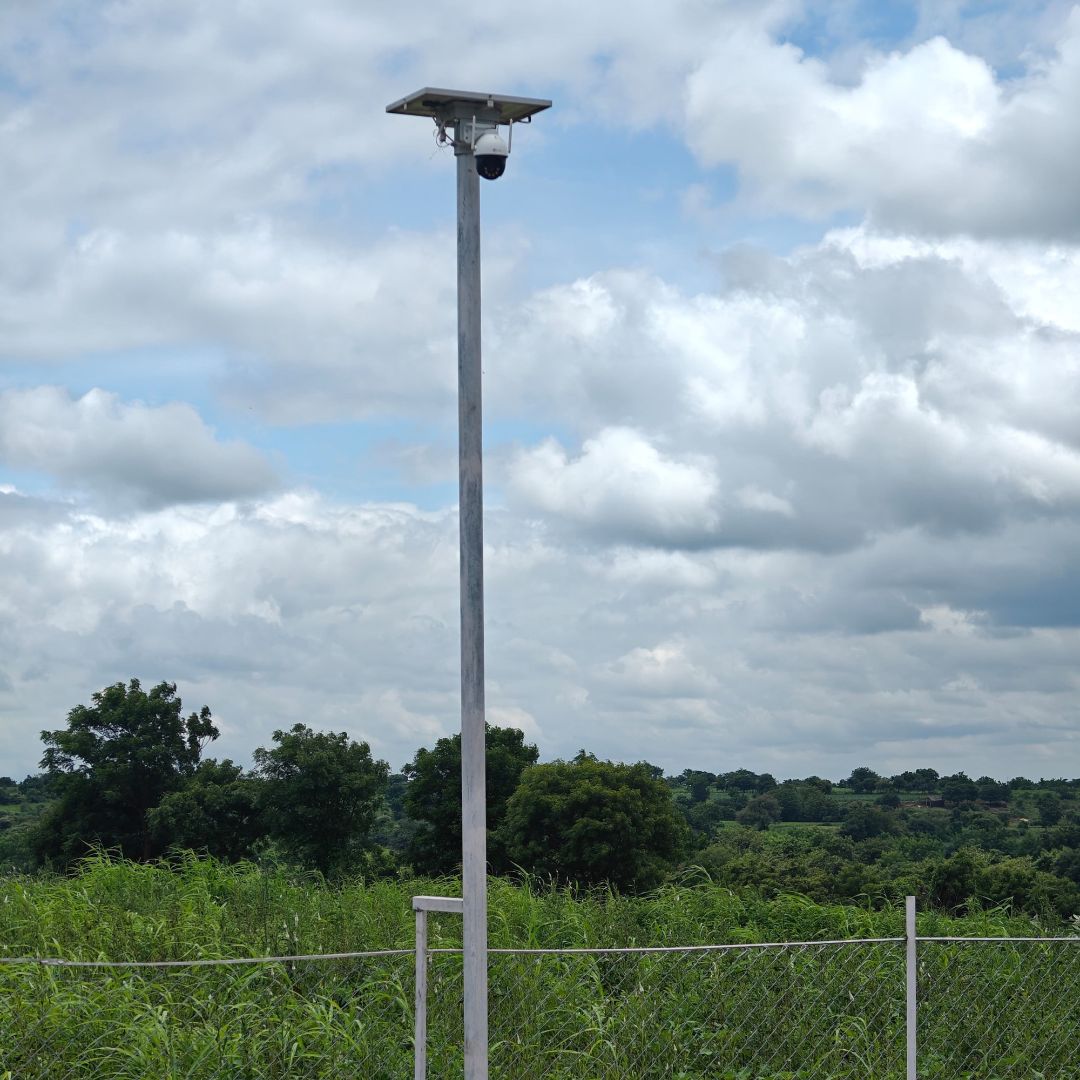
Check whether mains power is available at each camera location. In remote areas, solar-powered systems with battery storage may be worth considering. Their performance depends on sunlight, camera power consumption, battery capacity and local weather, so the design should be matched to the site.
Planning camera placement
Start by identifying the areas that matter most and the risks the system should help address. A site plan can make it easier to decide where cameras, cables, network equipment and recording devices should go.
- Map entrances and boundaries: Mark gates, vehicle approaches and commonly used paths.
- Identify high-value areas: Note machinery sheds, workshops, stores and other locations that need attention.
- Check sightlines: Account for trees, walls, parked vehicles, changing crops and other obstructions.
- Plan overlapping views: Where appropriate, avoid leaving important approaches outside the cameras’ fields of view.
- Consider lighting and mounting: Position cameras to reduce glare, direct sunlight into the lens and easy tampering.
- Test the view: Check images during the day and at night before finalising the installation.
Camera placement should be practical as well as comprehensive. Avoid positioning cameras where routine farm work could damage them or where dust, vibration or moving machinery may affect the image.
Recording, storage and remote viewing
Farm CCTV footage may be stored on a digital video recorder (DVR), network video recorder (NVR), memory card or cloud service, depending on the system. The right option depends on the number of cameras, recording quality, retention period, internet access and the need to view footage remotely.
Before installation, decide how many days of footage should be retained and whether cameras will record continuously, on a schedule or when motion is detected. Motion-based recording can reduce storage use, but moving vegetation, animals, rain and insects may trigger alerts. Test the settings and adjust detection zones and sensitivity where available.
Remote viewing can be convenient, but it relies on a suitable network connection and secure configuration. Use strong, unique passwords, enable available security features and keep the system’s software updated. Limit access to people who need it.
Common farm CCTV mistakes to avoid
- Choosing cameras without checking the actual viewing distance and required image detail.
- Assuming a wireless signal will reach every part of the property without a site assessment.
- Ignoring power supply and backup requirements for remote cameras.
- Installing cameras before checking for obstructions, glare and night-time lighting conditions.
- Relying on a single PTZ camera to provide continuous coverage in every direction.
- Failing to check recording, storage, time settings and remote access after installation.
Privacy and responsible use
Use CCTV for legitimate farm security and operational monitoring. Position cameras to focus on your property and avoid unnecessary capture of neighbouring homes, public areas or spaces where people reasonably expect privacy. Inform workers and visitors about monitoring where appropriate, and handle recordings securely in line with applicable Indian laws and workplace policies.
Keep the system well maintained
Farm conditions can quickly affect camera performance. Clean lenses carefully, inspect mounts and cable connections, check protective housings, and review recorded footage periodically. Test night vision, power backup, network connectivity and alerts. Regular checks can help identify a camera that has shifted, become obscured or stopped recording.
Conclusion
The best CCTV camera system for a farm is one designed around the layout, connectivity, power supply and security priorities of the property. A combination of suitable outdoor cameras, reliable recording and carefully planned placement can provide useful coverage across entrances, buildings and other key areas. A site assessment can help determine whether wired, wireless, cellular or solar-powered equipment is appropriate for each location.
CCTV Cameras for Farms in India: 7 FAQs on Connectivity, Outdoor Use, Solar Pricing and Banned Brands
- Will CCTV work without internet?
- Which CCTV is good for outdoor?
- Which camera is best for farm?
- Which CCTV is banned in India?
- What is the cost of farmer solar camera?
- What is the best camera for farm surveillance?
- Which cameras are best for CCTV?
Will CCTV work without internet?
Yes, CCTV cameras can work without an internet connection. A wired system connected to a DVR or NVR can record footage locally to a hard drive, while some cameras can store recordings on a memory card. Internet access is generally needed for remote viewing, cloud storage and app-based alerts, but not for local recording. For farm locations with limited connectivity, check that the system has a suitable power supply and enough local storage, and confirm how footage can be viewed or retrieved on site.
Which CCTV is good for outdoor?
For outdoor farm use, choose a CCTV camera designed to withstand dust, rain, heat and other local weather conditions. Look for a suitable IP weather-resistance rating, clear day-and-night imaging, infrared night vision and a field of view that matches the area you want to monitor. A fixed camera may suit gates and sheds, while a PTZ camera can be useful for viewing a wider area, though it may not monitor every direction at once. Also consider power and connectivity at the installation point, such as wired, wireless, cellular or solar options.
Which camera is best for farm?
The best CCTV camera for a farm depends on the area you want to monitor, the available power and network coverage, and local weather conditions. For outdoor use, choose a weather-resistant camera with clear day-and-night imaging, suitable viewing distance and reliable recording. Fixed cameras work well for gates and specific areas, while PTZ cameras can help monitor wider spaces; remote locations may require a wireless, cellular or solar-powered option. A site assessment can help identify the right combination for your farm.
Which CCTV is banned in India?
There is no blanket ban in India on a particular CCTV brand for ordinary private use, so it is not accurate to say that all Chinese-made cameras—or any one brand—are banned nationwide. However, government procurement may restrict products from countries sharing a land border with India, and CCTV equipment must meet applicable Indian security and certification requirements. For a farm installation, check the camera’s current MeitY/STQC compliance and confirm that it meets any requirements set by your organisation or local authority before purchasing.
What is the cost of farmer solar camera?
The cost of a solar CCTV camera for a farm depends on its features and installation requirements. Factors such as image quality, night vision, solar panel and battery capacity, 4G or Wi-Fi connectivity, storage options and weather resistance can affect the price. Additional costs may apply for mounting, cabling, network equipment and installation, so it is best to share your farm’s location and coverage needs with a supplier for an accurate quotation.
What is the best camera for farm surveillance?
The best camera for farm surveillance depends on the area you need to monitor, the distance involved and the availability of power and internet. For outdoor locations, choose a weather-resistant camera with clear day-and-night imaging, suitable infrared night vision and enough resolution to capture useful detail at the required distance. A fixed camera is ideal for continuously monitoring a gate or shed, while a PTZ camera can help inspect a wider area when operated remotely. For remote parts of a farm, wireless, cellular or solar-powered cameras may be suitable, subject to signal coverage and power requirements. Before choosing, assess the site, camera view, recording needs and storage capacity.
Which cameras are best for CCTV?
The best CCTV cameras for a farm depend on the areas you need to monitor. For gates, sheds and equipment stores, choose weather-resistant outdoor cameras with clear day-and-night imaging, suitable night vision and enough detail for the distance. Fixed cameras work well for continuous coverage of specific spots, while pan-tilt-zoom (PTZ) cameras can help inspect wider areas. For remote locations, consider wireless or cellular cameras, or solar-powered models where mains power is unavailable; check signal strength, power needs and recording options before choosing.