CCTV Recorder: The Control Centre of Your Surveillance System
A CCTV camera captures video, but a CCTV recorder helps store, manage and review that footage. It is an important part of a surveillance system for homes, offices, shops, factories, warehouses and other premises. Choosing the right recorder can make it easier to monitor multiple cameras and find recordings when they are needed.
What is a CCTV recorder?
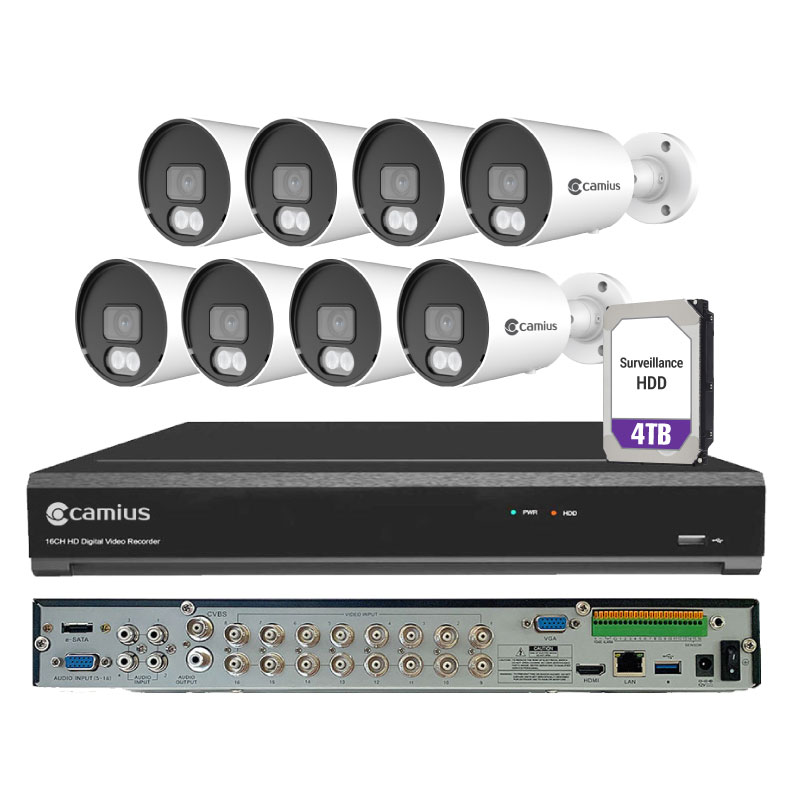
A CCTV recorder is a device that receives video from connected cameras and records it to a storage drive. Depending on the system, it may also support live viewing, playback, motion-based recording, remote access and alerts.
The two common types are:
- DVR (Digital Video Recorder): Typically used with analogue cameras. Cameras are generally connected to the recorder using coaxial cable.
- NVR (Network Video Recorder): Used with IP cameras, which send video over a network. Some NVRs provide Power over Ethernet (PoE), allowing compatible cameras to receive power and transmit data through one Ethernet cable.
The right type depends on the cameras already installed, the size of the site, cabling requirements and the features needed.
Key features to consider
Number of channels
A channel usually represents one camera connection. Select a recorder with enough channels for the cameras you need now, and consider allowing capacity for future expansion.
Video resolution and compatibility
Check that the recorder supports the resolution and video format of your cameras. Compatibility between cameras and the recorder is essential for reliable recording and playback.
Storage capacity and retention
How long footage is retained depends on the number of cameras, video quality, frame rate, recording hours and compression settings. A recorder may support one or more hard drives, but storage capacity and maximum supported drive size vary by model. Estimate your retention needs before selecting a system.
Recording options
Many recorders support continuous, scheduled or motion-triggered recording. Motion-based recording can help use storage more efficiently, while continuous recording may be preferable in areas that require uninterrupted coverage.
Remote viewing
Some systems allow authorised users to view live video and recorded footage through a computer or mobile application. Remote access should be configured securely, with strong passwords and suitable access permissions.
Backup and export
Check how footage can be exported for review or evidence. Depending on the model, this may be possible through a USB device, a network connection or other supported methods. Keep in mind that recorded footage should be handled and shared responsibly.
How to choose the right CCTV recorder
Before purchasing a recorder, consider the following:
- How many cameras are required, including any planned additions?
- Are the cameras analogue or IP-based?
- What resolution and recording quality are needed?
- How many days of footage should be retained?
- Is remote viewing required, and who should have access?
- Does the site need PoE, audio recording, motion alerts or integration with other systems?
- Is the recorder being installed in a secure, ventilated location?
For larger or more complex sites, a professional assessment can help confirm camera compatibility, storage requirements, network capacity and placement.
Installation and security tips
Install the recorder in a secure area with adequate ventilation and protection from dust, moisture and unauthorised access. Use suitable cabling and a reliable power supply. Where appropriate, consider a UPS to help protect the system during brief power interruptions.
Change default passwords, use strong and unique credentials, update the recorder’s firmware when recommended by the manufacturer, and restrict remote access to authorised users. Avoid exposing the recorder directly to the internet unless it has been configured with appropriate security measures.
Conclusion
A suitable CCTV recorder helps organise camera feeds, preserve footage and make playback more convenient. By considering camera compatibility, channel capacity, storage, recording settings and cybersecurity, you can select a system that fits your site and surveillance needs. Regular checks of the recorder, storage drives and camera connections can also help keep the system working reliably.
7 Essential Tips for Choosing and Setting Up Your CCTV Recorder
- Choose a recorder that supports your camera resolution.
- Check how many camera channels you need.
- Use a compatible surveillance hard drive.
- Set a strong password and update it regularly.
- Connect the recorder to a reliable power supply.
- Test recordings and playback after installation.
- Keep the recorder in a secure, ventilated place.
Choose a recorder that supports your camera resolution.
When selecting a CCTV recorder, make sure it supports the resolution of your cameras. If the recorder cannot handle the cameras’ resolution, video may be recorded at a lower quality or some features may not work as expected. Check the recorder’s specifications and confirm compatibility with your camera models before purchasing, especially if you plan to add higher-resolution cameras in the future.
Check how many camera channels you need.
Before choosing a CCTV recorder, count how many cameras you need to connect now and consider whether you may add more later. Each camera typically requires one recorder channel, so selecting a model with a few spare channels can make future expansion easier and avoid the cost of replacing the recorder.
Use a compatible surveillance hard drive.
Use a compatible surveillance hard drive in your CCTV recorder to support reliable, continuous recording. Surveillance-grade drives are designed to handle the frequent writing and longer operating hours common in security systems. Before installation, check the recorder manufacturer’s specifications for supported drive types, capacity and maximum number of drives. Also monitor the drive’s health and replace it if the recorder reports an error or recording becomes unreliable.
Set a strong password and update it regularly.
Set a strong, unique password for your CCTV recorder to help prevent unauthorised access to live feeds and recorded footage. Avoid easy-to-guess details such as names or birthdays, and use a mix of letters, numbers and symbols. Update the password regularly, especially if access is shared or a staff member leaves, and keep it stored securely.
Connect the recorder to a reliable power supply.
Connect your CCTV recorder to a reliable power supply to help ensure continuous recording and reduce the risk of unexpected shutdowns or data loss. Use the correct power adapter recommended by the manufacturer, and consider a UPS (uninterruptible power supply) to keep the recorder running during brief power cuts and voltage fluctuations.
Test recordings and playback after installation.
After installing a CCTV recorder, test both recording and playback to confirm that every camera is capturing clear footage and that the recordings can be viewed without interruptions. Check the date and time settings, review footage from different cameras, and test any motion-triggered recording or remote viewing features. Fixing issues early helps ensure important footage is available when you need it.
Keep the recorder in a secure, ventilated place.
Keep your CCTV recorder in a secure, well-ventilated place to protect it from tampering and overheating. Choose a dry, dust-free area with enough space around the unit for air to circulate, and keep it away from direct sunlight, heat sources and moisture. Restrict access to authorised people so the recorder and stored footage remain protected.