Facial Recognition Access Control: A Smarter Way to Manage Entry
Facial recognition access control uses a person’s facial features to verify their identity before granting access to a building, room or other restricted area. It can offer a convenient, contactless alternative to keys, access cards and PIN codes, while helping organisations manage entry more efficiently.
How Does Facial Recognition Access Control Work?
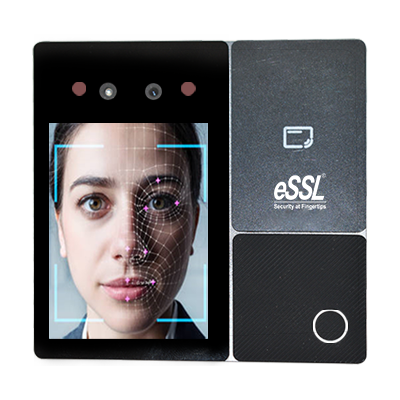
A typical system includes a camera or recognition terminal, access control software and an electronic locking mechanism. When someone approaches, the camera captures an image of their face. The system analyses selected facial characteristics and compares them with an authorised user profile stored in its database. If the identity is verified, the system sends a signal to unlock the door or permit entry.
Depending on the system, access can also be linked to time schedules, user permissions, attendance records and other security devices. For example, employees may be allowed into designated areas during working hours, while access to sensitive rooms is restricted to approved personnel.
Key Benefits
- Contactless entry: Users do not need to touch a reader or carry an access card, making entry more convenient.
- Efficient access management: Administrators can assign, update or remove user permissions through the system.
- Reduced reliance on cards and PINs: Facial verification can help address issues such as lost cards, shared PINs or forgotten credentials.
- Useful audit records: Depending on the configuration, the system can record access events for review and reporting.
- Integration options: Facial recognition terminals may be integrated with door locks, turnstiles, attendance systems, alarms and video surveillance.
Where Can It Be Used?
Facial recognition access control may be suitable for a range of environments, including offices, factories, warehouses, educational institutions, healthcare facilities, residential communities and restricted-access areas. The right solution depends on the number of users, the level of security required, the site layout and the organisation’s operational needs.
Choosing the Right System
Before selecting a system, consider the following factors:
- Recognition performance: Assess how the system performs in the site’s actual lighting, distance and user-flow conditions.
- Anti-spoofing features: Ask whether the terminal can help detect attempts to use photographs, screens or other presentation methods.
- Capacity and speed: Check that the system can support the expected number of users and entry volumes.
- Integration: Confirm compatibility with existing access control, attendance, CCTV and building management systems.
- Fallback options: Consider an alternative credential, such as a card or PIN, for authorised users if facial verification is unavailable or unsuitable.
- Installation and support: Review the requirements for cabling, network connectivity, system configuration, maintenance and user training.
Privacy and Data Security
Facial recognition systems process sensitive personal information. Organisations should clearly explain how the system will be used, who can access the data, how long it will be retained and what steps are taken to protect it. Access to administrative accounts should be restricted, and the system should be configured to collect and retain only the information needed for its stated purpose.
Before deployment, organisations in India should seek appropriate legal and privacy guidance and review applicable requirements. They should also provide a suitable access alternative where needed and ensure that employees, visitors or residents receive clear information about the system.
A Practical Part of a Wider Security Plan
Facial recognition access control can make entry management more convenient and help strengthen site security when it is planned and configured appropriately. It is not a substitute for sound security procedures. A complete solution may also include trained staff, secure doors, visitor management, CCTV coverage and regular reviews of user permissions.
Choosing the right system starts with understanding the site’s requirements. A qualified security solutions provider can help assess the premises, recommend compatible equipment and plan an installation that supports both operational needs and responsible data handling.
6 Essential Tips for Secure and Responsible Facial Recognition Access Control
- Use facial recognition only with informed consent.
- Keep access systems and software up to date.
- Set up a secure backup entry method.
- Limit and encrypt stored face data.
- Review access logs regularly.
- Test accuracy across different users and lighting.
Use facial recognition only with informed consent.
Use facial recognition access control only with informed consent. Clearly explain to employees, visitors or residents why facial data is being collected, how it will be used, who can access it and how long it will be retained. Provide a suitable alternative for anyone who does not wish to use facial recognition, and handle all personal data securely in line with applicable privacy requirements in India.
Keep access systems and software up to date.
Keep your facial recognition access control system and software up to date. Regular updates can improve system performance, address security vulnerabilities and maintain compatibility with connected devices. Follow the manufacturer’s guidance, apply updates promptly, and test the system afterwards to ensure authorised users can still enter smoothly.
Set up a secure backup entry method.
Set up a secure backup entry method in case facial recognition is unavailable because of a power cut, network issue, equipment fault or a user’s difficulty with recognition. Options may include an access card, PIN or staffed verification, based on the site’s security requirements. Limit backup access to authorised users, protect any PINs or credentials, and review access logs regularly. A well-planned backup keeps entry practical without creating an easy route around your security controls.
Limit and encrypt stored face data.
Limit the amount of facial data stored to what is strictly necessary, and retain it only for as long as required for access control. Use strong encryption to protect data both when it is stored and when it is transmitted, and restrict access to authorised personnel. These measures help reduce the risk of misuse or exposure if a device, network or database is compromised.
Review access logs regularly.
Review access logs regularly to check who entered, when access was granted or denied, and whether any unusual activity occurred. Routine reviews can help identify unexpected entry attempts, outdated user permissions or access outside normal working hours. Investigate anomalies promptly and update permissions when employees, visitors or contractors no longer require access. Keep log access restricted to authorised personnel and retain records only in line with your organisation’s policies and applicable requirements.
Test accuracy across different users and lighting.
Test the system’s accuracy with users of different ages, skin tones and facial features, and under the lighting conditions expected at the site, including bright sunlight, low light and backlighting. Check whether it verifies authorised users consistently without frequently rejecting them or incorrectly accepting unauthorised attempts. This practical testing helps identify camera placement or configuration issues before deployment and ensures the system works reliably for everyone.