Hikvision 7-Inch Video Door Phone: A Smarter Way to Manage Entry
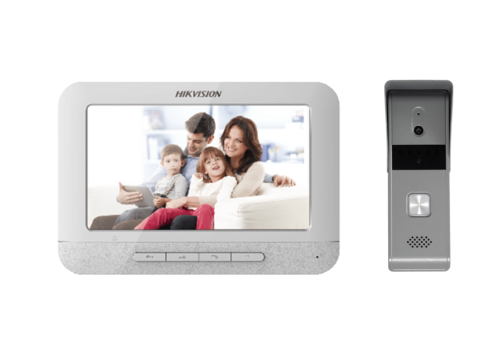
A video door phone lets you see and speak with visitors before opening the door. A Hikvision 7-inch video door phone combines a large indoor display with an outdoor calling unit, helping households and businesses manage entry with greater convenience and confidence.
What Is a 7-Inch Video Door Phone?
The system typically includes an indoor monitor with a 7-inch screen and an outdoor station fitted near the entrance. When a visitor presses the call button, the indoor monitor displays the visitor, allowing the occupant to communicate with them. Depending on the model and installation, the system may also allow the door or gate to be released from the monitor.
Hikvision offers different video intercom models and configurations. Features, wiring requirements and compatibility can vary, so it is important to check the specifications of the exact model before purchase.
Key Features and Benefits
- Large display: A 7-inch screen provides a clear, convenient view of visitors.
- Two-way communication: Speak with a visitor without going to the entrance.
- Door or gate release: Compatible systems can be connected to an electric lock or gate mechanism for remote release.
- Improved access management: Check who is at the door before allowing entry.
- Useful for different properties: Suitable configurations may be available for homes, apartments, offices and other premises.
- Expandable options: Some systems can be integrated with additional indoor monitors or other compatible devices, subject to the model and system design.
Where Can It Be Used?
A Hikvision 7-inch video door phone can be considered for a home entrance, apartment, office reception or gated property. It is especially useful where occupants want to communicate with visitors from indoors and control access without opening the door immediately.
Choosing the Right Model
Before selecting a video door phone, consider the number of entrances and indoor monitors required, the type of door lock or gate, the available cabling and the distance between the indoor monitor and outdoor station. Also check whether the chosen model supports the functions you need, such as call recording, additional cameras or integration with other security devices.
Not every feature is available on every model. Confirm the product datasheet and compatibility requirements with the supplier or installer before making a decision.
Installation and Maintenance
Correct installation is important for dependable operation. The outdoor station should be positioned where visitors can use it comfortably and where the camera has a suitable view of the entrance. The system should be installed using the recommended cabling and configured according to the manufacturer’s instructions. Professional installation can help ensure that the monitor, outdoor station and any connected lock work together properly.
Keep the outdoor unit clean and check the system periodically. If the display, audio or door-release function does not work as expected, have the wiring, power supply and device compatibility checked by a qualified technician.
Conclusion
A Hikvision 7-inch video door phone offers a practical way to see and speak with visitors before granting access. Its large indoor screen and potential door-release integration can make everyday entry management more convenient. As available features differ between models, compare the specifications and seek installation advice to choose a system that suits your property.
5 Essential Tips for Your Hikvision 7-Inch Video Door Phone
- Check your Hikvision model’s compatibility before buying accessories.
- Have a qualified installer connect the monitor and door station.
- Use the on-screen settings to adjust brightness and volume.
- Set a strong password if your model supports network access.
- Clean the 7-inch screen with a soft, dry cloth.
Check your Hikvision model’s compatibility before buying accessories.
Before buying accessories for your Hikvision 7-inch video door phone, check that they are compatible with your exact model. Features and connection requirements can vary across models, so an accessory that works with one system may not work with another. Refer to the product datasheet or consult an authorised supplier or installer to confirm compatibility and avoid unnecessary expense.
Have a qualified installer connect the monitor and door station.
Have a qualified installer connect the Hikvision 7-inch video door phone monitor and door station. Correct wiring and configuration help ensure clear audio and video, reliable operation and proper communication between the units. A professional can also check compatibility with your existing cabling, power supply and door lock before completing the installation.
Use the on-screen settings to adjust brightness and volume.
Use the on-screen settings on your Hikvision 7-inch video door phone to adjust the display brightness and speaker volume to suit your home or office. Increase the brightness for a clearer picture in a well-lit area, or lower it for a more comfortable view in dim conditions. Set the volume so you can hear visitor calls and conversations clearly without disturbing others.
Set a strong password if your model supports network access.
If your Hikvision 7-inch video door phone supports network access, set a strong, unique password during installation. Avoid default credentials, simple number sequences and passwords used for other accounts. A combination of upper- and lower-case letters, numbers and symbols can help protect the device from unauthorised access. Keep the password private and update it if you think it may have been shared.
Clean the 7-inch screen with a soft, dry cloth.
Clean the 7-inch screen gently with a soft, dry, lint-free cloth to remove dust and fingerprints. Avoid using abrasive materials, sprays or excess moisture, as these may damage the display. For best results, follow the care instructions provided with your Hikvision video door phone.