Hikvision Video Door Phone with Lock: A Smarter Way to Secure Your Entrance
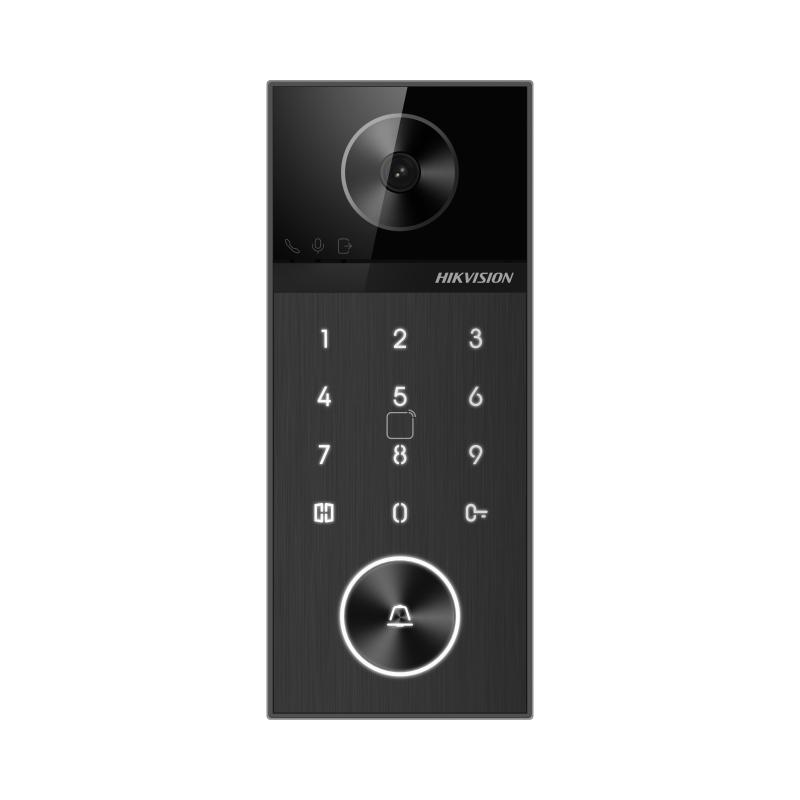
A video door phone with an electric lock lets you see and speak to a visitor before deciding whether to open the door. Hikvision video door phone systems combine a visitor-facing door station with an indoor monitor, and compatible models can be connected to an electric lock for convenient access control.
Whether it is for a home, apartment, office or other premises, the right setup can make it easier to manage visitors while adding another layer of security at the entrance.
How a Hikvision Video Door Phone with Lock Works
A typical system includes a door station installed at the entrance and an indoor monitor placed inside the property. When a visitor presses the call button, the monitor displays the visitor’s image and allows the occupant to speak with them. If the system and lock are configured for remote release, the occupant can press the unlock button to release the door without going to the entrance.
Depending on the model and installation, a system may also support features such as multiple indoor monitors, connection to other security devices or access through a mobile application. These options vary by product, so check the model’s specifications before purchase.
Types of Locks That May Be Used
The lock must be suitable for the door and compatible with the video door phone’s lock-control output. Common options include:
- Electric strike lock: Often fitted to a door frame and used with a suitable latch.
- Electromagnetic lock: Uses magnetic force to hold a door closed and is commonly considered for certain commercial entrances.
- Electric bolt or drop bolt: A motorised bolt that secures the door or gate.
Not every lock works with every door station. The power supply, wiring, lock type and release method must all be checked together. A qualified installer can help select the right combination.
Benefits of a Video Door Phone and Electric Lock
- See before you open: View the visitor on the indoor monitor before granting access.
- Speak from indoors: Communicate with visitors without opening the door.
- Convenient door release: Unlock a compatible entrance from the monitor when appropriate.
- More controlled access: Decide who enters rather than relying on an unattended doorbell.
- Useful for different premises: Suitable configurations may be available for homes, offices and multi-occupancy buildings.
What to Consider Before Buying
Before choosing a Hikvision video door phone with lock, consider the entrance layout and the way the system will be used:
- Check the exact model’s video, audio and lock-release specifications.
- Confirm that the door station, indoor monitor and lock are compatible.
- Choose a lock suited to the door material, frame and expected use.
- Consider whether you need one indoor monitor or several.
- Check wiring routes, power requirements and backup arrangements.
- If remote viewing or mobile access is important, verify that the selected model supports it and review the network requirements.
- For an apartment or shared entrance, confirm permissions and building-management requirements before installation.
Installation and Security Considerations
Correct installation is important for reliable operation. The door station should be positioned for a clear view of visitors, while the monitor should be placed somewhere convenient. The installer should also confirm the lock’s electrical requirements and follow the manufacturer’s instructions for wiring and configuration.
Keep in mind that an electric lock is only one part of entrance security. Use a suitable physical lock, maintain the door and frame, and ensure the chosen release method meets the needs of the premises. Where a door forms part of an emergency exit route, access control must be designed to meet applicable safety requirements and local regulations.
Frequently Asked Questions
Can a Hikvision video door phone unlock the door?
Some compatible systems can operate an electric lock through a release function. The capability depends on the specific door station, system configuration and lock. Confirm compatibility in the product documentation before buying.
Can an existing door lock be used?
Possibly, but it depends on the lock type and whether it can be connected and operated safely by the selected system. An installer can assess the existing door hardware and recommend a suitable solution.
Does every model support mobile unlocking?
No. Mobile viewing or unlocking depends on the model, system setup, network connection and supported software. Check the specifications for the exact product you are considering.
Is professional installation recommended?
Yes. Professional installation helps ensure that the video door phone, power supply, wiring and electric lock work together correctly.
Choose a Setup That Suits Your Entrance
A Hikvision video door phone with a compatible electric lock can bring visitor screening and convenient access control together in one system. The best choice depends on the entrance, the lock required and the features you need. Confirm model compatibility and consult a qualified installer to plan a safe, reliable setup.
6 Essential Tips for Setting Up a Hikvision Video Door Phone with Lock
- Choose a Hikvision door station and indoor monitor that support the same system.
- Check that the electric lock matches the door station’s relay rating.
- Use the correct power supply and follow the wiring diagram.
- Set the unlock time to a brief, safe duration.
- Change default passwords and restrict remote access.
- Have a qualified installer test the lock and backup power.
Choose a Hikvision door station and indoor monitor that support the same system.
Choose a Hikvision door station and indoor monitor that are designed to work together on the same system. Check the model numbers and compatibility details before purchasing, as features and connections can vary between product ranges. Matching components helps ensure reliable communication, video display and door-release operation with a compatible electric lock.
Check that the electric lock matches the door station’s relay rating.
Before connecting an electric lock, check that its voltage and current requirements are within the door station’s relay rating. If the lock draws more power than the relay can safely handle, it may damage the equipment or cause unreliable operation. Where necessary, use a compatible external power supply and relay, and have a qualified installer confirm the wiring against the manufacturers’ specifications.
Use the correct power supply and follow the wiring diagram.
Use the correct power supply specified for your Hikvision video door phone and compatible electric lock, as incorrect voltage or wiring can cause unreliable operation or damage the equipment. Follow the wiring diagram for the exact model, check all connections before switching on the system, and have a qualified installer complete the work if you are unsure.
Set the unlock time to a brief, safe duration.
Set the unlock time on your Hikvision video door phone to a brief, safe duration so the door does not remain unsecured longer than necessary. Choose a setting that gives an authorised visitor enough time to enter, then test it to ensure the lock engages properly after the door closes. The ideal duration depends on the door and lock type, so follow the manufacturer’s instructions or consult your installer.
Change default passwords and restrict remote access.
Change all default passwords on your Hikvision video door phone and any connected devices as soon as they are installed. Use strong, unique passwords and keep the system’s firmware updated. Restrict remote access to trusted users and enable it only when needed; review account permissions regularly and disable unused accounts. These steps help reduce the risk of unauthorised access to your video door phone and connected door lock.
Have a qualified installer test the lock and backup power.
Have a qualified installer test the Hikvision video door phone, electric lock and backup power together to confirm that the door releases correctly and the system continues to work during a power interruption. Regular checks can help identify wiring, battery or lock faults early and ensure the setup operates reliably when needed.