Home CCTV Camera System: A Practical Guide for Indian Homes
A home CCTV camera system can help you keep an eye on your property, identify unusual activity and review recorded footage when needed. Whether you live in an apartment, an independent house or a gated property, the right system can improve visibility around key areas such as entrances, driveways and common spaces.
Choosing a system is not just about buying a camera. It is important to consider where cameras will be placed, how footage will be stored, whether you need remote viewing and how to protect your privacy. This guide explains the main options and what to consider before installation.
What is a home CCTV camera system?
A home CCTV system uses cameras to capture video and send it to a recording device, storage service or viewing device. Depending on the setup, you may be able to watch live footage or review recordings on a monitor, computer or mobile phone.
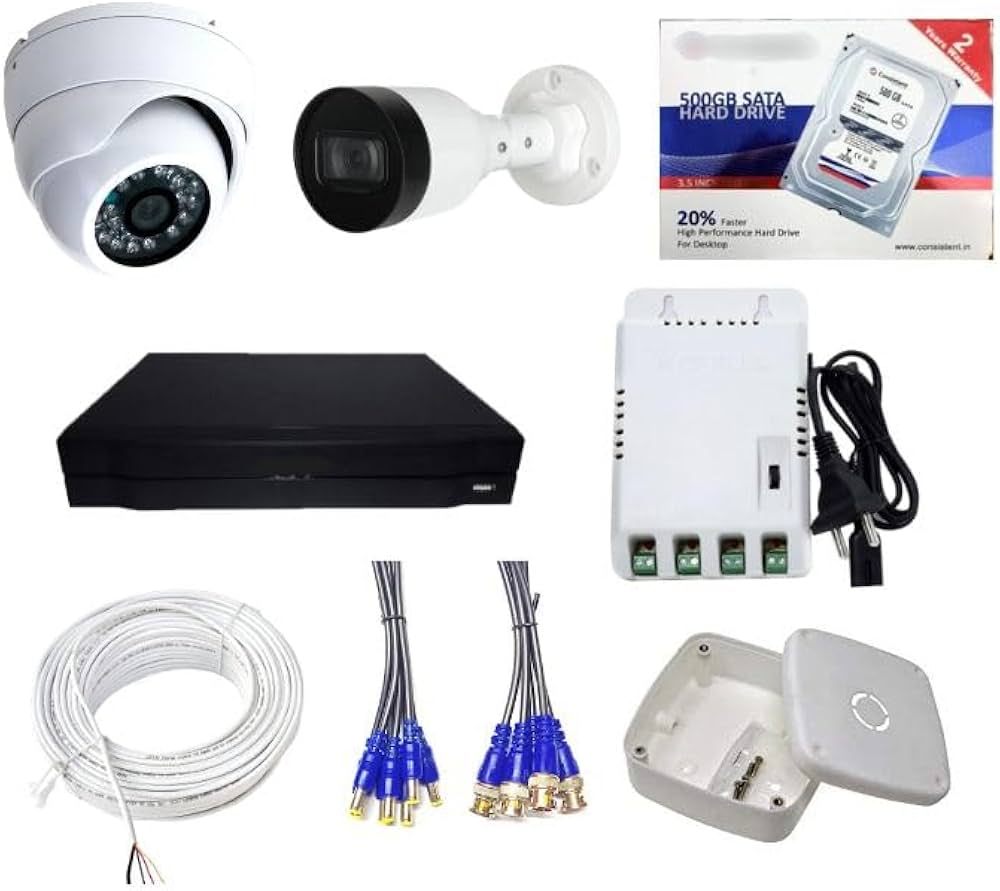
A typical system may include:
- CCTV cameras: Capture video indoors or outdoors.
- Recorder: An DVR or NVR stores footage from the cameras.
- Storage: A hard drive, memory card or cloud service retains recordings.
- Network connection: Enables remote access for compatible systems.
- Power supply and cabling: Provide power and, in wired systems, connect cameras to the recorder.
- Viewing device: A phone, computer or monitor used to view live or recorded video.
Common types of home CCTV cameras
Indoor cameras
Indoor cameras are designed for rooms, hallways and other interior areas. They are often compact and may include features such as two-way audio, motion alerts or pan-and-tilt movement. Place them only in appropriate shared or entry areas, and never in private spaces such as bathrooms.
Outdoor cameras
Outdoor cameras are built for use in exposed areas. When comparing models, check the manufacturer’s weather-resistance rating and suitability for the location. Common positions include entrances, parking areas, balconies and the perimeter of a property.
Wired cameras
Wired cameras connect to a recorder using cables. They can be a suitable choice when you want a permanent installation and reliable connectivity, but cable routing may require planning and professional installation.
Wireless cameras
Wireless cameras transmit video over a network, usually Wi-Fi. “Wireless” does not always mean cable-free: some models still need a power connection. Performance depends on the strength and reliability of the network where each camera is installed.
IP cameras
IP cameras send video over an internet protocol network. They may connect to an NVR or a compatible app and can offer features such as high-resolution video and remote viewing. Confirm that the camera, recorder and app work together before purchasing.
Key features to consider
- Video resolution: Higher resolution can make details easier to see, but also uses more storage and network bandwidth.
- Night vision: Infrared or low-light features can help cameras capture footage after dark. Check how well the feature suits the distance and lighting at your property.
- Field of view: A wider view covers more area, while a narrower view may show greater detail in a specific direction.
- Motion detection: Alerts can notify you when movement is detected. Adjust sensitivity and activity zones to reduce unnecessary notifications.
- Recording options: Check whether the system records continuously, only when motion is detected, or both.
- Storage capacity: The amount of footage retained depends on recording settings, video quality, number of cameras and storage size.
- Remote access: If you want to view footage on your phone, check the app’s compatibility, security features and internet requirements.
- Power backup: Consider what happens to the cameras and recorder during a power cut. A suitable backup arrangement may help maintain operation.
How many cameras does a home need?
The right number depends on the size and layout of your property, entry points and areas you want to monitor. Rather than choosing cameras by count alone, identify the places where visibility matters most. These may include the main door, rear entrance, driveway, garage or shared access points.
Before installation, walk around the property and note potential blind spots. A camera should provide a useful view without unnecessarily recording neighbours’ homes or public areas. For a larger or more complex property, a security professional can help plan camera positions and coverage.
Choosing between local and cloud storage
Local storage keeps recordings on a recorder, hard drive or memory card at the property. It may allow access without a cloud subscription, but the equipment should be secured against damage or theft.
Cloud storage saves footage online through a compatible service. It can make recordings accessible even if the camera or recorder is damaged, but may involve recurring charges and depends on a reliable internet connection. Review storage limits, subscription terms and account security before choosing a service.
Installation and placement tips
- Position cameras to cover entrances and important approaches, rather than pointing them randomly across a room or yard.
- Mount outdoor cameras high enough to reduce tampering, while keeping the intended area clearly visible.
- Avoid pointing cameras directly at bright lights, reflective surfaces or the sun, as glare can affect image quality.
- Check Wi-Fi signal strength at the proposed location before installing a wireless camera.
- Keep cables protected and use suitable fittings for the installation environment.
- Test live viewing, recording, playback and alerts after installation.
- Change default passwords and keep device software and apps up to date.
Privacy and security considerations
CCTV should be used responsibly. Aim cameras at your own property and avoid capturing areas where neighbours or visitors would reasonably expect privacy. Let household members and visitors know about cameras where appropriate, and follow applicable rules and building or housing-society requirements.
Protect your system by using a strong, unique password, enabling multi-factor authentication where available and limiting access to trusted users. Use a secure home network and review app permissions regularly. If footage is stored online, check the provider’s privacy and security information.
Maintaining your home CCTV system
Periodic checks help ensure that the system is working as expected. Clean camera lenses gently, confirm that cameras remain in position, test night vision and motion alerts, and review whether recordings are being saved. Also check storage capacity, power connections, network performance and software updates.
Conclusion
A well-planned home CCTV camera system can provide useful visibility around your property and make it easier to review activity. The best solution depends on your home’s layout, preferred recording method, network conditions and privacy requirements. Compare features carefully, plan camera placement before installation and secure the system with good digital security practices.
Sonal Enterprises India works with electronic security and surveillance solutions. For guidance on selecting a CCTV setup for your property, discuss your coverage requirements, installation environment and recording preferences with a qualified security professional.
5 Key Benefits of a Home CCTV Camera System
- Helps monitor your home and entrances.
- Lets you review recorded footage when needed.
- Provides night vision on compatible models.
- Can send motion alerts to your phone.
- Offers remote viewing on compatible systems.
7 Drawbacks of Installing a Home CCTV Camera System
- Initial purchase and installation can be costly.
- Wired systems may need extensive cabling.
- Wireless cameras rely on a stable network.
- Power cuts can interrupt monitoring.
- Cloud storage may require a subscription.
- Poor placement can leave blind spots.
- Cameras require regular maintenance and security updates.
Helps monitor your home and entrances.
A home CCTV camera system helps you monitor your property and keep an eye on key entrances, such as the main door, back entrance and driveway. Live viewing and motion alerts can help you check activity when you are away, while recorded footage lets you review events later. This added visibility can support a greater sense of security for you and your family.
Lets you review recorded footage when needed.
A home CCTV camera system lets you review recorded footage whenever needed, making it easier to check what happened at your property. Whether you missed a visitor, want to confirm a delivery or need to look into an unusual incident, you can search saved recordings for the relevant time and camera view. This can provide useful clarity and help you share information with the appropriate authorities, if required.
Provides night vision on compatible models.
Compatible home CCTV camera models with night vision can help you monitor key areas even in low-light conditions or after dark. Depending on the model, infrared or low-light technology may capture useful footage of entrances, driveways and other areas when visibility is limited. For best results, check the camera’s night-vision range and position it to avoid glare from nearby lights or reflective surfaces.
Can send motion alerts to your phone.
A home CCTV camera system with motion detection can send alerts directly to your phone when it detects activity in a monitored area. This helps you check what is happening in real time, whether you are at work, travelling or simply in another part of the house. Many systems let you adjust detection zones and sensitivity, so you can focus alerts on important areas such as entrances and driveways while reducing notifications from routine movement.
Offers remote viewing on compatible systems.
One of the key advantages of a home CCTV camera system is the ability to view live footage remotely on compatible systems. Using a smartphone, tablet or computer, homeowners can check selected areas of their property while away, provided the cameras and internet connection support remote access. This can offer added convenience and help you stay informed about activity at home.
Initial purchase and installation can be costly.
One drawback of a home CCTV camera system is the initial cost. Cameras, recording equipment, storage, cabling and professional installation can add up, particularly for larger homes or systems with advanced features. It is worth planning a budget in advance and comparing options to find a setup that meets your security needs without paying for features you may not use.
Wired systems may need extensive cabling.
One drawback of a wired home CCTV system is that it may require extensive cabling between the cameras, recorder and power sources. In an existing home, routing cables through walls, ceilings or outdoor areas can be disruptive, time-consuming and may require professional installation. Careful planning is needed to keep cables secure and unobtrusive, which can add to the overall installation cost.
Wireless cameras rely on a stable network.
Wireless home CCTV cameras rely on a stable Wi-Fi connection to transmit footage and send alerts. If the signal is weak or the network experiences an outage, video may lag, recordings may be interrupted, or remote viewing may become unavailable. Before installation, check Wi-Fi coverage at each camera location and consider improving the network or choosing a wired system for areas with unreliable connectivity.
Power cuts can interrupt monitoring.
One drawback of a home CCTV camera system is that power cuts can interrupt monitoring. Unless the cameras, recorder and network equipment have a suitable backup power supply, they may stop recording or become unavailable during an outage. This can leave important areas unmonitored until power is restored. A compatible UPS or other backup solution can help reduce interruptions, but its capacity and backup duration should be chosen to suit the system.
Cloud storage may require a subscription.
One drawback of cloud storage for a home CCTV camera system is that it may require a recurring subscription. Depending on the service, a fee may be needed to store recordings, access older footage or use additional features. These costs can add up over time, so check the plan’s price, storage limits and renewal terms before choosing a system. A camera with local storage may be an alternative if you prefer to avoid ongoing charges.
Poor placement can leave blind spots.
Poor placement can leave blind spots, leaving parts of your home or property outside the camera’s view. Entrances, corridors, stairways and outdoor access points may be missed if cameras are positioned without careful planning. Before installation, check each camera’s field of view and test the live feed from different angles. A professional site assessment can also help identify gaps and ensure cameras cover the areas that matter without intruding on neighbours’ privacy.
Cameras require regular maintenance and security updates.
Home CCTV cameras need regular maintenance to keep them working reliably. Lenses may require cleaning, connections and power supplies should be checked, and recording storage needs to be monitored. In addition, cameras, apps and recorders require security updates to fix vulnerabilities and protect footage from unauthorised access. Keeping up with these tasks can take time, and missed maintenance or updates may affect image quality, system performance and privacy.