IP Camera System: A Smarter Approach to Video Surveillance
An IP camera system is a video surveillance solution that captures and transmits footage over an internet protocol (IP) network. It can help businesses, institutions and property owners monitor premises, review recorded events and manage security from a central location. Unlike traditional analogue CCTV, an IP system sends digital video through a network, making it easier to integrate with other security and IT solutions.
What Is an IP Camera System?
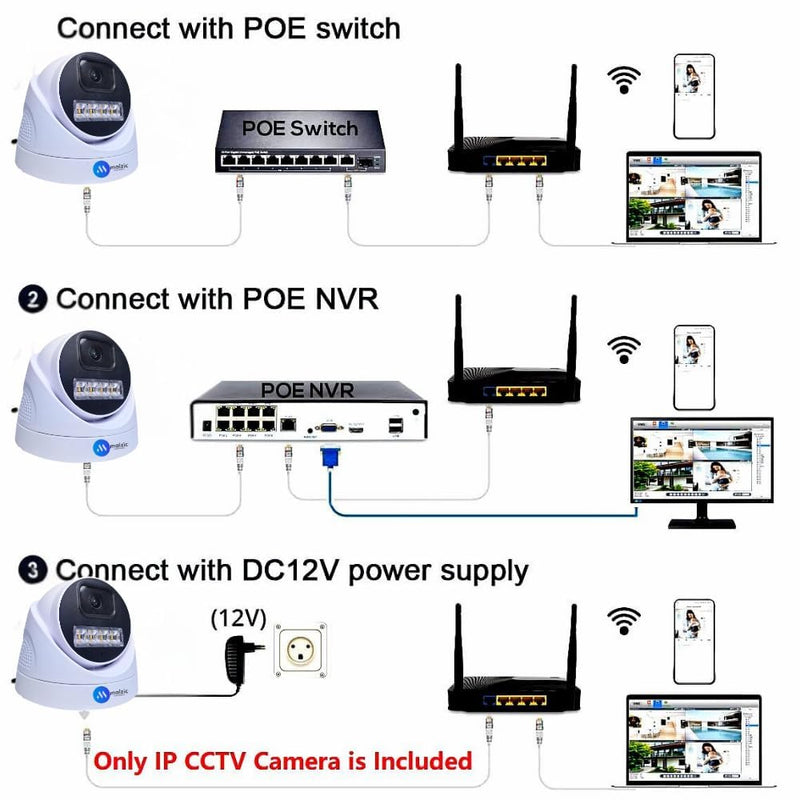
An IP camera, also known as a network camera, records video digitally and sends it over a wired or wireless network. A typical system may include IP cameras, a network video recorder (NVR), network switches, storage drives, cabling and monitoring software. Depending on the design, users may view live or recorded footage on a monitor, computer or authorised mobile device.
Many IP cameras support Power over Ethernet (PoE), which allows compatible network cabling to carry both data and electrical power. This can simplify installation, although the equipment and network must be designed to support it.
Key Benefits of IP Surveillance
- Clear digital video: IP cameras are available in a range of resolutions to suit different areas and identification needs.
- Flexible system design: Cameras can be placed across a site and connected through a suitable network infrastructure.
- Remote access: Authorised users may be able to view footage remotely, subject to the system configuration and internet availability.
- Centralised monitoring: An NVR or video management platform can help operators manage multiple cameras from one interface.
- Useful search and playback: Recorded footage can be reviewed by time, camera and, where supported, other search criteria.
- Integration options: Some systems can be integrated with access control, alarms and other security technologies.
Common Types of IP Cameras
The right camera depends on the location, lighting, coverage area and level of detail required. Common options include:
- Dome cameras: Often used indoors and in covered areas, with a discreet design.
- Bullet cameras: A visible camera style commonly used for monitoring entrances, boundaries and outdoor areas.
- PTZ cameras: Pan-tilt-zoom cameras can be moved and zoomed remotely, where the model and system support these functions.
- Fixed-lens and varifocal cameras: Fixed lenses provide a set field of view, while varifocal lenses allow the viewing angle to be adjusted.
- Specialist cameras: Depending on requirements, options may include thermal, low-light or other purpose-designed models.
Planning an IP Camera System
Good planning is essential for useful footage and reliable operation. Before selecting equipment, consider the following:
- Identify the purpose: Decide whether the priority is general monitoring, incident review, access-point coverage or clearer identification at specific locations.
- Survey the site: Check entrances, exits, work areas, perimeters, lighting conditions and possible obstructions.
- Choose camera locations: Position cameras to cover important areas while avoiding unnecessary views into private spaces.
- Select suitable resolution and lenses: The best choice depends on the distance, field of view and level of detail needed.
- Estimate storage requirements: Recording duration depends on factors such as camera count, resolution, frame rate, compression, motion activity and retention policy.
- Assess the network: Ensure the network can handle video traffic and that power, cabling and bandwidth are adequate.
- Plan system access: Set clear permissions for users who can view, export or manage footage.
Security and Privacy Considerations
Because IP cameras connect to a network, cybersecurity should be part of the system design. Change default passwords, use strong unique credentials, keep camera and recorder firmware updated, restrict access to authorised users and use secure network settings. Remote access should be configured carefully, and the network should be protected by appropriate security controls.
Video surveillance should also be used responsibly. Consider applicable privacy requirements, provide notices where appropriate and define how long footage will be retained and who may access it. Requirements can vary depending on the location and use of the system.
Installation and Ongoing Maintenance
Professional installation can help ensure cameras are positioned correctly, cabling is protected and the recorder and network are configured properly. After installation, test live viewing, recording, playback, alerts and remote access. Periodic checks should include camera alignment, lens cleanliness, storage health, time settings, user permissions and software updates.
Choosing the Right IP Camera Solution
There is no single IP camera system suited to every site. A small office may need a different design from a warehouse, educational campus, retail outlet or large commercial facility. The most appropriate solution will take account of coverage objectives, site conditions, network capacity, storage needs and future expansion.
Sonal Enterprises India offers security and surveillance solutions for a range of applications. For an IP camera system, begin with a site assessment and a clear understanding of what the system needs to monitor. A well-planned solution can support more effective surveillance, easier footage review and better day-to-day security management.
9 Essential Tips for a Secure and Reliable IP Camera System
- Place cameras at entrances and other key areas.
- Use strong, unique passwords for every camera.
- Change default login details during setup.
- Update camera firmware regularly.
- Secure the network with WPA2 or WPA3.
- Use PoE switches for simpler installation.
- Set up motion alerts to reduce unnecessary recordings.
- Check local privacy rules before recording.
- Test camera views and backups regularly.
Place cameras at entrances and other key areas.
Place IP cameras at entrances, exits and other key areas such as reception desks, loading bays and corridors to monitor important activity and support incident reviews. Position each camera to provide a clear view without obstructions, and check that lighting is suitable both during the day and at night. Avoid recording private areas, and follow applicable privacy requirements when installing and using cameras.
Use strong, unique passwords for every camera.
Use a strong, unique password for every camera in your IP camera system. Avoid default passwords and easy-to-guess details such as names or birthdays. A different password for each device helps limit the impact if one account is compromised. Store passwords securely and restrict access to authorised users only.
Change default login details during setup.
Change the IP camera’s default username and password during setup. Default login details are often publicly available, so leaving them unchanged can make it easier for unauthorised users to access your camera or footage. Create a strong, unique password for each device, store it securely and limit access to trusted users. Where available, enable two-factor authentication for an added layer of protection.
Update camera firmware regularly.
Update your IP camera firmware regularly to help keep the system secure, reliable and performing as intended. Firmware updates may fix software issues, address security vulnerabilities and improve compatibility with other equipment. Before updating, check the manufacturer’s instructions, back up important settings and ensure the camera has a stable power and network connection. Use firmware only from the manufacturer’s official source, and confirm that the update has completed successfully.
Secure the network with WPA2 or WPA3.
Secure the Wi-Fi network used by your IP camera system with WPA2 or, where supported, WPA3 encryption. These security standards help protect data travelling between cameras and the network from unauthorised access. Use a strong, unique Wi-Fi password, change the router’s default login details and keep its firmware updated. For added protection, consider placing cameras on a separate network from computers and other devices.
Use PoE switches for simpler installation.
Use Power over Ethernet (PoE) switches to simplify the installation of an IP camera system. With compatible cameras, a single Ethernet cable can carry both data and electrical power, reducing the need for separate power outlets and cabling at each camera location. This can make installation neater and easier to manage, particularly across larger sites. Before choosing a PoE switch, check that it supports the cameras’ power requirements and provides enough ports and network capacity for the system.
Set up motion alerts to reduce unnecessary recordings.
Set up motion alerts to help your IP camera system focus on relevant activity and reduce unnecessary recordings. Adjust the motion detection zones and sensitivity for each camera to suit its location—for example, exclude busy roads, moving trees or other areas that may trigger repeated alerts. This can help save storage space and make important events easier to find, while regular checks ensure the settings continue to work effectively.
Check local privacy rules before recording.
Before installing or using an IP camera system, check the privacy rules that apply in your area. Requirements may cover where cameras can be placed, whether people must be notified, who can access recordings and how long footage may be kept. Avoid capturing private spaces or more of a neighbouring property than necessary, and use clear signage where required. If unsure, seek advice from a qualified professional or the relevant authority.
Test camera views and backups regularly.
Test your IP camera views and backups regularly to make sure the system is ready when you need it. Check that each camera is focused, correctly positioned and recording clear footage in different lighting conditions. Review playback from the NVR or storage device, and confirm that scheduled or motion-based recordings are being saved as intended. Periodically test backup power and data backups, where available, so footage remains accessible during a power interruption or equipment failure.