How to Manage Access Control Effectively
Access control is the process of deciding who can enter a building, use a particular area or access a digital resource. A well-managed access control system helps protect people, property and information while allowing authorised users to move around efficiently.
For offices, factories, educational institutions, residential complexes and other premises, effective management involves more than installing a card reader or biometric device. It requires clear rules, accurate user records, regular reviews and a plan for responding to security incidents.
Identify Your Security Requirements
Start by understanding what needs protection and the level of security required. List the areas on your premises, such as reception areas, offices, server rooms, stores, laboratories and parking facilities. Consider the people who may need access, including employees, visitors, contractors and maintenance staff.
Assess the risks associated with each area. A public lobby may need simple entry monitoring, while a server room or cash-handling area may require stricter permissions and a record of every entry.
Create Access Levels
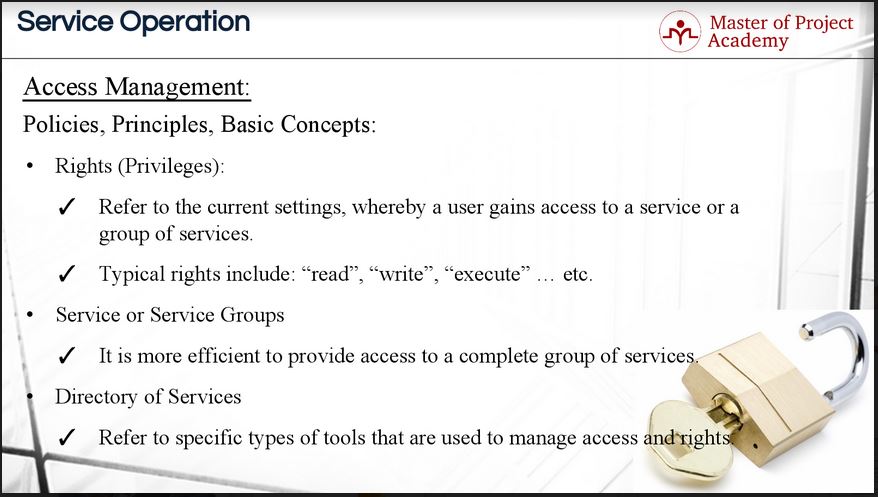
Give users access only to the areas they need for their role. This is known as the principle of least privilege. For example, an employee may be permitted to enter their department and shared facilities but not restricted areas.
Access levels should be based on job responsibilities, working hours and site requirements. Avoid giving every user the same permissions, and do not use shared credentials where individual identification is needed.
Choose Suitable Credentials
Access control systems can use a range of credentials, including:
- Proximity cards or key fobs
- PIN codes
- Biometric identifiers, such as fingerprints
- Mobile credentials
- Two-factor authentication, combining two forms of verification
The right option depends on the location, number of users, security requirements and ease of use. Sensitive areas may benefit from an additional verification step. Whatever method is selected, establish a process for reporting lost cards, changing PINs and disabling compromised credentials promptly.
Manage Users Throughout Their Lifecycle
Access permissions should be updated whenever a person joins, changes roles, moves to another site or leaves the organisation. Link the access control process with human resources or contractor onboarding procedures so that permissions are issued and withdrawn without delay.
For visitors and temporary workers, set an expiry date for credentials wherever possible. Collect visitor details according to your organisation’s policy, provide clear instructions and ensure temporary access is removed after the visit or assignment ends.
Set Clear Rules for Visitors and Contractors
Define how visitors are approved, registered and escorted. Depending on the site, visitors may need to show identification, wear a visitor badge or remain with an authorised host. Contractors may require access only to specific areas and during approved hours.
Make sure reception staff and site teams understand these procedures. Clear, consistent rules help prevent unauthorised entry without creating unnecessary delays for legitimate visitors.
Use Access Logs and Alerts Responsibly
Access logs can help administrators review entry activity, investigate incidents and identify unusual patterns. Configure alerts for events that matter, such as repeated denied access attempts or entry into a restricted area outside normal hours.
Logs should be reviewed by authorised personnel and retained only for as long as required by your organisation’s policies and applicable legal requirements. Protect records from unauthorised access, and explain to users how access information is collected and used.
Plan for Emergencies
Access control must support safe evacuation as well as security. Work with qualified professionals to ensure doors, locks and barriers operate appropriately during a fire alarm, power failure or other emergency. Emergency procedures should be compatible with applicable fire-safety requirements and local regulations.
Test emergency release arrangements regularly, and make sure staff know what to do if the system becomes unavailable. Any changes to doors or access equipment should be assessed for their impact on safe escape routes.
Maintain and Review the System
Routine maintenance helps keep an access control system reliable. Check readers, locks, door sensors, power supplies, network connections and backup arrangements at planned intervals. Investigate faults quickly, particularly where they affect a critical entrance or emergency exit.
Review permissions regularly, especially after organisational changes. An access review can identify inactive accounts, excessive permissions, expired contractor access and credentials that have not been returned.
Protect the System from Cyber Risks
Modern access control systems may connect to a network or central management platform. Use strong administrator passwords, restrict access to management software and apply security updates as recommended by the system provider. Separate system administration from everyday user accounts where possible, and maintain secure backups of essential configuration data.
Include access control in your organisation’s wider cybersecurity and incident-response plans. If a credential or administrator account is suspected to be compromised, follow a defined process to disable it, investigate the event and restore secure access.
Train Staff and Document Procedures
Even a well-designed system depends on people following the correct procedures. Train administrators to issue and remove credentials, manage permissions and respond to alarms. Explain to staff how to protect their cards or PINs and how to report a lost credential or suspicious activity.
Keep written procedures for enrolment, visitor access, emergency response, system maintenance and periodic reviews. Documentation makes responsibilities clear and helps ensure that access is managed consistently across locations.
Conclusion
To manage access control effectively, combine suitable technology with clear policies and regular oversight. Define who needs access, assign permissions carefully, remove access when it is no longer required and maintain the system over time. A planned approach can strengthen security while keeping day-to-day movement convenient for authorised users.
When assessing an access control solution, consider your site layout, user needs, security risks and emergency procedures. A qualified security systems provider can help evaluate these requirements and recommend an appropriate approach.
Access Control Management: 7 FAQs on ACLs, Access Control Types and IAM Pillars
- What is ACL and its types?
- What are the 4 types of access control?
- Why access control management?
- What are the 3 types of access control?
- What is access control examples?
- How do you manage access control?
- What are the 4 pillars of IAM?
What is ACL and its types?
An Access Control List (ACL) is a set of rules that specifies which users, groups or devices can access a particular resource and what actions they may perform, such as viewing, modifying or deleting it. In file systems, ACLs are commonly classified as access ACLs, which control permissions on an existing file or folder, and default ACLs, which set permissions inherited by new files and folders. In networking, ACLs are often described as standard or extended: standard ACLs generally filter traffic by source address, while extended ACLs can also consider details such as destination address, protocol and port. The exact types and features vary depending on the system.
What are the 4 types of access control?
The four common types of access control are Discretionary Access Control (DAC), Mandatory Access Control (MAC), Role-Based Access Control (RBAC) and Attribute-Based Access Control (ABAC). DAC lets the resource owner decide who gets access; MAC applies permissions set by a central authority, often using security classifications; RBAC grants access according to a person’s job role; and ABAC makes decisions using attributes such as the user, location, time or requested resource. The right approach depends on your organisation’s security needs and how access is managed.
Why access control management?
Access control management helps ensure that only authorised people can enter specific areas or use protected resources. It allows an organisation to assign and update permissions according to each person’s role, remove access when it is no longer needed, and review entry records when required. Managing access systematically can reduce the risk of unauthorised entry, support workplace safety and make day-to-day access more convenient for employees, visitors and contractors.
What are the 3 types of access control?
The three commonly recognised types of access control are Discretionary Access Control (DAC), Mandatory Access Control (MAC) and Role-Based Access Control (RBAC). With DAC, the owner of a resource decides who can access it. MAC uses centrally defined security rules and classifications to control access, while RBAC grants permissions according to a person’s job role. The most suitable type depends on the organisation’s security needs and how it manages users and resources.
What is access control examples?
Access control examples include using an access card or key fob to enter an office, a PIN or fingerprint to unlock a restricted room, and a visitor pass that permits entry only to approved areas. In digital environments, it can mean requiring a password or multi-factor authentication to access a computer system, or giving employees permission to view only the files needed for their roles.
How do you manage access control?
Access control is managed by identifying who needs access to each area, assigning permissions based on their role and issuing suitable credentials, such as access cards, PINs or biometrics. Review permissions regularly, update them when someone changes roles and remove them promptly when they leave. Keep access logs secure, maintain the system, train users and ensure emergency procedures allow safe evacuation.
What are the 4 pillars of IAM?
The four pillars of Identity and Access Management (IAM) are identification, authentication, authorisation and accountability. Identification establishes who a user is, while authentication verifies that identity, for example through a password, biometric check or multi-factor authentication. Authorisation determines which systems or resources the verified user may access, and accountability involves recording and reviewing user activity through logs and audits. Together, these pillars help ensure that only the right people can access the right resources and that their actions can be traced.