Small CCTV Camera for Home: A Practical Buying Guide
A small CCTV camera can help you keep an eye on important areas of your home, whether you are checking the entrance, monitoring a living room or keeping watch while you are away. Compact cameras are designed to fit discreetly into different spaces, but choosing the right one involves more than looking at its size. Image quality, connectivity, power supply and privacy should all be considered.
What Is a Small CCTV Camera?
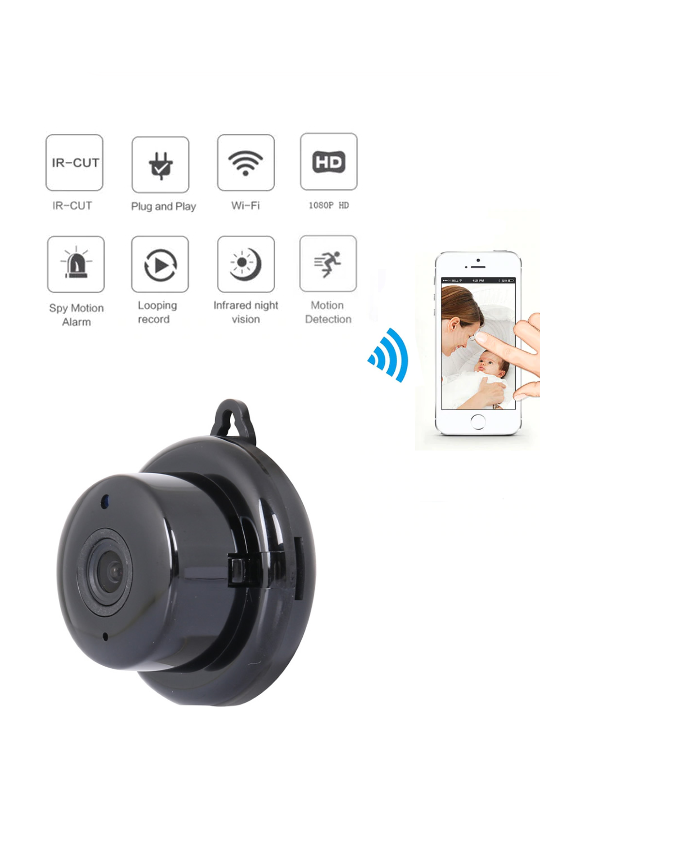
A small CCTV camera is a compact video camera used to monitor a specific area. Depending on the model, it may connect to a recorder, a home network or a mobile app. Some cameras are intended for indoor use, while weather-resistant models can be installed outdoors. Small size does not necessarily mean limited functionality: many models offer features such as night vision, motion alerts and two-way audio.
Benefits of a Compact Home CCTV Camera
- Fits into smaller spaces: Its compact design can suit entrances, corridors, shelves and other areas where a larger camera may be inconvenient.
- Helps monitor key areas: A camera can provide a view of a chosen location, such as a main door or garage entrance.
- Remote viewing: Network-connected models may let you view live footage through a compatible phone app, subject to the camera and internet connection.
- Useful features: Depending on the model, features may include night vision, motion detection, recording and notifications.
- Flexible installation: Some cameras are wired, while others use Wi-Fi and a rechargeable or plug-in power supply.
Features to Consider Before Buying
Image Quality
Choose a resolution that provides enough detail for the area you want to monitor. Consider the camera’s performance in different lighting conditions as well as its field of view. A wider view covers more space, but objects may appear smaller in the image.
Night Vision and Low-Light Performance
If the camera will be used after dark, check whether it includes infrared night vision or another low-light feature. Review the manufacturer’s specifications and make sure the camera is suitable for the expected distance and lighting at the installation point.
Wired or Wi-Fi Connectivity
A wired camera can provide a stable connection but may require more installation work. A Wi-Fi camera can offer greater flexibility, although performance depends on wireless coverage and network reliability. Check whether the camera needs a separate recorder or can store footage on a memory card or cloud service.
Recording and Storage
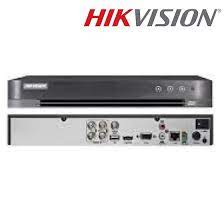
Find out how footage is saved and how long it can be retained. Storage options may include a digital video recorder (DVR), network video recorder (NVR), memory card or a cloud service. Cloud services may involve a subscription, so review the terms and costs before choosing.
Motion Detection and Alerts
Motion detection can help draw attention to activity in the camera’s view. Some models send alerts to a mobile device. Check whether sensitivity can be adjusted to reduce unnecessary notifications caused by pets, moving curtains or changes in lighting.
Power Supply
Confirm how the camera is powered. A mains-powered camera needs a suitable socket or wiring, while a battery-operated model will need periodic charging or battery replacement. For outdoor use, also check that the power arrangement is appropriate for the location.
Indoor or Outdoor Suitability
Use a camera specifically rated for the conditions where it will be installed. An indoor model may not withstand rain, dust or temperature changes. For an outdoor camera, check its weather-resistance rating and installation requirements.
Where Should You Install a Small CCTV Camera?
Start by deciding what you need to monitor. Common locations include the main entrance, a hallway, a garage or a room containing valuable equipment. Position the camera so that it has a clear view, is protected from accidental damage and is not pointed directly at bright windows or lights.
For the best view, consider the camera’s height, angle and field of vision before fixing it in place. Avoid installing a camera where it could capture private areas, such as bathrooms or neighbouring homes. If you are unsure about placement or wiring, consult a qualified CCTV installer.
Privacy and Security Considerations
Use CCTV responsibly. Tell household members and visitors where monitoring is taking place when appropriate, and avoid recording areas where people reasonably expect privacy. If a camera may capture a shared space or someone else’s property, consider the applicable privacy requirements and adjust its position to limit the view.
Protect the camera and its footage by changing default passwords, using a strong unique password and installing software updates. Secure your home Wi-Fi network and review who has access to the camera app or recordings.
Tips for Maintaining Your Camera
- Clean the lens gently so dust and marks do not affect the image.
- Check the camera’s view and recording periodically.
- Test night vision, motion alerts and remote viewing if these features are used.
- Keep the camera’s firmware and associated app up to date.
- Check cables, mounts and power connections for wear or looseness.
- Review storage capacity and remove or archive footage according to your needs.
Choosing the Right Small CCTV Camera for Your Home
The best small CCTV camera is one that suits the area, lighting conditions and recording needs of your home. Before purchasing, compare image quality, night vision, connectivity, storage, power requirements and weather suitability. Also consider how the camera will be installed and how you will keep the footage secure.
A well-planned CCTV setup can support home monitoring and provide useful visibility of selected areas. Sonal Enterprises India offers information on CCTV and surveillance systems to help you explore available security solutions. Assess your requirements carefully and seek professional advice where installation or system design is needed.
Small CCTV Cameras for Home: 6 Frequently Asked Questions in India
- What is the best small CCTV camera for home use?
- Can a small CCTV camera work without Wi-Fi?
- How much does a small CCTV camera for home cost in India?
- Does a small home CCTV camera record at night?
- Where should I install a small CCTV camera at home?
- How can I view and store footage from a small CCTV camera?
What is the best small CCTV camera for home use?
The best small CCTV camera for home use is one that suits the area you want to monitor and your recording needs. Look for clear video, reliable night vision, a suitable field of view, secure Wi-Fi connectivity and storage options such as a memory card, recorder or cloud service. Motion alerts and easy app access may also be useful. Before buying, check the power and installation requirements, choose an indoor- or outdoor-rated model as appropriate, and secure the camera with a strong password and updated software.
Can a small CCTV camera work without Wi-Fi?
Yes, a small CCTV camera can work without Wi-Fi if it supports local recording to a memory card, DVR or NVR. You may still be able to record and view footage directly on a connected monitor, but remote viewing and mobile alerts usually require an internet connection. Check the camera’s specifications, as some models need Wi-Fi for setup or core functions.
How much does a small CCTV camera for home cost in India?
The cost of a small CCTV camera for home use in India typically ranges from around ₹1,000 to ₹5,000 for a basic compact or Wi-Fi model. Cameras with higher resolution, colour night vision, two-way audio, pan-and-tilt or cloud storage may cost more. Installation, memory cards, recording equipment and subscription fees can also add to the total, so compare the complete costs and features before buying.
Does a small home CCTV camera record at night?
Yes, many small home CCTV cameras can record at night, provided they have night vision or suitable low-light capability. Infrared (IR) night vision can capture footage in darkness, usually in black and white, while some models produce colour images when there is enough ambient light. Check the camera’s night-vision range and ensure that recording is enabled and the device has power and sufficient storage.
Where should I install a small CCTV camera at home?
Install a small CCTV camera at key entry points and areas you want to monitor, such as the main entrance, hallway, garage or living room. Position it high enough to provide a clear view, while avoiding glare from windows and lights. Do not point cameras towards bathrooms or other private spaces, and adjust the angle to avoid unnecessarily recording neighbours or shared areas. Before fixing the camera, check its Wi-Fi signal, power supply and night-time view; consult a qualified installer if wiring or placement is uncertain.
How can I view and store footage from a small CCTV camera?
You can view footage from a small CCTV camera through a connected monitor, a mobile app or a computer, depending on the camera’s setup. Footage may be stored on a memory card, DVR/NVR or a cloud service; check the model’s storage options, recording settings and any subscription charges before buying. Use a strong password, secure your Wi-Fi connection and restrict access to recordings to help protect your privacy.