
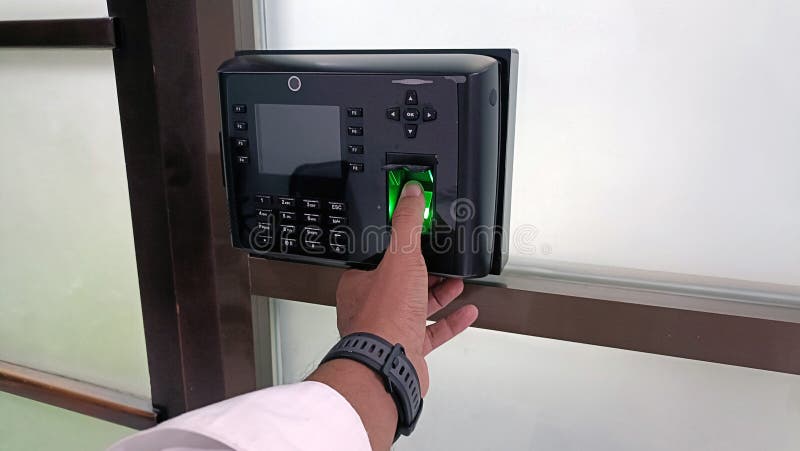
Thumb Machine for Attendance: A Practical Guide for Indian Businesses
A thumb machine for attendance is a biometric device that records employees’ working hours using their fingerprints. Often called a fingerprint attendance machine, it offers a simple way to record check-in and check-out times without relying on paper registers or manual entry.
From small offices and shops to factories, schools and larger organisations, fingerprint attendance systems can help make attendance records more organised. Here’s how they work and what to consider before choosing one.
How Does a Thumb Attendance Machine Work?
Each employee registers a fingerprint on the device. When they arrive or leave, they place their thumb or finger on the scanner. The machine compares the scan with the enrolled fingerprint record and logs the time if it finds a match.
Attendance data can usually be viewed on the machine or downloaded to a computer. Depending on the model, records may also be managed through dedicated software or a cloud-based platform. Some systems can connect with payroll, access control or HR software.
Benefits of Using a Fingerprint Attendance Machine
- More organised records: Digital logs make it easier to review attendance than paper registers.
- Less manual work: Automated time recording can reduce the need to enter attendance data by hand.
- Individual identification: Each employee uses their own registered fingerprint, helping distinguish one person’s record from another’s.
- Convenient reporting: Many systems provide reports for attendance, late arrivals, early departures and working hours.
- Flexible deployment: Machines are available for different team sizes and work environments, from small offices to busy industrial sites.
Features to Look For
Features differ between models, so consider your organisation’s requirements before purchasing. Useful points to compare include:
- Capacity: Check how many fingerprints and attendance records the device can store.
- Connectivity: Options may include USB, Ethernet, Wi-Fi or other network connections. Choose a method that suits your premises and IT setup.
- Attendance software: Confirm whether software is included, what reports it supports and whether it works with your existing systems.
- Shift and overtime support: If employees work different shifts, check that the system can handle your attendance rules.
- Backup and power: Consider how the device behaves during a power cut or network interruption, and how attendance data is backed up.
- Environmental suitability: A machine used at a factory entrance may need different protection from one installed in a clean, indoor office.
- Support and warranty: Ask about installation, training, maintenance and after-sales service.
Is a Thumb Machine Right for Every Workplace?
Fingerprint attendance machines can be useful, but they may not suit every situation. Fingerprints can be harder to read if a person’s hands are wet, dirty, worn or affected by certain types of work. For workplaces where this is common, ask the supplier about alternative verification options, such as a card, PIN or another suitable method.
It is also important to plan for employees who may have difficulty using a fingerprint scanner. A clear alternative process can help ensure that attendance is recorded fairly and consistently.
Installation and Everyday Use
Install the machine in a convenient, well-lit location where employees can use it without creating a queue or obstructing an entrance. Enrol fingerprints carefully and explain how to place a finger on the sensor. A short demonstration can reduce failed scans and help employees use the device correctly.
Before relying on the system for payroll or attendance decisions, test its settings and reports. Confirm that the device records the correct date and time, that shift rules are configured properly, and that managers know how to review and correct genuine errors.
Protecting Attendance Data
Fingerprint information is sensitive personal data. Before introducing a biometric attendance system, explain its purpose to employees and limit access to attendance records and biometric data to authorised personnel. Ask the supplier how the device stores and protects fingerprint information, how data can be deleted when it is no longer needed, and what controls are available for user access and backups.
Organisations in India should also review applicable data-protection requirements and obtain appropriate advice for their circumstances. Collect only the information needed for the stated purpose and establish a clear process for handling employee queries.
Choosing the Right Thumb Machine
The right fingerprint attendance machine depends on your workforce size, shift patterns, installation environment, reporting needs and existing software. Compare the device’s capacity, connectivity, support and data-protection features—not just its purchase price. A product demonstration can help confirm that the scanner and software work well for your team.
Conclusion
A thumb machine for attendance can make timekeeping more consistent and reduce manual record-keeping. With the right device, clear attendance rules and sensible safeguards for employee data, businesses can create a practical system for recording working hours. Assess your requirements carefully and choose a solution that fits the people and processes in your organisation.
7 Benefits of Using a Thumb Impression Attendance Machine
- Records attendance quickly and accurately.
- Reduces manual paperwork.
- Helps prevent buddy punching.
- Makes attendance reports easier to prepare.
- Tracks check-in and check-out times.
- Supports better payroll management.
- Suitable for offices, shops and factories.
7 Drawbacks of Using a Thumb Attendance Machine
- Fingerprints may not scan properly if hands are wet, dirty or worn.
- Employees with certain skin conditions may find scanning difficult.
- Busy entry points can lead to queues.
- Power or network issues may disrupt data syncing.
- Biometric data needs careful protection.
- Installation and software may add to costs.
- An alternative attendance method may still be needed.
Records attendance quickly and accurately.
A thumb machine records attendance quickly and accurately, allowing employees to clock in or out with a simple fingerprint scan. It logs the time automatically, helping reduce manual entry errors and making attendance records easier for managers to review.
Reduces manual paperwork.
A thumb machine for attendance reduces manual paperwork by recording employees’ check-in and check-out times digitally. This removes the need for paper registers and handwritten timesheets, making attendance records easier to store, review and manage. It can also save administrative time and help reduce errors caused by manual entries.
Helps prevent buddy punching.
A thumb machine for attendance helps prevent buddy punching, where one employee marks attendance on behalf of another. Since each person must use their own registered fingerprint to record a check-in or check-out, it is harder for colleagues to falsify attendance. This can support more accurate records and make attendance tracking fairer for everyone.
Makes attendance reports easier to prepare.
A thumb machine for attendance makes attendance reports easier to prepare by recording employees’ check-in and check-out times digitally. Instead of checking paper registers and entering details manually, authorised staff can access attendance data and generate reports for working hours, late arrivals, absences and shift records. This can save administrative time and help keep attendance information organised for payroll and routine review.
Tracks check-in and check-out times.
A thumb machine for attendance automatically records employees’ check-in and check-out times when they scan their fingerprints. This creates a clear, time-stamped attendance record, making it easier for businesses to monitor punctuality, review working hours and reduce errors associated with manual registers.
Supports better payroll management.
A thumb machine for attendance supports better payroll management by providing clear, time-stamped records of employees’ check-in and check-out times. These records make it easier to review working hours, late arrivals, absences and overtime, helping payroll teams calculate wages more accurately and spend less time checking attendance manually. When integrated with payroll software, the data can also streamline monthly processing and reduce errors.
Suitable for offices, shops and factories.
A thumb machine for attendance is suitable for a wide range of workplaces, including offices, shops and factories. It can help office teams maintain organised attendance records, support shops with tracking staff across shifts and provide factories with a convenient way to record employee check-ins at entry points. With options available for different team sizes and working environments, businesses can choose a system that fits their day-to-day needs.
Fingerprints may not scan properly if hands are wet, dirty or worn.
A thumb machine for attendance may not scan reliably when an employee’s hands are wet, dirty or worn from regular manual work. This can lead to repeated attempts, delays at entry points and occasional gaps in attendance records. Keeping the scanner clean and providing a suitable alternative, such as a PIN or access card, can help minimise disruption.
Employees with certain skin conditions may find scanning difficult.
Employees with certain skin conditions, such as very dry or irritated skin, may find it difficult for a thumb attendance machine to read their fingerprints reliably. Cuts, calluses or worn fingerprints can also lead to repeated failed scans and delays at check-in. Employers can help by keeping the scanner clean and offering an alternative attendance method, such as a PIN, access card or manual record, when needed.
Busy entry points can lead to queues.
Busy entry points can lead to queues when many employees arrive at the same time and must scan their fingerprints one by one. This may delay the start of work, especially if the machine is slow, scans fail or staff need to try again. Placing the device in an accessible location, choosing a model suited to the size of the workforce and considering additional machines can help reduce waiting times.
Power or network issues may disrupt data syncing.
Power or network issues can disrupt the syncing of attendance data, especially when a thumb machine relies on an internet connection or central server. As a result, managers may not see the latest attendance records straight away, which can delay reporting or payroll checks. Choosing a device with offline storage, backup power and automatic syncing once the connection returns can help reduce this risk.
Biometric data needs careful protection.
Biometric data, such as fingerprints, needs careful protection because it is sensitive personal information. Businesses using a thumb machine for attendance should restrict access to this data, store it securely and explain how it will be used. They should also check how the system handles backups and deletion, and follow applicable data-protection requirements. A clear policy helps protect employees’ privacy and build trust in the attendance system.
Installation and software may add to costs.
One drawback of a thumb machine for attendance is that the initial cost may go beyond the price of the device. Installation, attendance software, system integration and staff training can add to the overall expense. Some suppliers may also charge ongoing fees for software updates, cloud services or technical support, so it is worth checking the full cost before choosing a system.
An alternative attendance method may still be needed.
A thumb machine may not recognise every fingerprint reliably, particularly if an employee’s hands are wet, dirty, worn or affected by their work. In such cases, having a backup attendance method—such as a PIN, access card or manual register—can help ensure that employees’ working hours are recorded accurately and without unnecessary delays.

