Eurovigil Video Door Phone: A Smarter Way to Manage Visitors
A video door phone helps you see and speak with visitors before allowing them into your home, office or other premises. A Eurovigil video door phone can be part of a practical entry-management setup, combining a camera at the entrance with an indoor monitor for viewing and communication. The exact features and configuration depend on the model selected.
What Is a Video Door Phone?
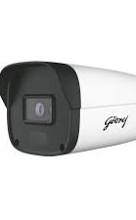
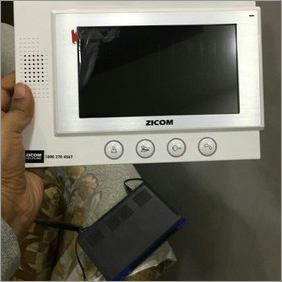
A video door phone is an electronic intercom system that lets an occupant communicate with a visitor at the entrance. Typically, an outdoor unit includes a camera, microphone, speaker and call button. An indoor monitor displays the visitor’s image and provides controls for answering the call and, on compatible systems, unlocking an electric door lock.
When a visitor presses the call button, the indoor monitor alerts the occupant. The occupant can view the person, speak with them and decide whether to grant access. This makes it easier to screen visitors without opening the door.
Potential Benefits of a Eurovigil Video Door Phone
- Visual visitor verification: View who is at the entrance before answering or admitting them.
- Two-way communication: Speak with visitors through the indoor monitor and outdoor unit.
- More controlled entry: Where supported and correctly installed, the system can work with an electric lock to release the door remotely.
- Convenience: Communicate with callers at the entrance without having to walk to the door immediately.
- Useful for different settings: Depending on the model and installation, a video door phone may suit houses, flats, offices and other premises.
Features to Check Before Choosing a Model
Video door phone specifications can differ between models. Before purchasing, check the product documentation and confirm which features are included:
- Screen size and display type
- Camera resolution and viewing angle
- Low-light or night-viewing capability
- Audio quality and hands-free communication options
- Support for one or more entrance stations or indoor monitors
- Compatibility with an electric door lock
- Recording, image-capture or memory-card functions, if required
- Wiring requirements, power supply and installation conditions
- Warranty, service support and availability of compatible accessories
Installation and Everyday Use
The outdoor unit is generally fitted near the entrance, positioned to capture a clear view of visitors. The indoor monitor is installed at a convenient location inside the premises. Correct placement, suitable wiring and compatibility between components are important for reliable operation. If the system is connected to an electric lock, the lock and power requirements should also be checked before installation.
After installation, users can answer a call from the indoor monitor, speak with the visitor and view them on the screen. Any door-release function should be used only after the visitor has been identified and the system has been configured for that purpose.
Choosing the Right System
Consider the entrance layout, the number of users and the distance between the entrance and the indoor monitor. For an apartment or shared building, check whether the system is suitable for the existing entrance arrangement and whether each household needs a separate monitor. For a larger property, ask an installer about the appropriate number of entrance stations and monitors.
It is also sensible to confirm whether the chosen Eurovigil model meets your requirements for display, audio, night viewing and door-lock integration. Product features may vary, so verify specifications with the product datasheet or an authorised seller rather than assuming that every model offers the same functions.
Conclusion
A Eurovigil video door phone can help occupants identify and communicate with visitors before opening the entrance. By choosing a model suited to the property and arranging a compatible, professional installation, users can make visitor handling more convenient and controlled. Always check the model-specific specifications, installation requirements and after-sales support before making a purchase.
9 Essential Tips for Using Your Eurovigil Video Door Phone
- Mount the camera at a clear viewing height.
- Keep the camera lens clean and unobstructed.
- Test the doorbell and indoor monitor after installation.
- Adjust the volume for clear two-way conversations.
- Check the visitor’s identity before unlocking the door.
- Use night vision or porch lighting in low light.
- Keep the power supply and wiring secure.
- Follow the manual for setup and maintenance.
- Contact an authorised technician for repairs.
Mount the camera at a clear viewing height.
Mount the Eurovigil video door phone camera at a height that gives a clear view of visitors’ faces, generally around eye level for most adults. Make sure the view is not blocked by the door frame, plants or other objects, and consider the height of children and wheelchair users who may use the entrance. Check the camera’s live view before finalising the installation so visitors can be identified comfortably and reliably.
Keep the camera lens clean and unobstructed.
Keep the Eurovigil video door phone camera lens clean and unobstructed for a clear view of visitors. Gently wipe the lens with a soft, dry microfibre cloth, and regularly check that dust, water marks, cobwebs, plants or other objects are not blocking the camera. Avoid abrasive materials and harsh cleaning liquids, as these may damage the lens or its protective cover.
Test the doorbell and indoor monitor after installation.
After installing your Eurovigil video door phone, test the doorbell and indoor monitor to make sure they work properly. Press the outdoor call button and check that the indoor monitor rings, displays a clear image and allows two-way conversation. If the system is connected to an electric lock, test the door-release function as well. Resolve any issues with the wiring, power supply or settings before relying on the system for everyday use.
Adjust the volume for clear two-way conversations.
Adjust the volume on your Eurovigil video door phone to make two-way conversations clear and comfortable. Set the indoor monitor and outdoor unit to levels that let you hear visitors without excessive background noise or feedback. If voices sound faint or distorted, check the volume controls and ensure the microphone and speaker are not obstructed.
Check the visitor’s identity before unlocking the door.
Before unlocking the door using your Eurovigil video door phone, take a moment to check the visitor’s face on the monitor and ask them to identify themselves. If you are unsure, speak with them through the intercom or contact the person they claim to be visiting. Unlock the door only when you are satisfied that the visitor is genuine.
Use night vision or porch lighting in low light.
In low-light conditions, use the Eurovigil video door phone’s night-vision feature, if available, to see visitors more clearly. Keep the porch or entrance lighting switched on as well, as good lighting can improve visibility and help the camera capture a clearer image. Ensure the light does not shine directly into the camera, as glare may make it harder to identify visitors.
Keep the power supply and wiring secure.
Keep the power supply and wiring of your Eurovigil video door phone secure to support reliable operation and help prevent electrical faults. Use the power supply recommended for the specific model, protect cables from moisture, heat and physical damage, and avoid loose connections or exposed wires. Have the system installed or checked by a qualified technician, and switch off the power before any wiring work. Always follow the product manual and local electrical safety requirements.
Follow the manual for setup and maintenance.
For your Eurovigil video door phone to work reliably, follow the manufacturer’s manual for both setup and regular maintenance. Use the specified wiring and power supply, place the camera and indoor monitor as instructed, and check that any connected door lock is compatible. Keep the camera lens and monitor clean with a soft, dry cloth, and avoid using harsh chemicals or opening the units unless the manual permits it. If you notice a fault, consult the troubleshooting guidance or contact an authorised service provider.
Contact an authorised technician for repairs.
For repairs to your Eurovigil video door phone, contact an authorised technician. These systems may involve electrical connections, wiring and door-lock integration, so attempting repairs yourself could cause further damage or affect safe operation. An authorised technician can diagnose the fault, use compatible parts and help ensure the system works as intended. Before arranging a visit, note the model and describe the issue to make troubleshooting easier.