WiFi DVR Camera System: A Practical Guide for Homes and Businesses
A WiFi camera system can make it easier to monitor a home, shop, office or other premises. It can provide live viewing, recorded footage and remote access through a phone or computer. However, the term “WiFi DVR camera system” is often used for different types of equipment, so it helps to understand how the system works before choosing one.
What Is a WiFi DVR Camera System?
A DVR, or Digital Video Recorder, records footage from connected security cameras onto a hard drive. Traditionally, DVR systems use wired analogue cameras connected by coaxial cables. Some newer systems support wireless cameras or combine wired and wireless connections.
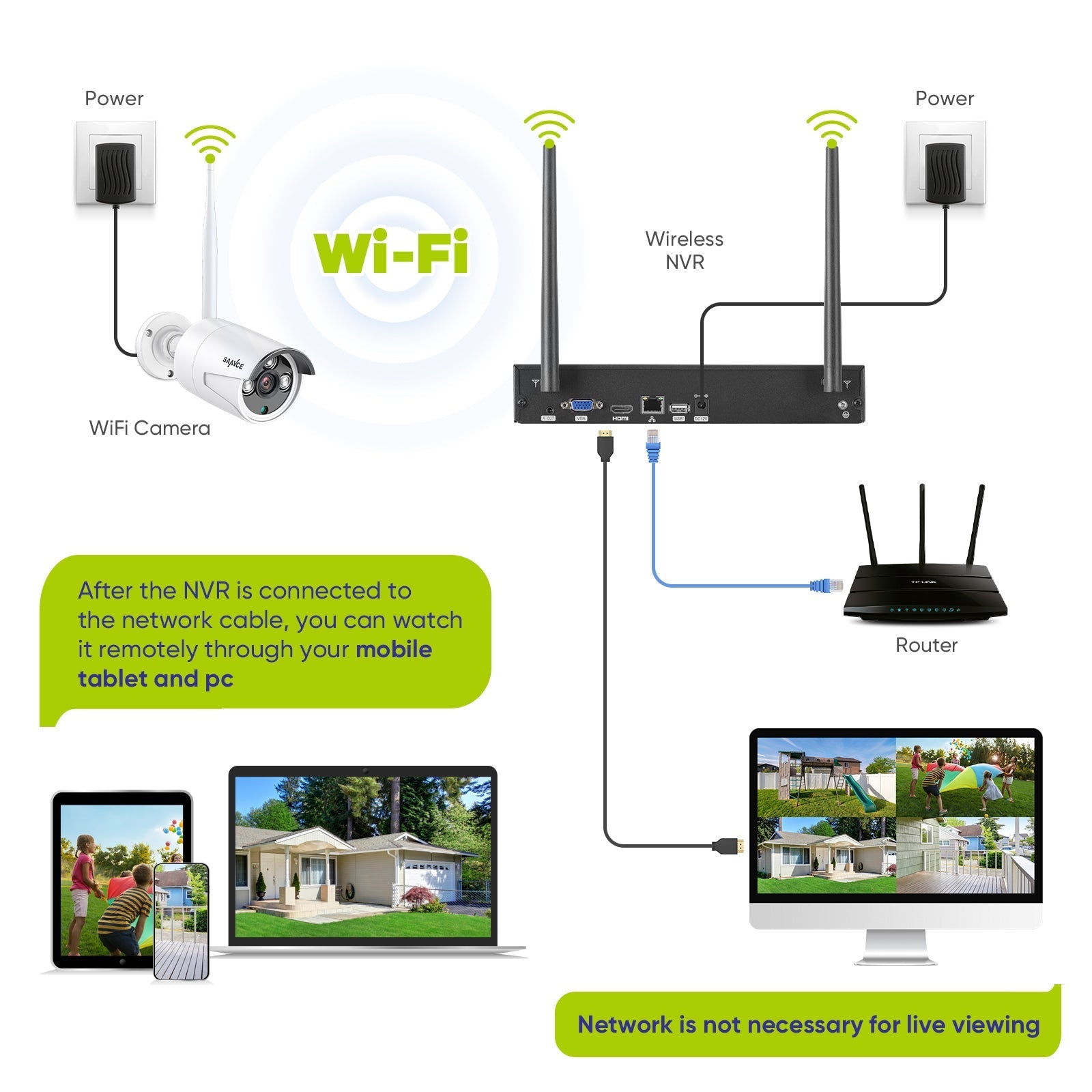
WiFi cameras usually transmit video over a wireless network. Many systems using network-based cameras record to an NVR (Network Video Recorder) rather than a traditional DVR. Some products are marketed as “WiFi DVR systems”, even when the recorder is technically an NVR. Check the specifications to confirm what type of recorder and cameras are included.
How Does It Work?
A typical system includes cameras, a recorder, storage and a viewing device. The cameras capture video and send it to the recorder either through a wired connection or over WiFi. The recorder stores the footage on a hard drive. Users can view live video or recordings on a connected monitor, mobile app or computer, depending on the system.
Remote viewing generally requires the recorder or cameras to be connected to the internet. WiFi is the local wireless connection between devices and a router; it is not the same as internet access. Some systems can continue recording locally even if the internet connection is unavailable, although remote viewing may stop until connectivity returns.
Key Benefits
- Flexible installation: Wireless cameras can reduce the need to run video cables, particularly in locations where cabling is difficult.
- Live and recorded viewing: A compatible recorder can help you review footage from earlier in the day or monitor cameras in real time.
- Remote access: Many systems offer viewing through a mobile app or web interface when configured with an internet connection.
- Expandable coverage: Depending on the recorder and product specifications, additional cameras may be added later.
- Different camera options: Systems may offer features such as night vision, motion detection, two-way audio or weather-resistant housings.
WiFi Cameras and Wired Cameras: What Is the Difference?
WiFi cameras can be convenient where running network or video cables is impractical. They still need power, unless they are battery-operated, and their performance depends on a reliable wireless signal. Walls, distance, interference and network congestion can affect the connection.
Wired cameras require cabling but can provide a more consistent connection, especially across larger sites or in areas with weak WiFi coverage. A wired system may be a better choice where reliability is a priority or where cameras must operate continuously. The right option depends on the premises, installation conditions and recording requirements.
What to Consider Before Buying
- Recorder type: Confirm whether the system uses a DVR, NVR or hybrid recorder, and check which camera types it supports.
- Camera compatibility: Ensure that the cameras are compatible with the recorder and its software.
- WiFi coverage: Check signal strength at every proposed camera location. A weak signal can cause delays, interruptions or lost footage.
- Recording storage: Consider how many cameras you will use, the video quality and how long you need recordings to be retained. Check the recorder’s hard-drive capacity and whether it supports additional storage.
- Power requirements: Wireless video transmission does not necessarily mean a camera is wire-free. Check whether each camera needs a power adaptor, power-over-Ethernet connection or battery.
- Night-time performance: Review the camera’s low-light specifications and consider the lighting conditions around the property.
- Weather protection: For outdoor use, choose cameras rated for the expected weather and installation environment.
- App and remote access: Check supported phones, software requirements and whether remote viewing depends on a manufacturer’s service.
- Warranty and support: Review warranty terms, software updates and the availability of technical support.
Installation and Placement Tips
Position cameras to cover entrances, reception areas, cash counters, driveways or other important points. Mount them securely and avoid aiming directly at bright lights, which may affect image quality. For outdoor cameras, protect power connections and follow the manufacturer’s installation guidance.
Before fixing cameras permanently, test the WiFi signal and viewing angle at each location. Check both daytime and night-time images, and confirm that the recorder is saving footage correctly. If the property is large or has thick walls, you may need access points, a mesh network or wired connections for more reliable coverage.
Protecting Your Camera System
Security cameras are connected devices, so protect them as you would other equipment on your network. Change default passwords, use strong unique passwords and enable two-factor authentication if available. Keep the recorder and camera firmware updated, secure the router and limit account access to authorised users. Follow applicable privacy requirements and avoid recording areas where people reasonably expect privacy.
Is a WiFi DVR Camera System Right for You?
A WiFi camera system may suit a home or small business where flexible camera placement and remote viewing are important. A wired or hybrid system may be more suitable for larger premises, weak WiFi coverage or applications that require a consistently stable connection. Compare the system’s recorder type, camera compatibility, storage, network needs and installation requirements before making a decision.
Frequently Asked Questions
Does a WiFi camera system need the internet to record?
Not always. Many systems can record to a local recorder or memory card without internet access. However, internet connectivity is usually needed for remote viewing and some app features. Check the product specifications.
Is a WiFi DVR system the same as a WiFi NVR system?
No. A DVR traditionally records video from analogue cameras, while an NVR records video from network cameras. Product names are not always used consistently, so verify the recorder and camera specifications before purchase.
Can WiFi cameras work if the router is far away?
They may work if the wireless signal is strong enough at the camera location. Distance, walls and interference can reduce signal quality. Test coverage before installation, or consider improving the network or using a wired connection.
How long can footage be stored?
Retention time depends on the storage capacity, number of cameras, video resolution, frame rate and recording settings. Continuous recording generally uses more storage than motion-based recording.
5 Essential Tips for a Secure and Reliable Wi-Fi DVR Camera System
- Place cameras within strong Wi-Fi range.
- Use a secure, unique password for the DVR.
- Choose cameras with night vision for clear footage.
- Check storage capacity and recording settings regularly.
- Keep the DVR firmware updated for better security.
Place cameras within strong Wi-Fi range.
Place each WiFi camera where it receives a strong, stable signal from your router or access point. Walls, floors, metal surfaces and long distances can weaken WiFi, leading to delayed video, dropped connections or missed recordings. Before fixing a camera in place, test the signal and check the live view at different times. If coverage is weak, consider repositioning the router, adding a WiFi access point or using a wired connection where practical.
Use a secure, unique password for the DVR.
Set a strong, unique password for your WiFi DVR camera system and avoid reusing passwords from other accounts. A password that combines upper- and lower-case letters, numbers and symbols can help prevent unauthorised access to your cameras and recordings. Change any default password during setup, and store the new password securely. If the DVR supports two-factor authentication, enable it for an additional layer of protection.
Choose cameras with night vision for clear footage.
Choose cameras with night vision to capture clearer footage in low-light conditions and after dark. Before buying, check the camera’s night-vision range and image quality, and consider the lighting and layout of the area you want to monitor. This can help ensure important details remain visible when there is little or no light.
Check storage capacity and recording settings regularly.
Check the storage capacity and recording settings of your WiFi DVR camera system regularly to make sure important footage is being saved for long enough. The number of cameras, video quality and continuous or motion-based recording can all affect how quickly storage fills up. Review how many days of recordings are available, adjust settings to suit your needs and back up any footage you may need to keep before it is overwritten.
Keep the DVR firmware updated for better security.
Keep your DVR firmware updated to help protect your WiFi camera system. Updates may fix security weaknesses, improve system stability and add useful features. Check for updates through the manufacturer’s official website or app, and follow the supplied instructions. Before updating, back up important settings and use a reliable power supply to avoid interruptions.