XPIA CCTV: A Guide to Choosing the Right Surveillance System
A CCTV system can help businesses, institutions and homeowners monitor their premises, review recorded footage and improve day-to-day security. If you are researching XPIA CCTV, it is important to understand the system’s features, check that the equipment suits your site and confirm the specifications of the exact model before purchasing.
What to consider when choosing XPIA CCTV
CCTV products and configurations can differ by model. Before selecting an XPIA CCTV camera or system, review the product documentation and consider the following requirements:
- Image quality: Choose a resolution that provides enough detail for the areas being monitored.
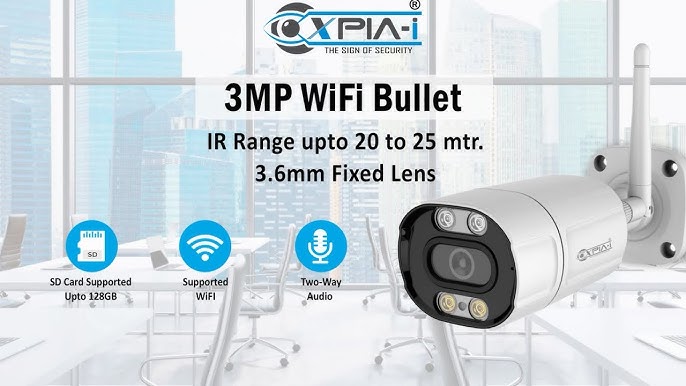
- Camera type: Dome, bullet and other camera designs suit different locations and installation needs.
- Lighting conditions: Check the camera’s low-light performance and whether it has night-vision features.
- Indoor or outdoor use: For outdoor installation, confirm the camera’s weather-resistance rating and suitability for local conditions.
- Recording and storage: Check whether the system uses a DVR, NVR, memory card or another storage method, and estimate how long footage needs to be retained.
- Remote viewing: If you need to view footage on a phone or computer, confirm the required app, network setup and compatible devices.
- System expansion: Consider whether additional cameras may be needed later and check the recorder’s channel capacity.
Benefits of a well-planned CCTV installation
When correctly selected and installed, CCTV can provide visibility across entrances, reception areas, corridors, car parks and other important spaces. Recorded footage may also assist with reviewing incidents. Camera placement is just as important as the equipment: cameras should cover relevant areas while avoiding unnecessary capture of neighbouring properties or private spaces.
A complete setup may include cameras, a recording device, storage, cabling or network equipment, a display and a reliable power supply. The exact components depend on whether the system is wired or network-based and on the site’s layout.
Installation and maintenance
Before installation, map the areas to be monitored and identify suitable camera positions. Ensure that images are not obstructed by lighting, signage, trees or building features. Use secure passwords for connected equipment, keep software updated where supported and restrict access to authorised users.
Regularly check camera views, recording status, storage capacity, time settings and connections. Clean the camera lenses carefully and review footage retention settings to ensure the system is working as intended.
Check the product details before you buy
The name “XPIA CCTV” alone may not provide enough information to determine a camera’s features or compatibility. Ask the supplier for the exact model number, technical specifications, warranty terms, installation requirements and details of any required software or accessories. Confirm that the system is compatible with your existing equipment before ordering.
Conclusion
XPIA CCTV may be worth considering if its verified specifications match your surveillance needs. Compare the available models carefully, plan camera coverage and choose suitable recording and storage options. A properly designed system, installed and maintained correctly, can support more effective monitoring of your premises.
XPIA CCTV Camera FAQs: Resetting, Prices, App and 3MP Camera Costs
- How to reset XPIA IP camera?
- What is the price of XPIA I CCTV camera?
- What is the cost of XPIA camera?
- What is the XPIA CCTV camera app?
- What is the cost of 3MP CCTV camera?
How to reset XPIA IP camera?
To reset an XPIA IP camera, first check its user manual for the model-specific reset procedure. Many cameras have a small reset button that must be pressed and held while the camera is powered on, but the required time can vary by model. A factory reset usually removes saved settings, including network details and passwords, so you may need to set up the camera again using the XPIA app or configuration software. If the camera has no accessible reset button or the procedure is unclear, contact the seller or manufacturer for model-specific guidance.
What is the price of XPIA I CCTV camera?
The price of an XPIA I CCTV camera can vary depending on the exact model, features, seller and whether installation or accessories are included. For the latest price, contact an authorised seller and ask for a quotation that clearly lists applicable GST, warranty and installation charges.
What is the cost of XPIA camera?
The cost of an XPIA camera depends on the model, features, resolution and whether it is purchased as part of a complete CCTV system. Installation, cabling, recording equipment and storage may also affect the total price. For an accurate quote, contact an authorised supplier with your site requirements and ask for a breakdown of the camera and installation costs.
What is the XPIA CCTV camera app?
The XPIA CCTV camera app is the mobile application specified for your particular XPIA camera or recorder, used to view live footage and, where supported, access recordings or receive alerts. The app may vary by model, so check the product manual, label or QR code for the correct app and setup instructions. For remote viewing, the camera or recorder usually needs to be connected to the internet and configured with authorised login details.
What is the cost of 3MP CCTV camera?
The cost of a 3MP CCTV camera depends on the brand, camera type, features and whether it is supplied with accessories or installation. Features such as night vision, weather resistance, audio, remote viewing and smart detection can also affect the price. For an accurate quotation, confirm the exact model and whether the price includes the recorder, cabling, storage and installation.