eSSL X7: A Compact Biometric Access Control System
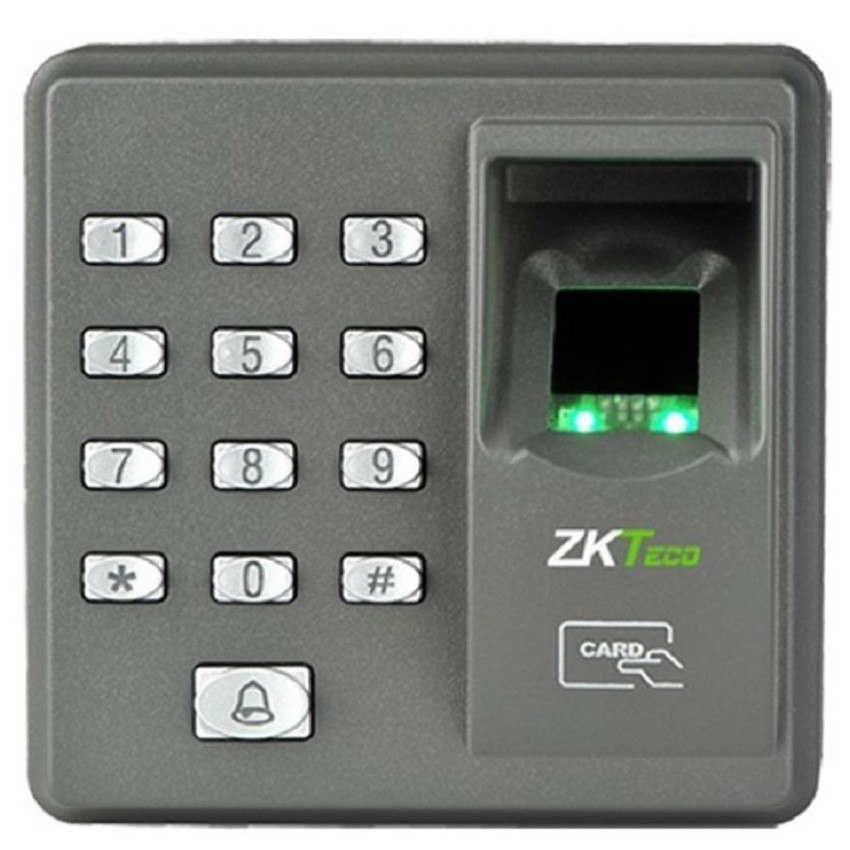
The eSSL X7 is a fingerprint-based access control device designed to help businesses manage entry to offices, shops, warehouses and other premises. By verifying a person’s registered fingerprint, it can provide a convenient alternative to keys and help restrict access to authorised users.
What is the eSSL X7?
The eSSL X7 is commonly used as a standalone access control terminal. Users enrol their fingerprints on the device, and the terminal checks each scan against its stored records before granting or denying access. Depending on the configuration, a compatible electric lock or access-control system can be connected to the unit.
It may also be used alongside a time and attendance system, subject to the model variant and software setup. This can help organisations record employee attendance as well as control entry.
Key features
- Fingerprint verification: Supports biometric identification for registered users.
- Access management: Can be connected to a compatible door lock to control entry.
- Compact design: Suitable for installation near an entrance where space is limited.
- Attendance support: Some configurations can be used for employee attendance recording.
- Connectivity options: Available connection methods can vary by model and installation. Check the product specification before purchase.
Where can the eSSL X7 be used?
The device may be suitable for small and medium-sized workplaces that need a straightforward way to manage access. Typical applications include:
- Office entrances and staff-only areas
- Retail shops and back-office rooms
- Warehouses and storage areas
- Workshops and small commercial premises
- Doors where employee attendance recording is also required
Benefits of fingerprint access control
Unlike a shared key or access card, a fingerprint is linked to an individual user. This can make it easier to manage who is authorised to enter and to remove access when someone leaves the organisation. It also reduces the need for users to carry a separate credential, although a suitable alternative entry method may be needed for emergencies or users whose fingerprints cannot be read reliably.
Installation and setup
For reliable operation, the eSSL X7 should be installed in a suitable location and connected to compatible locking and power equipment. The installer can enrol users, configure access permissions and test the lock release. If the terminal is being used for attendance, confirm that the selected software and communication method are compatible with the exact device.
Keep the fingerprint sensor clean and enrol more than one finger for each user where the system permits. This can help reduce access issues caused by minor cuts, dry skin or changes to a user’s fingertip.
Check the specifications before buying
Product specifications and functions can differ between versions or supplied configurations. Before ordering an eSSL X7, confirm details such as fingerprint capacity, event-log capacity, supported communication interfaces, card functionality, software compatibility and lock connections with the supplier. Also check whether the package includes installation, software, wiring and after-sales support.
Conclusion
The eSSL X7 can be a practical option for organisations seeking a compact fingerprint terminal for basic access control. Its suitability depends on the required user capacity, connectivity, software and door-lock setup. Confirm the exact model specifications and installation requirements before making a purchase.
7 Essential Tips for Setting Up and Maintaining Your eSSL X7 Attendance System
- Install the eSSL X7 away from direct sunlight and moisture.
- Connect it to a stable power supply.
- Enrol each user’s finger clearly and more than once.
- Keep the fingerprint sensor clean and dry.
- Set the correct date, time and time zone.
- Back up attendance logs regularly.
- Change the default admin password.
Install the eSSL X7 away from direct sunlight and moisture.
Install the eSSL X7 in a sheltered location, away from direct sunlight and moisture. Prolonged exposure to sunlight can affect the fingerprint sensor’s performance, while water or damp conditions may damage the device. Choose a dry, shaded spot near the entry point, and follow the manufacturer’s installation guidelines to help ensure reliable operation and a longer service life.
Connect it to a stable power supply.
Connect the eSSL X7 to a stable power supply that matches the voltage and current specified for your model. Unstable power can cause interruptions, unreliable fingerprint recognition or damage to the device. Use a suitable, good-quality adapter and, where power fluctuations are common, consider a compatible UPS or surge protector. Have a qualified installer check the connections and follow the manufacturer’s instructions.
Enrol each user’s finger clearly and more than once.
For reliable access, enrol each user’s fingerprint carefully and capture it more than once, following the eSSL X7’s on-screen instructions. Ask the user to place their finger flat and consistently on the sensor, ensuring the central part of the fingerprint is captured. If the device allows multiple finger enrolments, register a second finger as a backup. This can help reduce recognition issues caused by dry skin, minor cuts or changes in how a finger is positioned.
Keep the fingerprint sensor clean and dry.
Keep the eSSL X7 fingerprint sensor clean and dry for reliable recognition. Gently wipe it with a soft, lint-free cloth to remove dust, fingerprints or smudges, and avoid using water, harsh cleaners or abrasive materials, which may damage the sensor. Also ensure your finger is clean and dry before scanning, as moisture, oil or dirt can affect fingerprint reading.
Set the correct date, time and time zone.
Set the correct date, time and time zone on your eSSL X7 to ensure access events and attendance records are logged accurately. An incorrect clock can cause confusion when reviewing entry logs, preparing attendance reports or investigating an incident. Check the device settings during installation and update them whenever required, including after a power interruption or seasonal time change. If the X7 is connected to attendance software, make sure the device and software use the same time zone.
Back up attendance logs regularly.
Back up attendance logs from your eSSL X7 regularly to help protect important records from accidental deletion, device faults or data loss. Set a routine that suits your organisation—such as weekly or monthly—and check that each backup has saved correctly in a secure location. Regular backups make it easier to retrieve attendance information when needed and support accurate record-keeping.
Change the default admin password.
Change the default administrator password on your eSSL X7 as soon as it is installed. Default passwords may be easy to guess or publicly known, so keeping one can allow unauthorised users to change settings or manage access. Choose a strong, unique password, restrict it to trusted administrators and store it securely. If the device is managed through software, update the credentials there as well, where applicable.