DVR Systems: A Practical Guide to CCTV Recording
A Digital Video Recorder (DVR) system is a common solution for recording and managing CCTV footage. It connects to compatible cameras, records video to a storage drive and lets authorised users view live or recorded footage. DVR systems are used in homes, shops, offices, warehouses and other premises where reliable video monitoring is important.
What Is a DVR System?
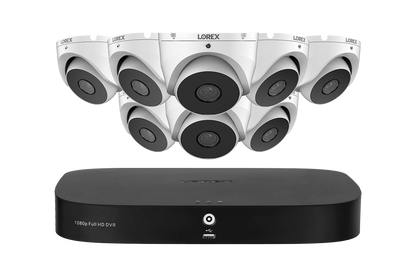
A DVR system usually includes a DVR unit, CCTV cameras, a hard disk drive, connecting cables, a monitor and a power supply. Cameras capture video and send it to the DVR, which processes and stores the footage. Users can view cameras live, search recordings by date and time, and export relevant clips when required.
Many DVRs also support remote viewing through a computer or mobile app. This feature depends on the recorder, camera setup, network connection and configuration.
How Does a DVR System Work?
- Video capture: Cameras record activity in their field of view.
- Video transmission: In a traditional setup, each camera sends video to the DVR through a cable, often coaxial cable.
- Recording: The DVR processes the video and saves it to its internal storage drive.
- Viewing and playback: Users can watch live feeds or search recorded footage using the DVR interface or supported software.
- Export: Selected recordings can usually be copied to an external storage device, depending on the model.
Types of DVR Systems
Analogue DVR Systems
Traditional analogue DVRs work with analogue CCTV cameras. They can be suitable for basic monitoring requirements, particularly where an existing analogue camera installation is already in place.
HD-over-Coax DVR Systems
Some DVRs support high-definition cameras that transmit video over coaxial cable. Depending on the recorder and cameras, these systems may support formats such as HD-TVI, HD-CVI, AHD or other manufacturer-specific standards. Compatibility should be confirmed before purchasing or connecting equipment.
Hybrid DVR Systems
A hybrid DVR may support more than one camera technology, such as analogue cameras and selected network cameras. The number and type of supported channels vary by model, so check the product specifications carefully.
Key Features to Consider
- Channel capacity: Choose a recorder with enough channels for the cameras you need now, with room for planned expansion.
- Camera compatibility: Confirm that the DVR supports the camera type, video format and resolution you intend to use.
- Recording resolution: Higher-resolution footage can show more detail, but it may also require more storage and network capacity.
- Storage capacity: The required hard disk space depends on the number of cameras, recording quality, frame rate, compression settings and retention period.
- Recording options: Look for continuous, scheduled and motion-triggered recording if these are relevant to your needs.
- Remote access: Check how remote viewing is set up and whether the system supports secure access through a mobile app or computer.
- Backup and export: Find out how footage can be backed up and exported for review.
- Audio support: Audio recording requires compatible equipment and should be used only where permitted by applicable laws and privacy requirements.
Benefits of a DVR System
- Centralised recording: Footage from multiple cameras can be managed from one recorder.
- Playback and review: Recorded video can help users review incidents and understand events.
- Use with existing cabling: Some DVR upgrades can make use of existing coaxial cable, subject to its condition and equipment compatibility.
- Flexible recording: Users can choose recording schedules and settings supported by the system.
- Local storage: Footage is commonly stored on a drive installed in the recorder, although storage arrangements vary by model.
DVR vs NVR: What Is the Difference?
A DVR is generally used with cameras that send video to the recorder over a direct connection, often coaxial cable. An NVR (Network Video Recorder) is typically used with IP cameras that send video over a network. The right choice depends on the cameras, cabling, site layout, desired features and budget. Some installations may also use hybrid equipment.
Choosing the Right DVR
Before selecting a DVR, assess the areas to be monitored and decide how many cameras are needed. Consider lighting conditions, camera placement, the level of detail required and how long recordings should be retained. Then confirm camera compatibility, channel capacity, storage requirements and remote-access options.
For larger or more complex installations, a site assessment can help determine camera positions, cable routes, network requirements and suitable storage. A qualified installer can also configure the system and explain how to access footage.
Installation and Maintenance Tips
- Place cameras to cover relevant entry points and areas without creating unnecessary blind spots.
- Install the DVR in a secure, ventilated location with protection from dust, heat and unauthorised access.
- Use suitable power supplies and cabling, and label connections to simplify troubleshooting.
- Set strong, unique passwords and update firmware when updates are available from the manufacturer.
- Review camera views and recording schedules regularly.
- Check the hard drive status and confirm that footage is recording correctly.
- Test playback and backup procedures periodically.
Privacy and Responsible Use
CCTV should be used responsibly. Position cameras to monitor areas for a legitimate security purpose, and avoid recording private spaces where people have a reasonable expectation of privacy. Inform relevant people about CCTV where required, restrict access to recordings and retain footage only for an appropriate period. Check applicable laws and regulations before installing or using a surveillance system.
Conclusion
DVR systems offer a practical way to record and review CCTV footage across a range of settings. The best system depends on camera compatibility, site requirements, storage needs and the features required. Careful planning, secure configuration and regular maintenance can help a DVR system provide dependable monitoring over time.
8 Key Benefits of DVR Systems for Security and Surveillance
- Records footage for later review.
- Manages multiple cameras from one unit.
- Supports scheduled and motion-based recording.
- Makes it easier to review incidents.
- Can use existing coaxial cabling.
- Offers local video storage.
- Provides live viewing and playback.
- Can support remote access on compatible models.
Key Drawbacks of DVR Systems
- Requires regular maintenance and storage checks.
- Hard drives can fail and cause footage loss.
- Remote viewing depends on a reliable internet connection.
- May be less flexible than IP-based NVR systems.
Records footage for later review.
One of the key advantages of a DVR system is that it records CCTV footage for later review. If an incident occurs, authorised users can search saved recordings by date and time to understand what happened, check details or support an investigation. Recording settings and storage capacity can be configured to suit the site’s needs, helping ensure relevant footage is available when required.
Manages multiple cameras from one unit.
A key advantage of a DVR system is that it can manage multiple cameras from a single unit. Users can view live feeds, record footage and review activity across different areas from one central interface, making monitoring more convenient and organised. The number of cameras supported depends on the DVR’s channel capacity.
Supports scheduled and motion-based recording.
DVR systems can be configured to record according to a schedule or when motion is detected. Scheduled recording helps ensure coverage during important hours, while motion-based recording captures activity when movement occurs. This can make it easier to find relevant footage and may reduce unnecessary recordings and storage use, depending on the system settings and the activity in the monitored area.
Makes it easier to review incidents.
DVR systems make it easier to review incidents by storing CCTV footage that can be searched and replayed later. Users can check recordings by date and time to understand what happened, verify details and support follow-up actions. This can be especially useful for reviewing events such as unauthorised entry, accidents or disputes.
Can use existing coaxial cabling.
One practical advantage of many DVR systems is that they can use existing coaxial cabling. This can make upgrading an older CCTV installation simpler, as you may not need to replace all the cables when changing the recorder or compatible cameras. Reusing suitable cabling can also help reduce installation time, disruption and cost. Before upgrading, have the cables checked for their condition and confirm that they are compatible with the new equipment.
Offers local video storage.
One key advantage of a DVR system is that it offers local video storage. Footage is recorded on a hard drive installed in the DVR, giving users convenient access to recordings at the premises without relying solely on cloud storage or an internet connection. Storage needs depend on factors such as the number of cameras, recording quality and how long footage must be retained. For added security, users should protect the recorder from unauthorised access and back up important clips when needed.
Provides live viewing and playback.
DVR systems allow users to view camera feeds live and play back recorded footage from a central recorder. This makes it easier to monitor activity as it happens and review specific events later by selecting a date and time. Depending on the model and setup, footage may also be accessible remotely through a computer or mobile device, helping authorised users keep track of a property when they are away.
Can support remote access on compatible models.
Many DVR systems support remote access on compatible models, allowing authorised users to view live camera feeds or review recorded footage through a computer or mobile device. This can help homeowners and businesses check their premises when they are away, provided the DVR is connected to the internet and configured securely. Remote access features vary by model, so it is important to check compatibility and use strong passwords to protect the system.
Requires regular maintenance and storage checks.
DVR systems require regular maintenance and storage checks to ensure they continue recording reliably. Hard drives can wear out or become full, while dust, heat, loose connections or outdated software may affect performance. Periodically checking recording status, available storage, playback and system settings helps prevent important footage from being missed or lost.
Hard drives can fail and cause footage loss.
A key drawback of DVR systems is their reliance on hard drives to store recordings. Like any storage device, a hard drive can wear out, become damaged or fail without warning, potentially resulting in lost footage—sometimes including recordings needed to review an incident. Regularly checking the drive’s health, setting up suitable backups and replacing ageing drives can reduce the risk, but cannot eliminate it entirely.
Remote viewing depends on a reliable internet connection.
One limitation of DVR systems is that remote viewing depends on a reliable internet connection. If the connection is slow, unstable or unavailable, live video may lag, recordings may take longer to load, or remote access may stop altogether. Local recording on the DVR can continue, depending on the system and power supply, but users may need to wait until connectivity is restored to view footage from outside the premises.
May be less flexible than IP-based NVR systems.
A DVR system may be less flexible than an IP-based NVR system, particularly when it comes to expanding or adapting an installation. DVRs commonly rely on direct connections and specific camera formats, which can limit camera choices and make changes more complicated. By contrast, IP-based NVR systems can often use a network to connect cameras and may offer greater flexibility in camera placement and system expansion, depending on the equipment and network setup.