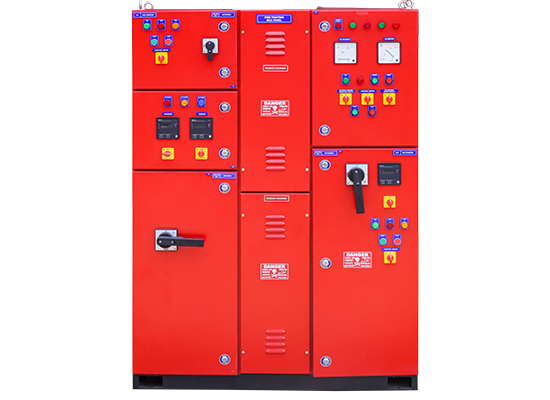
Fire Fighting Panel: The Control Centre of a Fire Protection System
A fire fighting panel is an essential part of a building’s fire protection system. It monitors and controls equipment used to supply water or other fire-suppression resources during an emergency. Depending on the installation, the term may refer to a fire pump control panel, which operates firefighting pumps, or a fire alarm control panel, which detects and reports fire conditions. These panels perform different functions, but both contribute to a coordinated response.
What Does a Fire Fighting Panel Do?
A fire pump control panel manages the operation of pumps that deliver water to firefighting systems such as hydrants, sprinklers and hose reels. It receives signals from pressure sensors or other control devices and starts or stops pumps according to the system design.
A typical pump arrangement may include:
- Jockey pump: Maintains pressure in the pipework and compensates for minor pressure drops.
- Main electric pump: Supplies water at the required pressure and flow when the system detects a significant pressure drop.
- Diesel standby pump: Provides an alternative water supply if the electric pump or power supply is unavailable.
The exact arrangement depends on the building’s fire protection design, applicable standards and local requirements. A fire alarm control panel, by comparison, receives inputs from devices such as smoke detectors, heat detectors and manual call points, then activates alarms and configured outputs.
Key Features of a Fire Pump Control Panel
Features vary by model and application, but a fire pump control panel may include:
- Automatic and manual pump start and stop controls
- Pressure monitoring and pump-start signals
- Status indicators for power, pump operation and faults
- Audible or visual alarms for abnormal conditions
- Protection and monitoring for electrical components
- Interfaces for remote monitoring or building management systems, where specified
- Separate controls for electric, diesel and jockey pumps, when these are installed
Clear labels and accessible indicators help authorised personnel understand the system’s status quickly. The panel should be installed in a suitable location where it is protected from damage and can be reached by trained staff.
Why Is the Panel Important?
Fire pumps may need to operate when a fire is already developing and immediate action is required. A correctly selected, installed and maintained panel helps the pumps respond as intended and alerts personnel to operating problems. It also makes it easier to check system status during routine inspections.
However, a panel cannot make a fire protection system effective on its own. Its performance depends on the complete installation, including the pumps, water storage, pipework, valves, sensors, power supply and alarm arrangements.
Choosing a Fire Fighting Panel
When selecting a panel, consider the type and rating of the pumps, the required starting method, the available power supply and the operating conditions at the site. The panel must be compatible with the equipment it controls and suitable for the environment in which it will be installed.
It is also important to confirm that the design and installation follow the applicable fire safety regulations and standards. A qualified fire protection professional should assess the requirements, particularly for commercial, industrial and multi-storey buildings.
Installation, Testing and Maintenance
Fire fighting panels should be installed and commissioned by competent professionals. Commissioning typically involves checking wiring, control signals, pump operation, alarms and any specified remote connections. Testing should follow the equipment manufacturer’s instructions and the site’s approved fire safety procedures.
Routine maintenance may include inspecting the panel and its indicators, checking for faults, verifying power supplies and confirming that connected pumps and control devices operate correctly. Any fault or unexpected alarm should be investigated promptly by a qualified technician. Testing must be planned carefully so that it does not create an unprotected period or disrupt other building systems.
Conclusion
A fire fighting panel plays a vital role in controlling and monitoring equipment used to protect people and property. Whether it operates fire pumps or forms part of a fire alarm system, it must be correctly specified, installed, tested and maintained. Working with qualified fire safety professionals helps ensure that the panel performs reliably as part of the building’s overall fire protection system.
9 Essential Fire-Fighting Panel Safety and Maintenance Tips
- Keep the fire-fighting panel accessible and clearly labelled.
- Allow only trained staff to operate the panel.
- Check the panel regularly for alarms and fault indicators.
- Treat every alarm as genuine until verified by authorised staff.
- Follow site procedures before silencing or resetting an alarm.
- Never isolate a zone or device without approval.
- Check the main power supply and backup batteries routinely.
- Record inspections, alarms, faults and maintenance in a log.
- Arrange scheduled testing and servicing by qualified technicians.
Keep the fire-fighting panel accessible and clearly labelled.
Keep the fire-fighting panel accessible and clearly labelled so authorised personnel can locate and operate it quickly during an emergency. Avoid placing furniture, stored goods or equipment in front of the panel, and ensure its labels and instructions are easy to read. Regularly check that the access route remains clear and that signage is visible, as even a short delay can affect the response.
Allow only trained staff to operate the panel.
Allow only trained and authorised staff to operate the fire fighting panel. They should understand its controls, indicators, alarms and site-specific emergency procedures. Untrained operation may lead to incorrect settings, delayed response or accidental disruption of the fire protection system. Keep the panel accessible to authorised personnel, display clear instructions nearby and report faults promptly to a qualified fire safety professional.
Check the panel regularly for alarms and fault indicators.
Check the fire fighting panel regularly for alarms and fault indicators to help identify problems before an emergency occurs. Make sure indicators are clear, note any warning or fault messages, and report them promptly to the authorised maintenance team. Do not ignore or reset an alarm without first following the site’s safety procedures, as it may point to an issue that needs attention.
Treat every alarm as genuine until verified by authorised staff.
Treat every alarm from the fire fighting panel as genuine until it has been checked and verified by authorised staff. Follow the building’s emergency procedures promptly, alert the appropriate personnel and avoid resetting or silencing the panel unless instructed by a trained person. A quick, careful response helps protect people and property while ensuring that any fault or actual fire is identified without delay.
Follow site procedures before silencing or resetting an alarm.
Always follow your site’s fire safety procedures before silencing or resetting a fire fighting panel alarm. First, treat every alarm as genuine and ensure the area has been checked by authorised personnel. Silencing an audible alert does not remove the cause of the alarm or confirm that the site is safe. Reset the panel only after the source has been identified, the relevant equipment or detector has been checked, and an authorised person has approved the action. If the alarm persists or the cause is unclear, contact the designated fire safety team or a qualified technician.
Never isolate a zone or device without approval.
Never isolate a zone or device on a fire fighting panel without approval from the responsible person or authorised fire safety professional. Isolation may prevent alarms or equipment from operating correctly, leaving people and property at risk. If isolation is necessary for maintenance or troubleshooting, follow the approved site procedure, inform the relevant occupants, record the action and restore the system as soon as the work is complete. Always confirm that the panel shows normal operation afterwards.
Check the main power supply and backup batteries routinely.
Check the fire fighting panel’s main power supply and backup batteries routinely to help ensure the system remains ready during an emergency. Look for power-supply fault indicators, loose connections, corrosion or visible battery damage, and confirm that the batteries are charging correctly. Follow the manufacturer’s instructions and arrange periodic testing by a qualified technician; replace batteries that are damaged or no longer hold charge.
Record inspections, alarms, faults and maintenance in a log.
Maintain a clear log of all fire fighting panel inspections, alarms, faults and maintenance. Record the date, time, findings and any action taken, including the name of the person or technician who completed the work. Accurate records help identify recurring issues, track servicing and provide useful information during audits or emergency reviews. Keep the log accessible to authorised staff and follow the site’s fire safety procedures for reporting and resolving faults.
Arrange scheduled testing and servicing by qualified technicians.
Arrange scheduled testing and servicing of the fire fighting panel by qualified technicians to help ensure it operates correctly during an emergency. Regular checks can identify faults, worn components, power supply issues or problems with connected pumps and alarms before they affect system performance. Follow the manufacturer’s recommendations and applicable fire safety requirements, and keep a record of inspections, tests and repairs.